- Subscribe to RSS Feed
- Mark Topic as New
- Mark Topic as Read
- Float this Topic for Current User
- Bookmark
- Subscribe
- Mute
- Printer Friendly Page
help with OCR

 Ehlert
07-16-2014 11:52 AM
- Mark as New
- Bookmark
- Subscribe
- Mute
- Subscribe to RSS Feed
- Permalink
- Report to a Moderator
I am doing a project where I need to do OCR on some printed lables
the font size is on 4...
and I am having a hard time seperating the letters - I am getting closer, but any hints would be highly appriciated!
ocr1 - orginal image
ocr3 - incresed brightness and contrasts
ocr4 - converted to binary, and used erode

 mfitzsimons
07-16-2014 02:33 PM
- Mark as New
- Bookmark
- Subscribe
- Mute
- Subscribe to RSS Feed
- Permalink
- Report to a Moderator
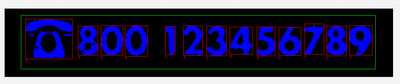
Try Gray Morphology - Dilate followed by Threshold. To separate characters you need to be able to draw a straight line vertically between characters without touching anything (blank space). You need to have at least one-pixel between characters. See attached image and example.
Certified LabVIEW Architect
LabVIEW 6.1 ... 2013, LVOOP, GOOP, TestStand, DAQ, and Vison
07-16-2014 02:43 PM
- Mark as New
- Bookmark
- Subscribe
- Mute
- Subscribe to RSS Feed
- Permalink
- Report to a Moderator
Why dialate and not erode?
mfitzsimons
07-16-2014 02:44 PM
- Mark as New
- Bookmark
- Subscribe
- Mute
- Subscribe to RSS Feed
- Permalink
- Report to a Moderator
Yes, seems to work in reverse of what you would think. Play with both and you will see why I chose dilate.
Matt
Certified LabVIEW Architect
LabVIEW 6.1 ... 2013, LVOOP, GOOP, TestStand, DAQ, and Vison
07-16-2014 02:46 PM
- Mark as New
- Bookmark
- Subscribe
- Mute
- Subscribe to RSS Feed
- Permalink
- Report to a Moderator
And I was not aware that a straight horizontal line was needed to separate the letters, that explains a lot!
07-16-2014 02:49 PM
- Mark as New
- Bookmark
- Subscribe
- Mute
- Subscribe to RSS Feed
- Permalink
- Report to a Moderator
mfitzsimons
07-16-2014 02:54 PM
- Mark as New
- Bookmark
- Subscribe
- Mute
- Subscribe to RSS Feed
- Permalink
- Report to a Moderator
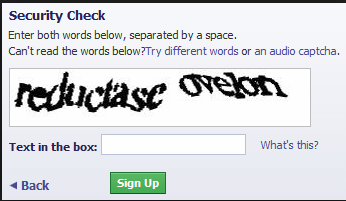
That is why you get to enter a security phrase when you buy tickets to prevent OCR automated buying.


Certified LabVIEW Architect
LabVIEW 6.1 ... 2013, LVOOP, GOOP, TestStand, DAQ, and Vison
