LabVIEW
- S'abonner au fil RSS
- Marquer le sujet comme nouveau
- Marquer le sujet comme lu
- Placer ce Sujet en tête de liste pour l'utilisateur actuel
- Ajouter cette question à mes {0}
- S'abonner
- Sourdine
- Page imprimable
- « Précédent
-
- 1
- 2
- Suivant »
Search 1D Array with first occurance
Résolu !
 Bob_Schor

le 01-16-2015 10:06 AM
- Marquer comme nouveau
- Ajouter ce message à mes {0}
- S'abonner
- Sourdine
- S'abonner au fil RSS
- Surligner ce Message
- Imprimer
- Signaler un contenu inapproprié
Maybe I am not being clear. What I am after for is a wildcard search on the 1D array. After the characters are entered, like Eri, I want a wildcard search for any other characters after the initial characters are entered into the Search string control.
OK, so don't try my algorithm! Yes, it's a bit more work, but you can also modify Crossrulz's Sequential Search by using some clever thinking and reading what you, yourself, wrote (quoted above -- "I want a wildcard search ...", so do a wildcard search!). You'll need to think about how to better handle the "not found" condition, and also think what happens when you are looking for Zelda on a really long list of contacts (you'll have to search the entire list on every character you enter ...).
BS


01-16-2015 10:17 AM - modifié 01-16-2015 10:19 AM
- Marquer comme nouveau
- Ajouter ce message à mes {0}
- S'abonner
- Sourdine
- S'abonner au fil RSS
- Surligner ce Message
- Imprimer
- Signaler un contenu inapproprié
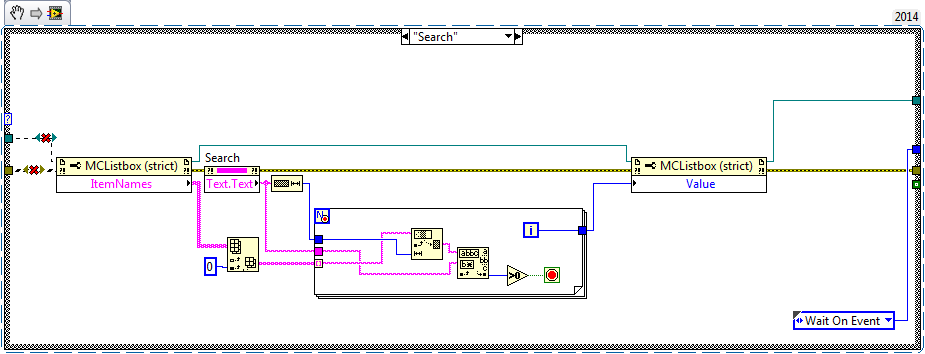
I think I figured it out after just stepping back for a moment.
I had to use Subset Array along with the string length to compare against each element in the 1D array. Once I found a match using the Greater than Zero primitive, I just used the iteration terminal to feed the MultiColumn Listbox value.
Attached is a snippet in case anyone else needs to use this for a project.

le 01-16-2015 10:42 AM
- Marquer comme nouveau
- Ajouter ce message à mes {0}
- S'abonner
- Sourdine
- S'abonner au fil RSS
- Surligner ce Message
- Imprimer
- Signaler un contenu inapproprié
One more question that relates to this. Since I can now select the row programmactically, how do I make the highlighted item visible without having to manually scroll up/down?
Bob_Schor
le 01-16-2015 10:52 AM
- Marquer comme nouveau
- Ajouter ce message à mes {0}
- S'abonner
- Sourdine
- S'abonner au fil RSS
- Surligner ce Message
- Imprimer
- Signaler un contenu inapproprié
I'm not sure what you mean by "make the highlighted item visible". I've not worked with MCListboxes, myself, but I assume that you can set the Active Cell (the one you find programmatically) with the ActiveCell property. Do you need something other than that?
BS
01-16-2015 12:13 PM - modifié 01-16-2015 12:14 PM
- Marquer comme nouveau
- Ajouter ce message à mes {0}
- S'abonner
- Sourdine
- S'abonner au fil RSS
- Surligner ce Message
- Imprimer
- Signaler un contenu inapproprié
What I meant was, when I find a match, the row becomes highlighted. The multicolumn listbox only has about 15 names visible to the user. If it goes beyond the visible selections, I want to force the multicolumn listbox to automaticlly scroll to the selection without the user doing this manually.

 crossrulz
le 01-16-2015 12:25 PM
- Marquer comme nouveau
- Ajouter ce message à mes {0}
- S'abonner
- Sourdine
- S'abonner au fil RSS
- Surligner ce Message
- Imprimer
- Signaler un contenu inapproprié
There is a property called Top Left Visible Cell. If you set that to the selected row, then your selected item will be at the top.
There are only two ways to tell somebody thanks: Kudos and Marked Solutions
Unofficial Forum Rules and Guidelines
"Not that we are sufficient in ourselves to claim anything as coming from us, but our sufficiency is from God" - 2 Corinthians 3:5
- « Précédent
-
- 1
- 2
- Suivant »
