- Subscribe to RSS Feed
- Mark Topic as New
- Mark Topic as Read
- Float this Topic for Current User
- Bookmark
- Subscribe
- Mute
- Printer Friendly Page
Getting thumbnailPhoto from Active Directory using LDAP
Solved!
 reniam
03-28-2023 10:54 AM
- Mark as New
- Bookmark
- Subscribe
- Mute
- Subscribe to RSS Feed
- Permalink
- Report to a Moderator
Hi,
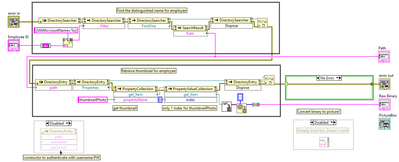
Using .NET and LDAP I'm able to obtain AD user info such as "displayName", "physicalDeliveryOfficeName", etc strings without issue. Using "thumbnailPhoto" I get a byte stream as expected, but I have not been able to convert this back into a picture. I have already tried using the PNG to LV Image.vi. It doesn't work in this instance. Any help would be appreciated.
Thanks
Solved! Go to Solution.

 tst
tst

03-29-2023 01:38 AM
- Mark as New
- Bookmark
- Subscribe
- Mute
- Subscribe to RSS Feed
- Permalink
- Report to a Moderator
I have no experience with this and a quick search did not show clear documentation for what the format of the data is (I assume it's this and it doesn't seem to specify a format), but it does show an example where it says it does work:
                        byte[] data = user.Properties["thumbnailPhoto"].Value as byte[];

                        if (data != null)
                        {
                            using (MemoryStream s = new MemoryStream(data))
                            {
                                return Bitmap.FromStream(s);
                            }
                        }
So presumably you just need to find the MemoryStream and Bitmap classes and do the same code. With the Bitmap class, I assume you can convert it to a more friendly format (worst case, you could probably save it to a file and read that).
___________________
Try to take over the world!

 GerdW
GerdW
03-29-2023 02:28 AM
- Mark as New
- Bookmark
- Subscribe
- Mute
- Subscribe to RSS Feed
- Permalink
- Report to a Moderator
Hi reniam,
could you please downconvert your VI for LV2019? Thanks!
GerdW
using LV2016/2019/2021 on Win10/11+cRIO, TestStand2016/2019

 rolfk
rolfk
03-29-2023 04:29 AM - edited 03-29-2023 04:33 AM
- Mark as New
- Bookmark
- Subscribe
- Mute
- Subscribe to RSS Feed
- Permalink
- Report to a Moderator
The PNG to LV VI of course expects a PNG byte stream. Depending how the picture is stored in Active Directory it might or might not be a PNG byte stream, but I doubt it is. You would need to look at the first few bytes in that byte array/string. It could be "BM" in which case it would be a Windows Bitmap or it could be JFIF or something similar, which would indicate a JPEG byte stream.
The .Net class Bitmap actually does this distinction internally and then invokes the according byte stream to image decoder, but in LabVIEW you do not have such a versatile "consume almost every image byte stream out there and try to figure out how to decode it".
It wouldn't be incredibly difficult to do to work for a few standard image types, but you can not imagine the amount of variations and different formats out there! It can never be made to work for all possible images and will then cause the standard complaint: "But I have here an image stream, why doesn't this function work?" Often it is easier to simply avoid the trouble, than having to deal with the consequences of having tried to solve it. 😁

03-30-2023 10:49 AM - edited 03-30-2023 10:54 AM
- Mark as New
- Bookmark
- Subscribe
- Mute
- Subscribe to RSS Feed
- Permalink
- Report to a Moderator
Hello,
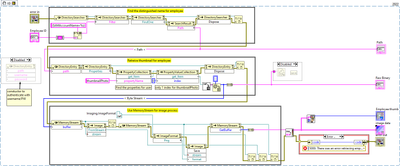
In case anyone finds this thread in the future, this worked for me.
Cheers

 zou
zou
03-30-2023 11:14 AM
- Mark as New
- Bookmark
- Subscribe
- Mute
- Subscribe to RSS Feed
- Permalink
- Report to a Moderator
What is the Employee ID? Is the Windows user name?
GerdW
03-30-2023 02:15 PM
- Mark as New
- Bookmark
- Subscribe
- Mute
- Subscribe to RSS Feed
- Permalink
- Report to a Moderator
Hi reniam,
as I already asked for: can you please downconvert your VI to LV2019?
GerdW
using LV2016/2019/2021 on Win10/11+cRIO, TestStand2016/2019
03-30-2023 02:58 PM
- Mark as New
- Bookmark
- Subscribe
- Mute
- Subscribe to RSS Feed
- Permalink
- Report to a Moderator
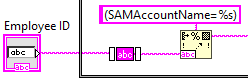
It's the SAM-Account-Name attribute to filter the forest of members on the domain. For us, this is the Employee ID. I spent a few minutes trying to get UserPrincipalName to work; id est "john.doe@ourdomain.com" without success.
03-30-2023 03:02 PM
- Mark as New
- Bookmark
- Subscribe
- Mute
- Subscribe to RSS Feed
- Permalink
- Report to a Moderator
GerdW,
Enjoy.
