LabVIEW
- Iscriversi a feed RSS
- Contrassegnare la discussione come nuova
- Contrassegnare la discussione come letta
- Sposta questo Discussione per l'utente corrente
- Preferito
- Iscriversi
- Disattiva notifiche
- Pagina in versione di stampa
multiple selection in listbox without using ctrl key
Risolto!
 SanRac
in data 03-25-2009 07:38 AM
- Contrassegnare come Nuovo
- Preferito
- Iscriversi
- Disattiva notifiche
- Iscriversi a feed RSS
- Evidenziare
- Stampare
- Segnalare contenuto inappropriato

 CHOWSL
in data 10-19-2017 08:15 PM
- Contrassegnare come Nuovo
- Preferito
- Iscriversi
- Disattiva notifiche
- Iscriversi a feed RSS
- Evidenziare
- Stampare
- Segnalare contenuto inappropriato
Thanks for the solution.
However it seems like there is still have a problem.
When we double click. It will deselect others too.

 GerdW
GerdW

in data 10-20-2017 01:27 AM
- Contrassegnare come Nuovo
- Preferito
- Iscriversi
- Disattiva notifiche
- Iscriversi a feed RSS
- Evidenziare
- Stampare
- Segnalare contenuto inappropriato
Hi chowsl,
However it seems like there is still have a problem.
When we double click. It will deselect others too.
Then you made something different than what was done 8 years ago…
As you didn't attach your VI you need to debug your code on your own.
GerdW
using LV2016/2019/2021 on Win10/11+cRIO, TestStand2016/2019
CHOWSL
in data 10-20-2017 02:00 AM
- Contrassegnare come Nuovo
- Preferito
- Iscriversi
- Disattiva notifiche
- Iscriversi a feed RSS
- Evidenziare
- Stampare
- Segnalare contenuto inappropriato
GerdW wrote:Then you made something different than what was done 8 years ago…
As you didn't attach your VI you need to debug your code on your own.
I just download from the provided solution and didn't made any different.
Anyway, I had solve the problem. And, here is my own solution.
GerdW
in data 10-20-2017 02:11 AM
- Contrassegnare come Nuovo
- Preferito
- Iscriversi
- Disattiva notifiche
- Iscriversi a feed RSS
- Evidenziare
- Stampare
- Segnalare contenuto inappropriato
Hi chowsl,
why do you use a "mouse up" event? This most often is wrong!
Why don't you use the "value change" event to handle user actions? Then just compare old and new value to control the selected items…
GerdW
using LV2016/2019/2021 on Win10/11+cRIO, TestStand2016/2019
CHOWSL
in data 10-20-2017 02:23 AM
- Contrassegnare come Nuovo
- Preferito
- Iscriversi
- Disattiva notifiche
- Iscriversi a feed RSS
- Evidenziare
- Stampare
- Segnalare contenuto inappropriato
Hi GerdW,
If I use "value change", it could not deselect the last value (No value change occur).
"Mouse up" will go wrong if clicking at scroll bar area. That's why I calculate and limit the available click area.
If you have better solution, please do share your VI too.
Thanks.
Best regards,
ChowSL
GerdW
in data 10-20-2017 02:54 AM
- Contrassegnare come Nuovo
- Preferito
- Iscriversi
- Disattiva notifiche
- Iscriversi a feed RSS
- Evidenziare
- Stampare
- Segnalare contenuto inappropriato
Hi chowsl,
that's a good point!
(But you should set your listbox to "0 or more items" selection mode instead of "1 and more"…)
GerdW
using LV2016/2019/2021 on Win10/11+cRIO, TestStand2016/2019

 altenbach
10-20-2017 10:27 AM - modificato 10-20-2017 10:31 AM
- Contrassegnare come Nuovo
- Preferito
- Iscriversi
- Disattiva notifiche
- Iscriversi a feed RSS
- Evidenziare
- Stampare
- Segnalare contenuto inappropriato
@CHOWSL wrote:
If I use "value change", it could not deselect the last value (No value change occur).
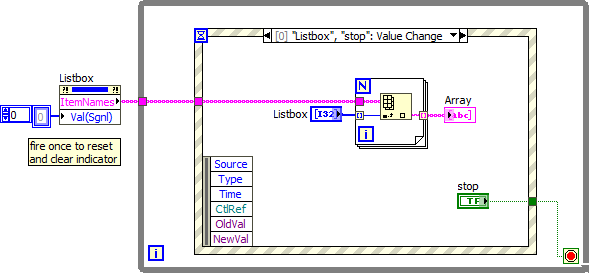
- Value change is the correct event. But yes, the selection mode needs to be set to "0 or more items".
- Now you can deselect any selected row, even the last one with ctrl-click.
- You need an event for the stop button.
- It is annoying if the front panel and diagram windows are saved maximized to the screen.
@CHOWSL wrote:
If you have better solution, please do share your VI too.
Try the attached. Arguably simpler!
 CHOWSL
in data 10-22-2017 08:41 PM
- Contrassegnare come Nuovo
- Preferito
- Iscriversi
- Disattiva notifiche
- Iscriversi a feed RSS
- Evidenziare
- Stampare
- Segnalare contenuto inappropriato
Thank for your solution, however it didn't suit the application.
As "multiple selection without using ctrl key" as mentioned in title,
In application like touch screen where ctrl or shift cannot be press.
1) I didn't notice there is "0 or more item" selection mode. Good to know that. However for "mouse up" method, it seems like no differences.
2) "Value change" method still unable deselect the last value by clicking it. Unless it using ctrl key. It's quite annoying.
3) Sorry for the annoying fp. Usually I use dual monitor for coding, I will take note next time. Btw, it could change to any size for depends on own preference.
4) Stop button is just depends on own preference only. for testing vi, I just stop it by using ctrl + "."
Anyway, thanks for the solution.
altenbach
in data 10-23-2017 11:51 AM
- Contrassegnare come Nuovo
- Preferito
- Iscriversi
- Disattiva notifiche
- Iscriversi a feed RSS
- Evidenziare
- Stampare
- Segnalare contenuto inappropriato
Another option I sometimes use is to keep e.g. a boolean array in a shift registers and whenever an entry is double-clicked I switch the symbol from blank to a checkmark or back and update the boolean array accordingly. Now the listbox must be set to "1 item" and I even color the selection white so it is invisible. The information on the selected items is in the boolean array and indicated with the symbol.
