Vision Application built into a VI doesn't work when made into a executable
已解决!
 drogers13
Hello Everyone,
I am used NI Vision Assistant to build a LabVIEW to perform pattern matching and OCR. I used the Vision Assistants "Build a VI" to create a VI. I then inserted that into my main program as well as the project that I am using. I then built an executable to test the program out on my main work station and the program doesn't seem to be doing anything past removing a color plane. I tried injecting the vision code in its raw state rather than as a SubVI and I still run into the same issue. Has anyone ran into the issue before? I've attached the VIs in question.
Thanks,
Dan
已解决! 转到解答。

 cy...
cy...
error codes, if any?
for starters, all image same type?
for vision that uses references, some serialization may help
Hey Cy,
To answer your questions:
I don't get any errors when I run the program as a normal .VI, but when I run it as an .EXE I get the following error code:
-1074396157
Source:
IMAQ Setup Match Geometric Pattern 2
I think that error code is just a general error code, but I am not entirely sure.
Image types don't change throughout the program.
Thanks,
Dan

 AnalogKid2Digit
Sounds like you don't have or have not activated the needed Vision Run-Time license.
-AK2DM
"It’s the questions that drive us.”
~~~~~~~~~~~~~~~~~~~~~~~~~~
Hey AK2DM,
I am building and running the program on my workstation which has the Vision Development Module Runtime program installed.
Looking at the program, there are 2 "IMAQ Setup Match Geometric Pattern 2", where the error is being generated from. Both of those are "Call Library Function" nodes which I assume are built when in the Vision Assistant. The library they are calling to is located on the dependency list of the LabVIEW project. I am wondering if it isn't calling the library correctly because in the application because it has a different build path? I will try setting the build path into the same folder as the main program.
Thanks,
Dan

 billko
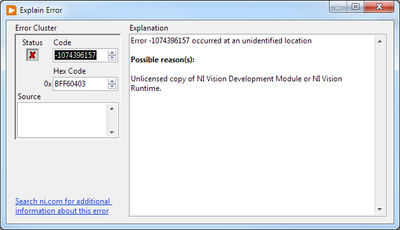
The error code is very clear, as was explained earlier. This is what I get when I plug it into "explain error":
(Mid-Level minion.)
My support system ensures that I don't look totally incompetent.
Proud to say that I've progressed beyond knowing just enough to be dangerous. I now know enough to know that I have no clue about anything at all.
Humble author of the CLAD Nugget.
*sigh* Thanks, I'm not sure why it is giving me that error when I run the application on my main work station, but I assume it is something silly that won't take much to solve.
Thanks,
Dan
AnalogKid2DigitUse NI License Manager to verify it is activated.
-AK2DM
"It’s the questions that drive us.”
~~~~~~~~~~~~~~~~~~~~~~~~~~
Hey AK2DM,
That was the problem. For some reason the Run-Time Engine was not activated when I activated the development module. I got it activated and everything is working smoothly now.
Thanks for you help,
Dan
