- Subscribe to RSS Feed
- Mark Topic as New
- Mark Topic as Read
- Float this Topic for Current User
- Bookmark
- Subscribe
- Mute
- Printer Friendly Page
Scanned variable read function - all channels
Solved!
 Ryan01
05-17-2018
09:33 AM
- last edited on
09-14-2025
07:31 PM
by
 Content Cleaner
- Mark as New
- Bookmark
- Subscribe
- Mute
- Subscribe to RSS Feed
- Permalink
- Report to a Moderator
Does anybody know a way to read all channels of a c-series module with one function? The below archived white paper shows all channels on a module can be read with the scanned variable read function, but when i do this, i get the attached error. I'd prefer one function icon that outputs an array instead of, for example, dragging and dropping 32 I/O shared variables then wiring these to a build array function.
Thanks guys!
Solved! Go to Solution.

 MichaelBalzer
05-17-2018 08:52 PM
- Mark as New
- Bookmark
- Subscribe
- Mute
- Subscribe to RSS Feed
- Permalink
- Report to a Moderator
What c-series module are you trying to perform the scanned read with? I just tried a 9205 and a cRIO-9033 running LV2017, and it worked without error.
If you right-click the refnum, then expand Select Variable Class, what's the current class type? Note mine is listed as a 9205 Variable Container:


Unless otherwise stated, all code snippets and examples provided
by me are "as is", and are free to use and modify without attribution.
05-18-2018 08:16 AM
- Mark as New
- Bookmark
- Subscribe
- Mute
- Subscribe to RSS Feed
- Permalink
- Report to a Moderator
Good Morning Michael!
My setup details are labVIEW 2015 sp1, cRIO9075 with NI 9213 and NI 9207 modules. i drag & drop a scanned variable read function, click the refnum in, create constant. I then click the refnum drop-down arrow, browse. For both browse options, Variable Engines and Current Project, the module is grayed out so selection is disabled. See attached jpg. i can select individual channels, but not the module. When i manually edit the refnum text ni.var.io://192.168.1.214/Mod1/TC0 to delete /TC0 and run the code, i get an error. Variable class is shown in attached jpg.
i'll start researching the variable classes, maybe it is a configuration issue.
Ryan - CLD
05-18-2018 08:30 AM
- Mark as New
- Bookmark
- Subscribe
- Mute
- Subscribe to RSS Feed
- Permalink
- Report to a Moderator
I noticed in my previous post i did not set a data type on the scanned variable read function first before creating the refnum. when I wire a array of double, and try to read Mod1, i get error "-1950678944 Scanned Variable Read in Untitled 4.vi".

 James_W
05-18-2018
08:40 AM
- last edited on
09-14-2025
07:32 PM
by
Content Cleaner
- Mark as New
- Bookmark
- Subscribe
- Mute
- Subscribe to RSS Feed
- Permalink
- Report to a Moderator
Did you check out this white paper too:
The first one you linked has been archived and was published 8 years ago, the above was last updated earlier this year and deals explicitly with cRIO and the Scan engine
James
05-18-2018 08:54 AM
- Mark as New
- Bookmark
- Subscribe
- Mute
- Subscribe to RSS Feed
- Permalink
- Report to a Moderator
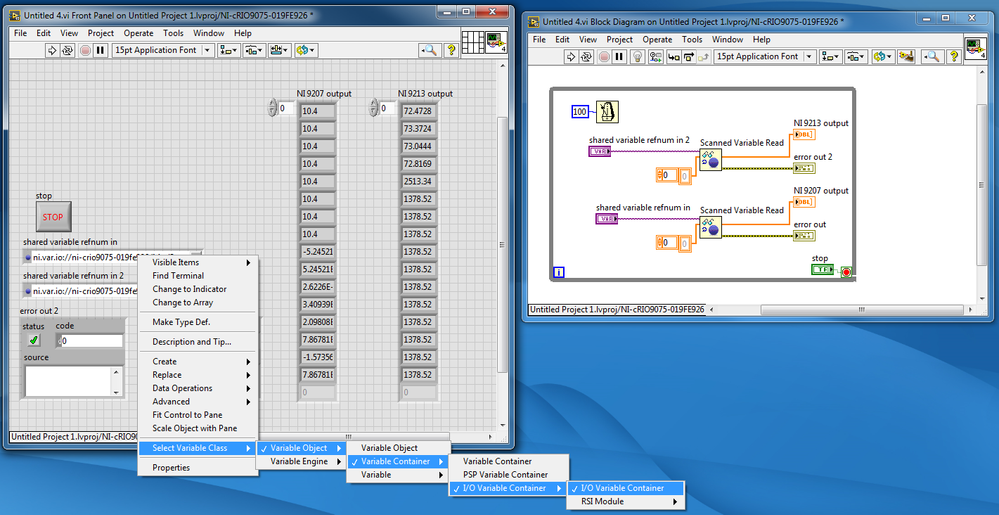
I got it!!! Selecting the correct class was the trick. I did trial and error by selecting every type of variable class one at a time. The below class worked for getting all module channels.
Thanks mike for pointing me in the right direction!