How can I restructure an unfavourable 2D array format to 1D?
해결 완료!

A surface profilometer we use produces data in text files with five columns with data point ordering by row first; i.e. if you have the following data sample;
1 2 3 4 5
6 7 8 9 10
11 12 13 14 15
Then the data order follows the number order here. I want to chop up this annoying format into multiple arrays by row (depending on the number of rows = for loop?) then splice them back together as a single column (transpose these arrays then build array?). Help!
해결되었습니다! 솔루션으로 이동.


/Y



You've just described one solution. Autoindexing will take into account the number of rows present - you could easily build the for loop by taking the array size and feeding the number of rows to it, but autoindexing does this for you.
CLA
That's the other solution I'd thought of - find the array size of the input array, index array twice to find row and column sizes, then feed in as the dimension for Reshape Array.
CLA


Are you asking how to take a 2-D array and transpose it? If so, I recommend using the Transpose 2D Array function found on the Array Palette. [I'm sure you already thought of that, which means that I don't understand your problem ...].

 altenbach

06-18-2013 11:19 AM - 편집 06-18-2013 11:20 AM
- 신규로 표시
- 북마크
- 구독
- 소거
- RSS 피드 구독
- 강조
- 인쇄
- 부적절한 컨텐트 신고
@apg504 wrote:
A surface profilometer we use produces data in text files with five columns with data point ordering by row first; i.e. if you have the following data sample;
1 2 3 4 5
6 7 8 9 10
11 12 13 14 15
Then the data order follows the number order here. I want to chop up this annoying format into multiple arrays by row (depending on the number of rows = for loop?) then splice them back together as a single column (transpose these arrays then build array?). Help!
Once you have a 1D array, the concept of rows and columns no longer exists.
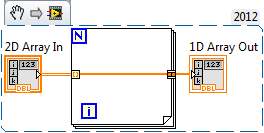
In any case, reshaping is the right thing. Here's what I would do:


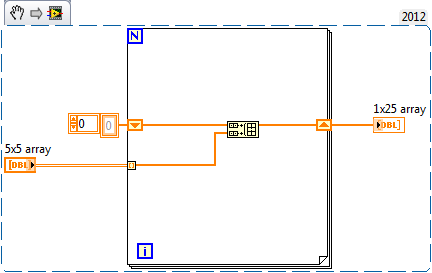
I was right, I didn't understand the problem (later posts cleared it up). I think the most "intuitive" (easiest-to-understand) way to do this is to simply feed the 2D Array into a For loop and use a Concatenating Tunnel at the far end to reassemble the pieces as a single 1D Array. I don't know how this compares in speed to the reshaping solutions, but (a) I'm sure the time difference (in the context of your entire program) is trivial, and (b) there's something to be said for a "dirt-simple solution" that can easily be seen to do what you want.
BS
P.S. -- the output tunnel shown here is a LabVIEW 2012 "new feature". It may well be that in earlier versions of LabVIEW, it would not be so intuitive ...


@Bob_Schor wrote:
I was right, I didn't understand the problem (later posts cleared it up). I think the most "intuitive" (easiest-to-understand) way to do this is to simply feed the 2D Array into a For loop and use a Concatenating Tunnel at the far end to reassemble the pieces as a single 1D Array. I don't know how this compares in speed to the reshaping solutions, but (a) I'm sure the time difference (in the context of your entire program) is trivial, and (b) there's something to be said for a "dirt-simple solution" that can easily be seen to do what you want.
BS
P.S. -- the output tunnel shown here is a LabVIEW 2012 "new feature". It may well be that in earlier versions of LabVIEW, it would not be so intuitive ...
Trust me, the Reshape Array that Altenbach showed is much easier to understand and will run a lot faster.
There are only two ways to tell somebody thanks: Kudos and Marked Solutions
Unofficial Forum Rules and Guidelines
"Not that we are sufficient in ourselves to claim anything as coming from us, but our sufficiency is from God" - 2 Corinthians 3:5
Trust me, the Reshape Array that Altenbach showed is much easier to understand and will run a lot faster.
As Ronald Reagan used to say (and as Darren Nattinger has so well demonstrated at NI Week), "Trust, but Verify". I wrote a routine where you specify the rows and columns of an array, builds a 2-D array (using nested For Loops) containing random doubles. It then passes this array through Altenbach's "Reshape" routine, and through my "For-loop concatenate" routine, timing how long it takes each routine.
In LabVIEW 2012 on my 3-year-old Windows 7 PC, here are the times, in microseconds (there's some variability, but these are representative):
Array Size Altenbach BS
3 by 4 43 11
300 by 400 9866 285
What this means is that the clever guys at NI have really optimized array processing in For loops (I recall one of Darren's Timing challenges about three years ago at NI Week involved something like this).
Bob Schor
P.S. -- I teach (as well as "do") LabVIEW, and also am willing to challenge the assertion that "the Reshape Array that Altenbach showed is much easier to understand" -- it strongly depends on your audience.
