- Subscribe to RSS Feed
- Mark Topic as New
- Mark Topic as Read
- Float this Topic for Current User
- Bookmark
- Subscribe
- Mute
- Printer Friendly Page
DAQmxSystem executable not running in Windows 7
Solved!
 FredATI
12-13-2011 07:51 AM
- Mark as New
- Bookmark
- Subscribe
- Mute
- Subscribe to RSS Feed
- Permalink
- Report to a Moderator
I have a very simple vi that queries all DAQ hardware connected to a PC running Windows 7 (32 bit) and LabVIEW 2009.
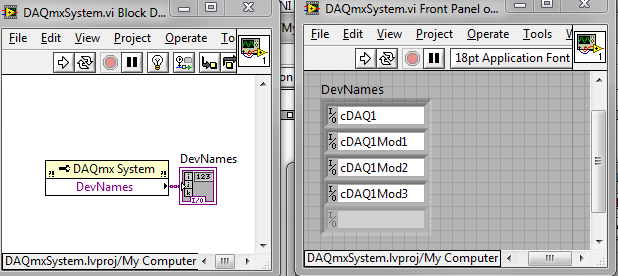
This vi works perfectly well as shown in the screen capture above. I then create an executable, and this is where the problem occurs: when running the .exe on the same Windows 7 PC, the .exe returns an empty DevNames list. However, if I run the same .exe on windows XP, everything works as expected.
Reinstalled latest DAQmx 9.4 to no avail. Please help!
Solved! Go to Solution.

 Ben
Ben

12-13-2011 08:41 AM
- Mark as New
- Bookmark
- Subscribe
- Mute
- Subscribe to RSS Feed
- Permalink
- Report to a Moderator
Not all DAQmx stuff is supported on Win 7.
Check with support for the details of whcich version works on what OS and for what hardware.
Ben

 Seth_B.
12-13-2011 02:54 PM
- Mark as New
- Bookmark
- Subscribe
- Mute
- Subscribe to RSS Feed
- Permalink
- Report to a Moderator
That property should be supported on Windows 7. Does the cDAQ chassis show up in MAX?
Principal Test Engineer | National Instruments
Certified LabVIEW Architect
Certified TestStand Architect
12-13-2011 05:03 PM
- Mark as New
- Bookmark
- Subscribe
- Mute
- Subscribe to RSS Feed
- Permalink
- Report to a Moderator
Chassis and modules also show in "devices and interfaces" in "measurement and automation".
Seth_B.
12-14-2011 09:34 AM
- Mark as New
- Bookmark
- Subscribe
- Mute
- Subscribe to RSS Feed
- Permalink
- Report to a Moderator
Can you try adding an indicator that shows the error out terminal of the DAQmx System property node? Also, could you try one of the other DAQmx System properties (like Major DAQmx Version) and make sure that returns also?
Principal Test Engineer | National Instruments
Certified LabVIEW Architect
Certified TestStand Architect
12-14-2011 09:48 AM
- Mark as New
- Bookmark
- Subscribe
- Mute
- Subscribe to RSS Feed
- Permalink
- Report to a Moderator
I modified the LabVIEW code as requested:
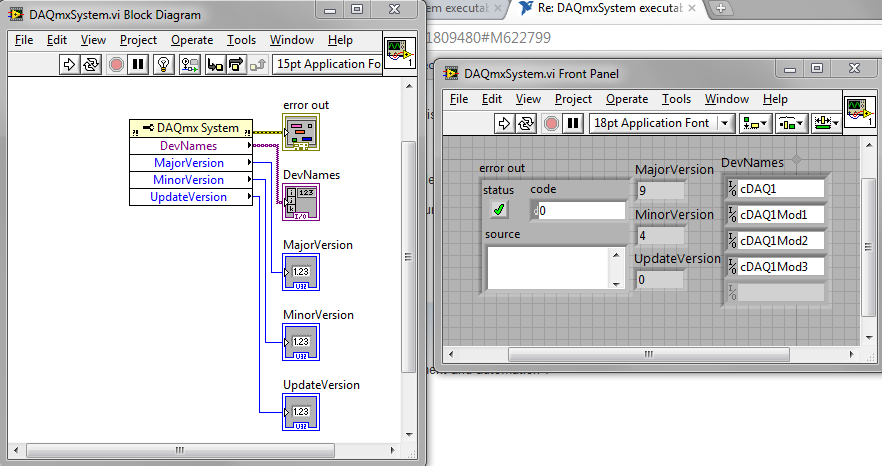
Executable is compiled using all defaults when creating a new lvproj. Here are the .exe results
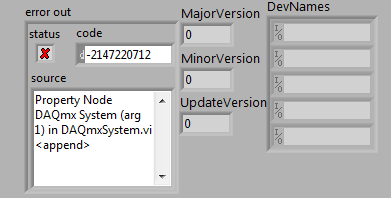
and the MAX:
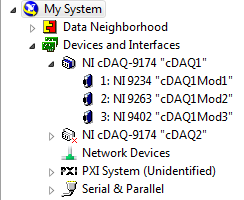
thanks for the help
Seth_B.
12-14-2011 10:27 AM
- Mark as New
- Bookmark
- Subscribe
- Mute
- Subscribe to RSS Feed
- Permalink
- Report to a Moderator
That's really strange. That property node works correctly on my Windows 7 x64 system. I'm going to ask around and see if anyone has any recommendations.
If you have time, could you also try something like the following code:
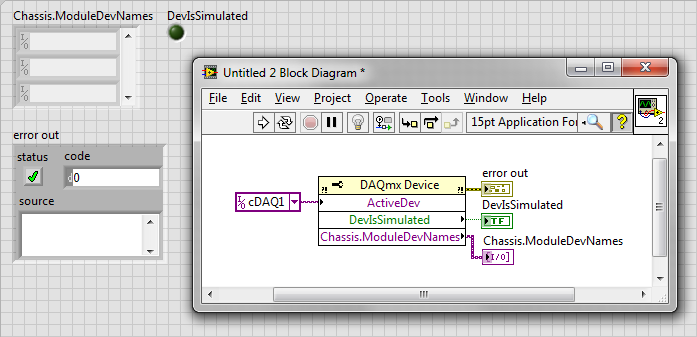
I'm curious if the issue is specific to the DAQmx System property node code path.
Principal Test Engineer | National Instruments
Certified LabVIEW Architect
Certified TestStand Architect

 Wayne.C
12-14-2011 10:46 AM
- Mark as New
- Bookmark
- Subscribe
- Mute
- Subscribe to RSS Feed
- Permalink
- Report to a Moderator
FredATI,
Do you have DAQmx Runtime installed on the Win7 Machine?
12-14-2011 10:49 AM
- Mark as New
- Bookmark
- Subscribe
- Mute
- Subscribe to RSS Feed
- Permalink
- Report to a Moderator
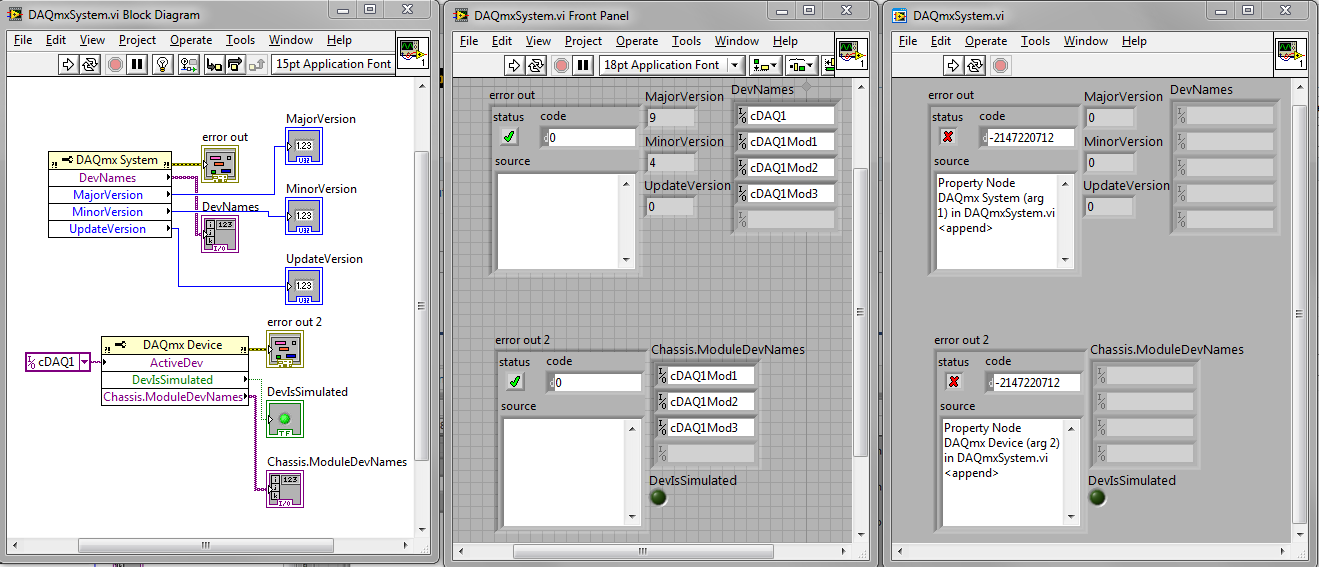
Modified again as requested: middle is .vi, far right is .exe
I run LabVIEW 2009 SP1 9.0.1 in 32 bit in Windows 7.
The reason I need this is for deployment of several CompactDAQ systems continously being moved (and modules also swapped) around across multiple PCs. I am running this function to determine which where each module type is connected before I start my data aquisition. If you have an alternative method to my end goal, I will take your suggestions.
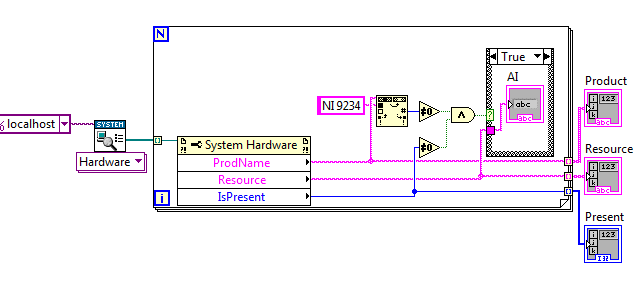
I initially tried to do it using find.vi in syscfg.llb (not as elegant), but I have the same problem: work as a .vi, doesnt work as .exe in windows 7, and work as .exe in Windows XP.
 Ben
Ben
12-14-2011 10:53 AM
- Mark as New
- Bookmark
- Subscribe
- Mute
- Subscribe to RSS Feed
- Permalink
- Report to a Moderator
Until you get this figured out...
In a very old USB app I resorted to trial and error in the configuration sub-VI and (in my case) when I found the counter I knew I had found the proper device.
Admit, very crude but it did work.
Ben
