|
|||||||||||||
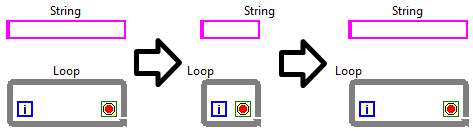
Check out the below image.
Step 1: Two BD objects were created with labels shown at 120px wide, then the label was dragged to the center of the object.
Step 2: The object was resized from 120px down to 60px
Step 3: The object was resized back to 120px.
Notice, the labels do not stay in the center (they need to). Also, notice the snapping behavior of these two objects differs as object is resized. Similar scenario occurs on FP objects.
This post is partially a bugfix/partially related to my own experimentation of this post.
This is actually more complicated, because the behavior depends on the justification setting of the label.
Select the label and pick "justification...centered" and it will stay in the center!
Same if the label is left aligned, it will stay with the left edge.
etc....
It seems the correct combination of alignment setting and placement will get you almost there. Still, I agree this is too convoluted and should be more reasonable automatically. ![]()
I think that the justify-setting should be adjusted automatically if the move-and-snap-feature has been used on a size-to-text-label. Changing the justification on such a label has no visible effect, but improves the alignment after further text changes.
So - Kudos!
You must be a registered user to add a comment here. If you've already registered, please log in. If you haven't registered yet, please register and log in.
Post New Idea to submit a product idea to the LabVIEW Idea Exchange. Be sure to submit a separate post for each idea.
My Profile | Privacy |
Legal |
Contact NI
© 2011 National Instruments Corporation. All rights reserved. | E-Mail this Page
|
||

E-Mail this Page