NI Home
Cart Cart | Help
Hello Events Academic NI Developer Zone Support Solutions Products & Services Contact NI MyNI
You are here: 
NI Home > NI Developer Zone > NI Discussion Forums


Announcements
The NI Idea Exchange is a product feedback forum where NI R&D and users work together to submit ideas, collaborate on their development, and vote for the ones they like best. View all of the NI Idea Exchanges to post an idea or add your opinion on an existing one today!
Hueter

Integrated Structure Labels

Status: Completed
by Active Participant Hueter on ‎06-30-2009 06:11 PM

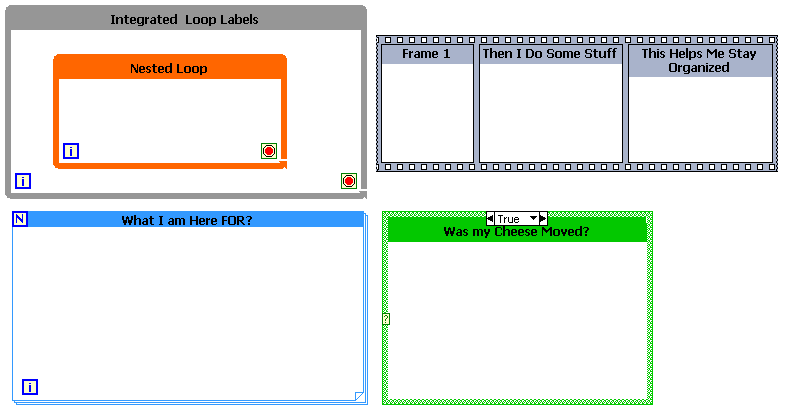
I think structures should have a better label system. Currently I use free labels of the same color as the loop which looks great and makes the code easy to read and debug. But if I resize my loop I have to manually resize the label as well. I think this should be built into a right-click option.


(structure) rick-click » visible items » Structure label


Integrated Structure Labels.PNG

Status: Completed
Available in LabVIEW 2012
Comments
by Active Participant Jim_Kring on ‎07-01-2009 07:55 PM

This is a great idea.  However, loops already have labels and you can color them the same as the structure (they even reposition with the upper left corner of the structure, as the structure is moved and resized).  Granted, it's not exactly the same as what you propose, and isn't quite as featureful, but it gets the job done for me.


 1.png

by Trusted Enthusiast on ‎07-03-2009 12:10 PM
As Jim states, current functionality "gets the job done for me" too. Check out this link that proposes that the current implementation of centered labels becomes more predictable.
by Member jm346 on ‎07-10-2009 03:24 AM
I disagree with the previous comments. Integrated labels, especially coloured ones like those suggested, would definietly aid readability.
by Member Chris in Colorado on ‎08-26-2009 12:26 PM
I would use this a lot!!!
by Member Chris in Colorado on ‎08-26-2009 12:27 PM
"reposition and color" = time I don't have.
by Knight of NI on ‎08-26-2009 12:27 PM

Chris,


Stop flooding the ideas board with meaningless posts!!!!!!! :smileymad:

by Member rgvdh@rdf on ‎01-18-2011 10:14 AM

Current functionality on loop labels works for me too - I don't know why it needs to be just inside rather than just outside the upper left corner.

I do think that having the label change automatically color when you change the color of the loop would save some mouse clicks.


What is shown above that I really want is individual frame labels within a sequence structure.  Something similar to that would be nice for case and event structures too: yes you can drop a free text block into every case, but that can be a pain when resizing.  Having the "what this frame does" or "what this case does" description autoposition when you resize the same way the entire structure's label does would be handy.

by Member Randy_Bryant on ‎04-20-2011 01:46 PM

Along these lines, I took over a project and one of the while loops has a lable that is missing the box around it.  How did that happen and how do it get the box back?

by Active Participant Christina_R on ‎04-27-2011 04:37 PM

Randy,


The label has a foreground color (the box) and a background color (the color behind the text). Try right-clicking  the box using the Coloring tool to bring up the color selection dialog and using the "F" and "B" keys to switch between selecting the foreground and background colors. There's more about the color selection dialog on my blog (http://www.eyesonvis.com/blog/2006/10/demystifying-labview-color-picker.html) if you're curious.

by Member vugie on ‎05-05-2011 05:42 AM
For people voting for this I'd like to recommend a plugin for Right-Click Framework - Label Manager (http://lavag.org/files/file/104-label-manager/). It doesn't cover full functionality proposed in this idea, but speeds up repainting and repositioning a lot.
Latest LabVIEW Idea Exchange Blog Posts
About LabVIEW Idea Exchange

Have a LabVIEW Idea?

  1. Browse by label or search in the LabVIEW Idea Exchange to see if your idea has previously been submitted. If your idea exists be sure to vote for the idea by giving it kudos to indicate your approval!
  2. If your idea has not been submitted click Post New Idea to submit a product idea to the LabVIEW Idea Exchange. Be sure to submit a separate post for each idea.
  3. Watch as the community gives your idea kudos and adds their input.
  4. As NI R&D considers the idea, they will change the idea status.
  5. Give kudos to other ideas that you would like to see in a future version of LabVIEW!
Idea Statuses
Top Kudoed Authors
User Kudos Count
131
88
76
68
68
By using this web site, you accept the Terms of Use for this web site. Please read these Terms of Use carefully before using any part of this site. Please go here for information on ni.com's copyright infringement policy.
My Profile | Privacy | Legal | Contact NI © 2011 National Instruments Corporation. All rights reserved.    |    E-Mail this Page E-Mail this Page