ni.com is currently undergoing scheduled maintenance.
Some services may be unavailable at this time. Please contact us for help or try again later.
- Subscribe to RSS Feed
- Mark Topic as New
- Mark Topic as Read
- Float this Topic for Current User
- Bookmark
- Subscribe
- Mute
- Printer Friendly Page
xy -Graph with timestamp

 Martin88
08-11-2014 01:54 AM
- Mark as New
- Bookmark
- Subscribe
- Mute
- Subscribe to RSS Feed
- Permalink
- Report to a Moderator
Hi forum,
i need help again. I have a .csv file from labview where the first row is a timestamp:
| 08/10/201423:45:53.871 |
the other rows are floating data.
I would like to read this data and plot it with timestamp on the x-Axis. How i could do this in labview.
Thanks and best
Martin

 GerdW
GerdW

08-11-2014 02:17 AM
- Mark as New
- Bookmark
- Subscribe
- Mute
- Subscribe to RSS Feed
- Permalink
- Report to a Moderator
Hi Martin,
I recommend to put a space between date and time, but it works this way too:
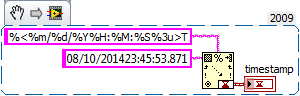
GerdW
using LV2016/2019/2021 on Win10/11+cRIO, TestStand2016/2019
08-11-2014 02:27 AM
- Mark as New
- Bookmark
- Subscribe
- Mute
- Subscribe to RSS Feed
- Permalink
- Report to a Moderator
Hi gerd,
thanks for ur fast help! I still dont get how i could plot the graph, so i will read the first row as a string format it into a timestamp and then i just can plot it on the x axis?
Best,
Martin
GerdW
08-11-2014 02:30 AM
- Mark as New
- Bookmark
- Subscribe
- Mute
- Subscribe to RSS Feed
- Permalink
- Report to a Moderator
Hi Martin,
you could either create an XY graph with an array of timestamps used for the x axis - or you could create a waveform using a single timestamp (as t0) and a fixed dt…
In your OP you only provided a single timestamp and no additional information, so all I could suggest is how to convert that timestamp string into a "real" LabVIEW timestamp!
GerdW
using LV2016/2019/2021 on Win10/11+cRIO, TestStand2016/2019
08-11-2014 02:38 AM - edited 08-11-2014 02:55 AM
- Mark as New
- Bookmark
- Subscribe
- Mute
- Subscribe to RSS Feed
- Permalink
- Report to a Moderator
hi Gerd,
i will have in the firt row an array of timestamps and multible data points in the second row. The graph should look like in the picture attached i want to plot the first row(timestamps) on the x axis and the data points on the y axis.
I attached my vi but its not working.
Thanks
Martn
GerdW
08-11-2014 03:55 AM
- Mark as New
- Bookmark
- Subscribe
- Mute
- Subscribe to RSS Feed
- Permalink
- Report to a Moderator
Hi Martin,
you need to read in your data as "String" and convert the timestamps as I have shown above…
GerdW
using LV2016/2019/2021 on Win10/11+cRIO, TestStand2016/2019
08-11-2014 11:44 AM
- Mark as New
- Bookmark
- Subscribe
- Mute
- Subscribe to RSS Feed
- Permalink
- Report to a Moderator
Hi Gerd,
i still stuck i may dont get the idea. I attached my vi to plot the csv file. How i could read just the first row and format this to string the other row to foating points and then plot it.
Thanks for your help
Martin
GerdW
08-12-2014 01:29 PM
- Mark as New
- Bookmark
- Subscribe
- Mute
- Subscribe to RSS Feed
- Permalink
- Report to a Moderator
Hi Martin,
sorry for delay, but next time you should save your VI in LV2011…
See this:
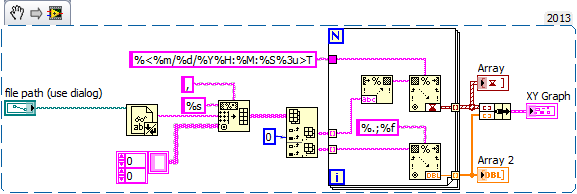


- read in the text file and convert to array of strings
- get columns (instead of rows!) and convert each column depending on its datatype to timestamp and float
- plot data on XY graph
You went wrong on
- the format specifier for SpreadsheetStringToArray
- indexing rows instead of columns
- the whole process of data conversion: after converting to float you convert back to string to finally (trying) to convert back to timestamp…
GerdW
using LV2016/2019/2021 on Win10/11+cRIO, TestStand2016/2019
08-16-2014 01:02 AM - edited 08-16-2014 01:06 AM
- Mark as New
- Bookmark
- Subscribe
- Mute
- Subscribe to RSS Feed
- Permalink
- Report to a Moderator
HI gerd,
thanks a lot!
It works fine 🙂 one other thing how i would make it if i wana plot 2 graphs on the y scale?
THanks
Martin

 mikeporter
08-17-2014 12:13 AM
- Mark as New
- Bookmark
- Subscribe
- Mute
- Subscribe to RSS Feed
- Permalink
- Report to a Moderator
Mike...
Certified Professional Instructor
Certified LabVIEW Architect
LabVIEW Champion
"... after all, He's not a tame lion..."
For help with grief and grieving.
