- Subscribe to RSS Feed
- Mark Topic as New
- Mark Topic as Read
- Float this Topic for Current User
- Bookmark
- Subscribe
- Mute
- Printer Friendly Page
counter

 Daan82
03-29-2018 05:08 AM
- Mark as New
- Bookmark
- Subscribe
- Mute
- Subscribe to RSS Feed
- Permalink
- Report to a Moderator
Hello i am Danny.
Just start with labview basics, but i can use some help.
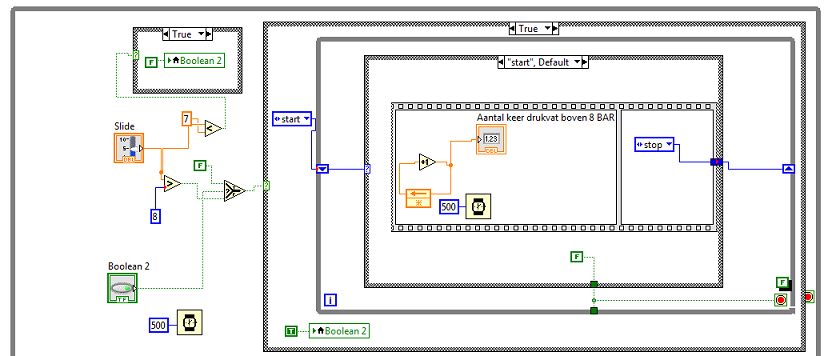
I have a (pressure) signal from a QuantumX MX840B. The signal is from a pressure vessel and i want te count how often the barrel is at 8 bar.
This is working but it counts continulously. so i need a kind of stop or reset.
thanks

 PalanivelThiruv
03-29-2018 05:26 AM
- Mark as New
- Bookmark
- Subscribe
- Mute
- Subscribe to RSS Feed
- Permalink
- Report to a Moderator
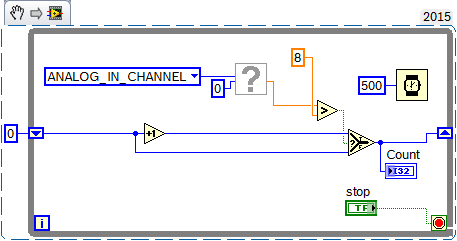
You acquired data once and Just Increment in a loop, Even the Acquisition should be inside loop and Incremet the counter only when it is above 8.
use Shift registers to hold the previous count.
Palanivel Thiruvenkadam | பழனிவேல் திருவெங்கடம்
LabVIEW™ Champion |Certified LabVIEW™ Architect |Certified TestStand Developer
Kidlin's Law -If you can write the problem down clearly then the matter is half solved.
-----------------------------------------------------------------------------------------------------------------
03-29-2018 05:54 AM
- Mark as New
- Bookmark
- Subscribe
- Mute
- Subscribe to RSS Feed
- Permalink
- Report to a Moderator
Thanks
I just use Shift registers and put a slide i it. so it easy to test.
The pressure signal is sometimes hours above 8 (bar) and the counter should only add 1 at a time.

 GerdW
GerdW
03-29-2018 06:00 AM
- Mark as New
- Bookmark
- Subscribe
- Mute
- Subscribe to RSS Feed
- Permalink
- Report to a Moderator
Hi Daan,
so you should determine when the value is crossing the limit - and not, when it is greater equal limit!
There is a function named PtByPt BooleanCrossing: that will help you…
GerdW
using LV2016/2019/2021 on Win10/11+cRIO, TestStand2016/2019
PalanivelThiruv
03-29-2018 06:40 AM
- Mark as New
- Bookmark
- Subscribe
- Mute
- Subscribe to RSS Feed
- Permalink
- Report to a Moderator
Even your Acquisition logic should be inside the loop.
Its Simple add/Increment whenever Pressure signal (in bar) is above 8, else hold with the old value using shift register.
Palanivel Thiruvenkadam | பழனிவேல் திருவெங்கடம்
LabVIEW™ Champion |Certified LabVIEW™ Architect |Certified TestStand Developer
Kidlin's Law -If you can write the problem down clearly then the matter is half solved.
-----------------------------------------------------------------------------------------------------------------
03-29-2018 07:14 AM
- Mark as New
- Bookmark
- Subscribe
- Mute
- Subscribe to RSS Feed
- Permalink
- Report to a Moderator
the is no PtByPt BooleanCrossing in my labview.
is there another solution?
i try to update
PalanivelThiruv
03-29-2018 07:17 AM
- Mark as New
- Bookmark
- Subscribe
- Mute
- Subscribe to RSS Feed
- Permalink
- Report to a Moderator
Try This
Palanivel Thiruvenkadam | பழனிவேல் திருவெங்கடம்
LabVIEW™ Champion |Certified LabVIEW™ Architect |Certified TestStand Developer
Kidlin's Law -If you can write the problem down clearly then the matter is half solved.
-----------------------------------------------------------------------------------------------------------------
GerdW
03-29-2018 07:19 AM
- Mark as New
- Bookmark
- Subscribe
- Mute
- Subscribe to RSS Feed
- Permalink
- Report to a Moderator
Hi Daan,
are you really using such a tiny font size on your computer???
GerdW
using LV2016/2019/2021 on Win10/11+cRIO, TestStand2016/2019
03-29-2018 07:53 AM
- Mark as New
- Bookmark
- Subscribe
- Mute
- Subscribe to RSS Feed
- Permalink
- Report to a Moderator
Thanks Palanivel
Unfortunately this is not the solution, the counter must stop at 1 now he count continues.
when the pressure vessel is empty it will pumped fully with air. when it is at 8bar a 2 must be made of the 1
i am updating labview!
04-02-2018 05:02 AM
- Mark as New
- Bookmark
- Subscribe
- Mute
- Subscribe to RSS Feed
- Permalink
- Report to a Moderator
I found a solution, maybe a bit cumbersome but it works for me.
thanks for help.