ni.com is currently undergoing scheduled maintenance.
Some services may be unavailable at this time. Please contact us for help or try again later.
- Subscribe to RSS Feed
- Mark Topic as New
- Mark Topic as Read
- Float this Topic for Current User
- Bookmark
- Subscribe
- Mute
- Printer Friendly Page
Trigger an event using a QR Code scanner
Solved!
 ben64
ben64
04-19-2017 03:00 PM
- Mark as New
- Bookmark
- Subscribe
- Mute
- Subscribe to RSS Feed
- Permalink
- Report to a Moderator
I would like to trig an event when data from a QR Code scanner (Eyoyo) is entered in an active string control. There is always the possibility of adding an OK button but I would like to have minimal user interaction.
When the data is entered it is followed by a newline character but since there is no "enter" action performed the value changed event is not triggered.
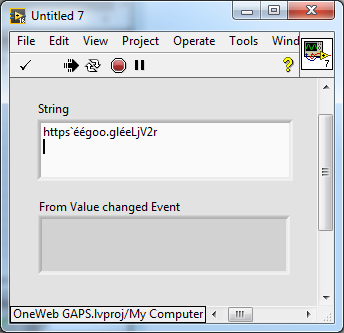
I can't use a timeout and compare the string with its previous iteration value since the value doesn't change without a enter. There is probably no way to avoid an OK button but somebody may have had a similar issue and found a way to trig an event. In this case I could use the Prompt User For Input express vi.
Also note the funny scanned data, that is because the Eyoyo uses a Japanese keyboard, I might have to work out a lookup table to get something more readable (the QR Code to be used will be created by our production engineer, hopefully they will create them to be readable).
Ben64

Solved! Go to Solution.

 ogk.nz
04-19-2017 03:18 PM
- Mark as New
- Bookmark
- Subscribe
- Mute
- Subscribe to RSS Feed
- Permalink
- Report to a Moderator
Just clarifying a few things in my head here, The reason that your data is going into the active string control is because the QR reader is acting as a keyboard right?
So what is the return to the all of the values for the "Key Down" event? Surely one of those must have some correlation to a line return. It's a little hard to test without your setup but surely Char should return a consistent value.

 OEM_Dev
04-19-2017 03:27 PM
- Mark as New
- Bookmark
- Subscribe
- Mute
- Subscribe to RSS Feed
- Permalink
- Report to a Moderator
Update value while typing doesn't work? I thought it triggered a value change each time, and you could check it then for a newline character to know when it's finished
04-19-2017 03:37 PM
- Mark as New
- Bookmark
- Subscribe
- Mute
- Subscribe to RSS Feed
- Permalink
- Report to a Moderator
@ogk.nz wrote:
Just clarifying a few things in my head here, The reason that your data is going into the active string control is because the QR reader is acting as a keyboard right?
So what is the return to the all of the values for the "Key Down" event? Surely one of those must have some correlation to a line return. It's a little hard to test without your setup but surely Char should return a consistent value.
Yes, the QR Reader is acting like a keyboard. That seems like a good idea, but I still don't know how to trigger the string control value change when the return character is detected. I will look into it.
Ben64
Ben64
04-19-2017 04:00 PM
- Mark as New
- Bookmark
- Subscribe
- Mute
- Subscribe to RSS Feed
- Permalink
- Report to a Moderator
Thanks to both of you, the solution I'm developing is a combination of your answers. The string is set to update while typing and I'm also using a string key down event and when the return key is detected I'm triggering a user event to process the QR scanner data.
Ben64

 levanlap_tk
04-23-2017 09:01 AM
- Mark as New
- Bookmark
- Subscribe
- Mute
- Subscribe to RSS Feed
- Permalink
- Report to a Moderator
right click in control string, chose limit 1 row, you can do it
 diamondnazira
09-18-2019 11:30 PM
- Mark as New
- Bookmark
- Subscribe
- Mute
- Subscribe to RSS Feed
- Permalink
- Report to a Moderator
Hi! i need help! i just bought eyoyo qr code reader/scanner for my project but i dont know how to use it. It is said plug and play so i just thought when you scan the qr code it will be redirected to the link but when i scan it nothing happened. there is no installation disk or whatsoever and i am so confuse. How do you use eyoyo scanner ? please help, thank you in advance!
