- Subscribe to RSS Feed
- Mark Topic as New
- Mark Topic as Read
- Float this Topic for Current User
- Bookmark
- Subscribe
- Mute
- Printer Friendly Page
Screenshot

 SThom
SThom
08-04-2014 11:58 AM
- Mark as New
- Bookmark
- Subscribe
- Mute
- Subscribe to RSS Feed
- Permalink
- Report to a Moderator
I need to save a screenshot containing a grapgh and other data indiactors (as shown in the attached figure). Please advise the ioptions available in version 2012 or lower. Thanks in advance

 RavensFan

08-04-2014 12:10 PM
- Mark as New
- Bookmark
- Subscribe
- Mute
- Subscribe to RSS Feed
- Permalink
- Report to a Moderator
Are you looking for a screenshot of a LabVIEW front panel?
This looks more like the screenshot of an instrument.

 NLutz
NLutz
08-04-2014 12:37 PM
- Mark as New
- Bookmark
- Subscribe
- Mute
- Subscribe to RSS Feed
- Permalink
- Report to a Moderator
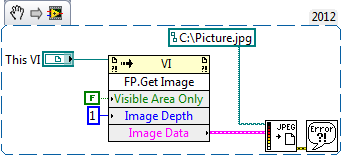

An Image Depth of 1 will return a black and white picture.
08-04-2014 01:08 PM
- Mark as New
- Bookmark
- Subscribe
- Mute
- Subscribe to RSS Feed
- Permalink
- Report to a Moderator
Hi,
Yes it's the part of the front pannel. Graph and all the data are captured from a spectrum anlyzer separately. I can save the graph only, but need to include those data too in the image.
Thanks!
08-04-2014 01:12 PM
- Mark as New
- Bookmark
- Subscribe
- Mute
- Subscribe to RSS Feed
- Permalink
- Report to a Moderator
How do I choose a part of the front pannel (Do'nt need to include some control buttons of the front pannel)
Thanks!
NLutz
08-04-2014 01:27 PM
- Mark as New
- Bookmark
- Subscribe
- Mute
- Subscribe to RSS Feed
- Permalink
- Report to a Moderator
You could put the controls that you want into a tab control. I've attached an example of this.
An alternative method is to resize the VI such that only the data you want is visible . The constant of Visible Area Only would then need to be set to True.
RavensFan
08-04-2014 01:41 PM
- Mark as New
- Bookmark
- Subscribe
- Mute
- Subscribe to RSS Feed
- Permalink
- Report to a Moderator
Also look at the Code Capture Tool. It is often used on the forums for capturing and posting screenshots (with embedded code). But it provides a palette that allows you to programmatically take screen captures.

 billko
08-04-2014 04:00 PM
- Mark as New
- Bookmark
- Subscribe
- Mute
- Subscribe to RSS Feed
- Permalink
- Report to a Moderator
@RavensFan wrote:
Also look at the Code Capture Tool. It is often used on the forums for capturing and posting screenshots (with embedded code). But it provides a palette that allows you to programmatically take screen captures.
You forgot the link you usually provide. Unfortunately, I forgot what it was, also. And there are two community nuggets, one for v1 and one for v2.
(Mid-Level minion.)
My support system ensures that I don't look totally incompetent.
Proud to say that I've progressed beyond knowing just enough to be dangerous. I now know enough to know that I have no clue about anything at all.
Humble author of the CLAD Nugget.
RavensFan
08-04-2014 07:23 PM
- Mark as New
- Bookmark
- Subscribe
- Mute
- Subscribe to RSS Feed
- Permalink
- Report to a Moderator
You're right. I just didn't have the time to go dig up the link. Over the years, how to get to it has changed as new versions came out. I googled it and found it here.
http://lavag.org/files/file/63-code-capture-tool/
But I think if you download and install VIPM, it will also show up in the list of add-ons you can install.
08-05-2014 08:01 AM
- Mark as New
- Bookmark
- Subscribe
- Mute
- Subscribe to RSS Feed
- Permalink
- Report to a Moderator
Thanks NLutz,
That's almost done. Only one problem remaining. In B&W image, Tab FG is black and no labels are visible [I need it in B&W]. Could you please advise how to solve this.
Thanks!
