- Subscribe to RSS Feed
- Mark Topic as New
- Mark Topic as Read
- Float this Topic for Current User
- Bookmark
- Subscribe
- Mute
- Printer Friendly Page
Quick VI Version Check Help Needed
Solved!
 JeLe
JeLe
07-19-2017 01:14 PM
- Mark as New
- Bookmark
- Subscribe
- Mute
- Subscribe to RSS Feed
- Permalink
- Report to a Moderator
Hi,
I have a few VI's that I would like to know the source version of since I intend to install the closest version of Labview to these VI's to minimize compilation errors (knowing they're old/outdated). However, since I currently don't have Labview installed in order to determine the version, I was hoping someone on these forums could kindly conduct a quick version check for me so I don't have to install Labview twice.
One method to check the Labview version is as follows:
"Under File»VI Properties. The Source Version appears under the General Category in the drop-down menu, as seen below."
Source: http://digital.ni.com/public.nsf/allkb/0C72D335AA87DD6486256FC40069C17F
Thanks in advance,
Jeff
Solved! Go to Solution.

 paul_cardinale
07-19-2017 01:36 PM
- Mark as New
- Bookmark
- Subscribe
- Mute
- Subscribe to RSS Feed
- Permalink
- Report to a Moderator
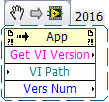

 aeastet
07-19-2017 01:42 PM - last edited on 07-19-2017 02:36 PM by LiliMcDonald
- Mark as New
- Bookmark
- Subscribe
- Mute
- Subscribe to RSS Feed
- Permalink
- Report to a Moderator
Configure Pulse Mod Source.vi is ver 5.1
PSG Sig Gen.vi 148 KB ver 5.1
Build Active Analog List.vi 9 KB ver 9.0
Process Data.vi 39 Ver 9.0
GHSP
