- Subscribe to RSS Feed
- Mark Topic as New
- Mark Topic as Read
- Float this Topic for Current User
- Bookmark
- Subscribe
- Mute
- Printer Friendly Page
Problem installing NI Packet Manager: GUIExecutableFullPath
Solved!
 AlbertoMF
02-23-2023 02:03 PM
- Mark as New
- Bookmark
- Subscribe
- Mute
- Subscribe to RSS Feed
- Permalink
- Report to a Moderator
Hello community,
I write here because I have a problem installing the NI Packet Manager and have tried almost all solutions I could find without getting positive results.
The problem is the following:
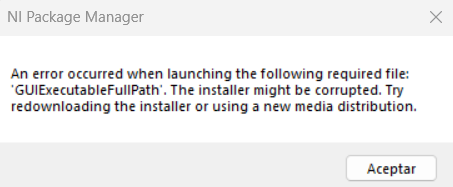
C:\Program Files\National Instruments
C:\Program Files (x86)\National Instruments
but didn't solve anything. After that I tried searching in the program section of Windows for any program which could have been installed, but there was nothing related to the NI Packet Manager. Then I tried installing the program in the HDD, but I was not able to change the installation path. Finally, I used the offline installation method, but throws the message "Packet is already installed", which is partially false.
So I web through the Internet in search of a solution and came accross a post in wich the owner had the same problem:
Other users answered him with 3 different solutions:
- Delete hidden files: I tried searching for hidden files in the folders mentioned before but found nothing.
- Reformat the C: drive: This is the only solution I have not tried because Windows is installed in it.
- Using the uninst.exe file: I was not able to locate this file so I suppose it was not installed.
Furthermore, I tried repairing the program using the following file:
C:\Program Files\National Instruments\NI Package Manager\Updater\Install.exe
But throws the following error:
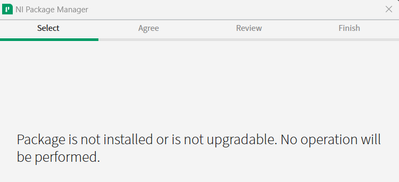
A solution I've seen but can't use is downloading LabVIEW directly from https://download.ni.com/, it installs correctly but I also need NI-DAQmx driver and Vision Development Module add-on, obtainable from the NI Packet Manager, so it does not work for me.
I'm really grateful that you have read my post, and hope someone is able to help me.
Solved! Go to Solution.

 Scott_Richardso
02-23-2023 03:01 PM
- Mark as New
- Bookmark
- Subscribe
- Mute
- Subscribe to RSS Feed
- Permalink
- Report to a Moderator
Alberto, do you know what version of NI Package Manager that you downloaded and installed?
https://testeract.com
02-23-2023 03:07 PM
- Mark as New
- Bookmark
- Subscribe
- Mute
- Subscribe to RSS Feed
- Permalink
- Report to a Moderator
Thanks for answering Scott, I downloaded various versions because I need the version 2022 Q3, but when I tried to install them, all of them appeared as version 2023 Q1 in the following step:
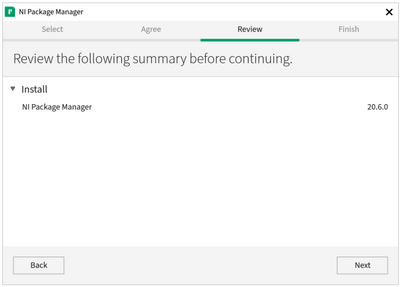
(In the image it says 20.6.0 because it is not mine, I am not able to reach that step as it shows me the error message when I use the executable file)
Thanks again for answering.
Scott_Richardso02-23-2023 09:26 PM - edited 02-23-2023 10:05 PM
- Mark as New
- Bookmark
- Subscribe
- Mute
- Subscribe to RSS Feed
- Permalink
- Report to a Moderator
Alberto, since you had installed the latest version of NIPM, you will need to go thru some manual steps using a utility that I will have to send you to fix this. I tried to send you a private message to your user name in this community, but the system says that it was disabled, which might be a configuration option for your account, not sure.
Can you please send me a message using the Send Message option when you hover over my forum user name let me know how I can contact you.
https://testeract.com
02-24-2023 05:35 AM
- Mark as New
- Bookmark
- Subscribe
- Mute
- Subscribe to RSS Feed
- Permalink
- Report to a Moderator
Thanks for helping me out Scott.
I tried to send you a private message but it does not let me do it:

I'll try again later but don't think it will change.
I've also searched for an option to let you send me a message, but I have not found it.
Do you need my email or something like that? As I can not send you a private message with it and don't want to post it publicly, I can post a doc on the internet with my mail and delete it after you see it, just let me know what you need.
Scott_Richardso02-24-2023 12:45 PM
- Mark as New
- Bookmark
- Subscribe
- Mute
- Subscribe to RSS Feed
- Permalink
- Report to a Moderator
Can you check to see if the below checkbox is checked which might prevent me from sending you a message:
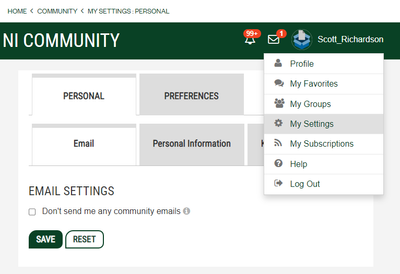
https://testeract.com
Scott_Richardso02-24-2023 06:07 PM
- Mark as New
- Bookmark
- Subscribe
- Mute
- Subscribe to RSS Feed
- Permalink
- Report to a Moderator
Issue resolve with custom steps from support to uninstall NIPM manually, and then reinstall NIPM normally.
https://testeract.com
 ThorstenA
05-31-2023 09:14 AM
- Mark as New
- Bookmark
- Subscribe
- Mute
- Subscribe to RSS Feed
- Permalink
- Report to a Moderator
Hey Scott
I have a similar problem. Could you also send me the fix you previously sent?
Thank you.
Thorsten
Scott_Richardso06-01-2023 07:49 AM
- Mark as New
- Bookmark
- Subscribe
- Mute
- Subscribe to RSS Feed
- Permalink
- Report to a Moderator
We contacted Thorsten directly and we were able to resolve the issue with some internal tools.
https://testeract.com
 ThomasMuller
08-28-2023 12:44 AM
- Mark as New
- Bookmark
- Subscribe
- Mute
- Subscribe to RSS Feed
- Permalink
- Report to a Moderator
Dear Scott,
I have the same problem, it is possible to rsolve this issue with your tools in my laptop ?
Thanks a lot.
Thomas
