ni.com is currently undergoing scheduled maintenance.
Some services may be unavailable at this time. Please contact us for help or try again later.
- Subscribe to RSS Feed
- Mark Topic as New
- Mark Topic as Read
- Float this Topic for Current User
- Bookmark
- Subscribe
- Mute
- Printer Friendly Page
NI6229 Channel range configuration
Solved!
 bhyy
bhyy
12-28-2019 03:36 AM
- Mark as New
- Bookmark
- Subscribe
- Mute
- Subscribe to RSS Feed
- Permalink
- Report to a Moderator
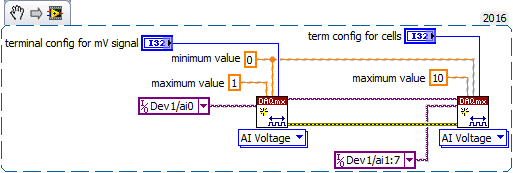
I have a problem when I use the PCI_6229.The first channel collects millivolts,and the remaining channels collect cell monomer voltage.So I want to set the first channel range is 0~1v,and the remaining channels range is 0~10v.How do I configure the Card in this situation?
Solved! Go to Solution.

 GerdW
GerdW

12-28-2019 09:41 AM
- Mark as New
- Bookmark
- Subscribe
- Mute
- Subscribe to RSS Feed
- Permalink
- Report to a Moderator
Hi bhyy,
have you tried to configure the DAQmxCreateVirtualChannel function for each channel as needed?
GerdW
using LV2016/2019/2021 on Win10/11+cRIO, TestStand2016/2019

 mcduff
12-28-2019 11:20 AM
- Mark as New
- Bookmark
- Subscribe
- Mute
- Subscribe to RSS Feed
- Permalink
- Report to a Moderator
According to the spec sheet, the ADC is muxed; thus all channel gains need to be the same, if I understand the question correctly.
mcduff

 Bob_Schor
12-28-2019 01:07 PM
- Mark as New
- Bookmark
- Subscribe
- Mute
- Subscribe to RSS Feed
- Permalink
- Report to a Moderator
Build a simple x1000 pre-amp for Channel 1.
Bob Schor

 Kevin_Price
12-31-2019 08:51 AM
- Mark as New
- Bookmark
- Subscribe
- Mute
- Subscribe to RSS Feed
- Permalink
- Report to a Moderator
You *can* configure distinct gains / ranges for the different channels. Here's a snippet to illustrate GerdW's suggestion in msg #2.
-Kevin P

 BertMcMahan
12-31-2019 09:23 AM
- Mark as New
- Bookmark
- Subscribe
- Mute
- Subscribe to RSS Feed
- Permalink
- Report to a Moderator
Kevin_price is right, you can set different ranges per channel, BUT be aware you might get some ghosting after switching between channels, depending on your circuit's specifics.
I had an application where I needed to measure 15 channels in the 0-0.1V range, then a 16th in the 0-10V range, and I would see higher voltage than was real after scanning the 10V channel. (Note I was also scanning very quickly- a slower rate will help a lot).
Basically, if the muxed ADC is reading 9 V on something, then it needs to read 0.01 V, it will need some time to "bleed" down to that level. IIRC I was reading at ~50 kHz which resulted in ghosting on the first few channels. Just something to keep in mind.
