ni.com is currently undergoing scheduled maintenance.
Some services may be unavailable at this time. Please contact us for help or try again later.
- Subscribe to RSS Feed
- Mark Topic as New
- Mark Topic as Read
- Float this Topic for Current User
- Bookmark
- Subscribe
- Mute
- Printer Friendly Page
Measuring Strain

 JoseR94
01-11-2019 09:30 AM
- Mark as New
- Bookmark
- Subscribe
- Mute
- Subscribe to RSS Feed
- Permalink
- Report to a Moderator
Hello all,
I am am trying to take strain measurements for experiments I am running. Currently I have my strain gauges hooked to a NI 9945 (quarter bridge 350 ohm) then that connects to at NI 9237, which is sitting in a cDAQ NI-9188. It seems that I have everything set up properly but the results I am getting seem to be a bit large. In terms of the code I am using the DAQmx VIs and not DAQ assist. How are these VIs converting Voltage into strain? Is there some where I can find the equation it uses?
Thank you,
Jose

 $agar
$agar
01-12-2019 06:48 AM
- Mark as New
- Bookmark
- Subscribe
- Mute
- Subscribe to RSS Feed
- Permalink
- Report to a Moderator
*but the results I am getting seem to be a bit large*
What do you mean by large?
So currently you are not using any equation?
From your question i understood that your device is communicating properly but final data is not correct. Am i right?
01-14-2019 08:55 AM
- Mark as New
- Bookmark
- Subscribe
- Mute
- Subscribe to RSS Feed
- Permalink
- Report to a Moderator
So members of my lab have used the same type of strain gauge using a different DAQ, and different code. In their code they measure the out put voltage and then using the some equations calculate what the strain should be. I told lab view to measure strain using the DAQmx AI Strain VI. I am getting values in the milli strain range while they are getting micro strain. Currently I have no equations hard coded, I assumed the VI would do that for me. Everything does seem to be communicating properly I am just questioning the results, so I wanted to understand how the VIs worked before I jump to conclusions.

01-15-2019 10:03 PM
- Mark as New
- Bookmark
- Subscribe
- Mute
- Subscribe to RSS Feed
- Permalink
- Report to a Moderator
Generally the strain would be coming in as a ratiometric measurement with the voltage returned from the sensor being divided by the excitation voltage that's been set.

 Yamaeda
01-16-2019 05:34 AM
- Mark as New
- Bookmark
- Subscribe
- Mute
- Subscribe to RSS Feed
- Permalink
- Report to a Moderator
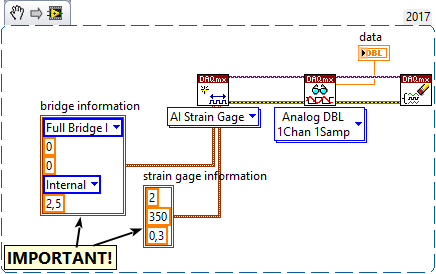
Have you set up the Strain Gauge correctly?
/Y

01-16-2019 09:21 AM
- Mark as New
- Bookmark
- Subscribe
- Mute
- Subscribe to RSS Feed
- Permalink
- Report to a Moderator
So are you saying that the output of the VI is simply Vo/Vex?
01-16-2019 09:27 AM
- Mark as New
- Bookmark
- Subscribe
- Mute
- Subscribe to RSS Feed
- Permalink
- Report to a Moderator
@Yamaeda wrote:
Have you set up the Strain Gauge correctly?
/Y
I believe I coded it correctly. The only difference seems to be that I am using a quarter bridge set up and you have a Full Bridge. See Attached


 Ben
Ben

01-16-2019 09:57 AM
- Mark as New
- Bookmark
- Subscribe
- Mute
- Subscribe to RSS Feed
- Permalink
- Report to a Moderator
When dealing with a new type of Acq. I will often start by using MAX to create a task fo the type I need and then "poke at the settings" until I get a good set of readings.
Then save the task and then got to the BD of a new VI, drop a DAQmx Task constant on the diagram and THEN right-click and select "generate config and example".
LV will script-up the code to do what you saw when poking around in MAX.
The other thing to investigate is if you can do a "null'.
Ben
Yamaeda
01-17-2019 02:56 AM
- Mark as New
- Bookmark
- Subscribe
- Mute
- Subscribe to RSS Feed
- Permalink
- Report to a Moderator
On the strain gage I used there was calibration values printed on it that I needed to enter/use in the code, the default didn't cut it.
/Y
01-22-2019 08:20 AM
- Mark as New
- Bookmark
- Subscribe
- Mute
- Subscribe to RSS Feed
- Permalink
- Report to a Moderator
I emailed engineers at National Instruments apparently it may be a hardware issue, although I am still waiting a response. I did find a similar VI, Convert Volts to Strain, that provides the proper equation. If I can't find a solution I may switch to this VI.
