- Subscribe to RSS Feed
- Mark Topic as New
- Mark Topic as Read
- Float this Topic for Current User
- Bookmark
- Subscribe
- Mute
- Printer Friendly Page
LabVIEW VI scripting - save generated VI
Solved!
 chikenene
07-07-2014 06:58 AM
- Mark as New
- Bookmark
- Subscribe
- Mute
- Subscribe to RSS Feed
- Permalink
- Report to a Moderator
Is it possible to automatically save a generated VI (using LabVIEW VI scripting) under a specific target that is already added to the project?
Solved! Go to Solution.

07-07-2014 09:23 AM
- Mark as New
- Bookmark
- Subscribe
- Mute
- Subscribe to RSS Feed
- Permalink
- Report to a Moderator
Yes. The easiest way to do this is to open the VI in the proper context. Both Open VI Ref and New VI have an application input. Use this with an application reference from your specific target to open the VI in the proper context. Then save normally.
One way to get the application reference is the following sequence:
- Application property: Project.ActiveProject
- Project property: Targets
- TargetItem property: Name (filter to find correct target)
- TargetItem property: Application
There is probably a faster way, but this will work.
07-14-2014 02:39 AM
- Mark as New
- Bookmark
- Subscribe
- Mute
- Subscribe to RSS Feed
- Permalink
- Report to a Moderator
It is still not clear to me how to do that from your answer. Could you add a photo of those steps?

 crossrulz

07-14-2014 07:24 AM - edited 07-14-2014 07:25 AM
- Mark as New
- Bookmark
- Subscribe
- Mute
- Subscribe to RSS Feed
- Permalink
- Report to a Moderator
I think DFGray is trying to do something like this. There is also an Invoke Method for the Target Item class to add a file.

There are only two ways to tell somebody thanks: Kudos and Marked Solutions
Unofficial Forum Rules and Guidelines
"Not that we are sufficient in ourselves to claim anything as coming from us, but our sufficiency is from God" - 2 Corinthians 3:5

 Senkaki
05-22-2023 11:32 AM
- Mark as New
- Bookmark
- Subscribe
- Mute
- Subscribe to RSS Feed
- Permalink
- Report to a Moderator
I can't save my autogenerated VI...😓
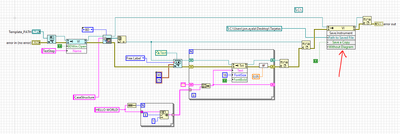
Can I have some help please?

 tst
tst
05-23-2023 01:18 AM
- Mark as New
- Bookmark
- Subscribe
- Mute
- Subscribe to RSS Feed
- Permalink
- Report to a Moderator
@Senkaki wrote:
I can't save my autogenerated VI...😓
Can I have some help please?
I would suggest looking at the error you get, but I'm guessing that the error is that you probably need to give the full path to the VI and there's probably already a folder called Tarjetas on your desktop, so LV can't save a VI with that name.
Another potential issue is that you might need to create all of the folders in the hierarchy of the path (I didn't check) and there's an OpenG VI which does that (there's also a shipping VI, but that returns an error if the path already exists, so you have to filter for that error).
___________________
Try to take over the world!
Senkaki
09-21-2023 06:37 AM
- Mark as New
- Bookmark
- Subscribe
- Mute
- Subscribe to RSS Feed
- Permalink
- Report to a Moderator
Sorry for the late response.
For some reason, it wasn't saving the VI if I generate it from a VIT.
I chose to save a pattern VI, copy and paste it, and then modify it before the saving. This way, it doesn't give me any errors.
Regards,
JonA
