- Subscribe to RSS Feed
- Mark Topic as New
- Mark Topic as Read
- Float this Topic for Current User
- Bookmark
- Subscribe
- Mute
- Printer Friendly Page
- « Previous
-
- 1
- 2
- Next »
Inconsistent Variant to Data Errors
Solved!

09-17-2012 10:41 AM
- Mark as New
- Bookmark
- Subscribe
- Mute
- Subscribe to RSS Feed
- Permalink
- Report to a Moderator
Sure. Sorry about that. The excel files are in previous posts.

 GregFreeman

09-17-2012 10:48 AM
- Mark as New
- Bookmark
- Subscribe
- Mute
- Subscribe to RSS Feed
- Permalink
- Report to a Moderator
@PiDi wrote:
I can't check it now, so this is a pure guess:
Try putting additional time delay between Worksheet.Activate and executing VLookup.
For future reference with regards to this, there is actually a callback that you can capture from Excel when it's ready. So, I usually set a busy cursor, then unset it when I get this callback. This way you aren't guessing how long it will take before it's started up, because this can vary depending on your processor, if you just rebooted, what other work the PC is doing etc. I will find the exact callback once I get my code out of SCC
GregFreeman
09-17-2012 11:02 AM - edited 09-17-2012 11:11 AM
- Mark as New
- Bookmark
- Subscribe
- Mute
- Subscribe to RSS Feed
- Permalink
- Report to a Moderator
Here's what I was suggesting in my previous post. I register for all Excel callbacks I want to register for in the VI shown at the bottom. The VI at the top is the VI that is called when a callback is received, which then fires an appropriate user event. I capture that event with my event structure.


09-17-2012 11:25 AM
- Mark as New
- Bookmark
- Subscribe
- Mute
- Subscribe to RSS Feed
- Permalink
- Report to a Moderator
So I tested your code, and individually they work, like you said. So I did the following:
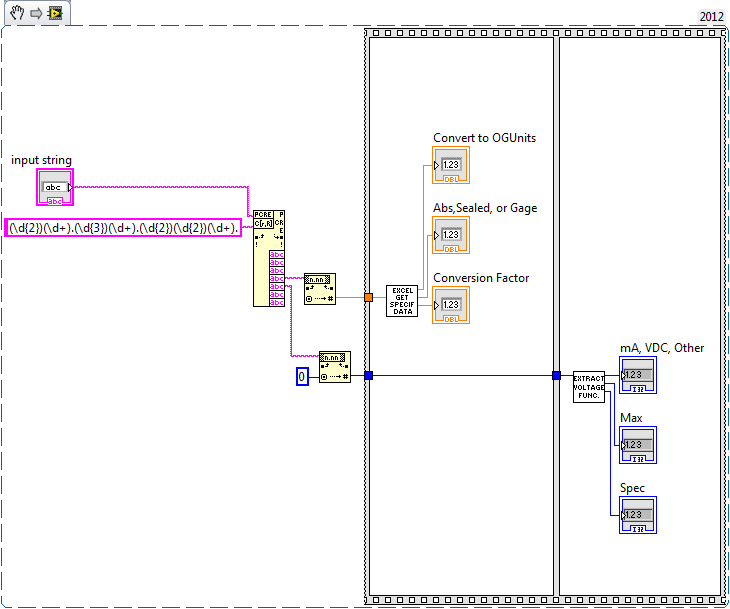
And now I do not get the error on the variant.
I haven't looked too deeply into this, but it looks like something in your VI's is not thread safe, so ensuring they don't run at the same time solves the problem.
I hope this helps.
SISU
09-17-2012 11:33 AM
- Mark as New
- Bookmark
- Subscribe
- Mute
- Subscribe to RSS Feed
- Permalink
- Report to a Moderator
Works perfect! Thanks Nathan!
- « Previous
-
- 1
- 2
- Next »
