- Subscribe to RSS Feed
- Mark Topic as New
- Mark Topic as Read
- Float this Topic for Current User
- Bookmark
- Subscribe
- Mute
- Printer Friendly Page
Image on shift register slowing down the program
Solved!
 mam1nej
02-15-2017 02:48 PM
- Mark as New
- Bookmark
- Subscribe
- Mute
- Subscribe to RSS Feed
- Permalink
- Report to a Moderator
Hello Everyone,
I am trying to add a beam tracking feature to a program that controls a laser, reads its beam position and plots it.
The beam tracking option is supposed to give the previous beam positions as well as the current one.
I was able to get it running by using a shift register to carry the image on one of the program threads:
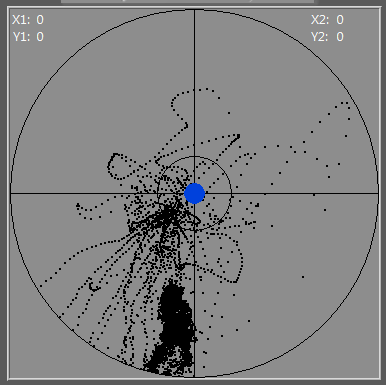
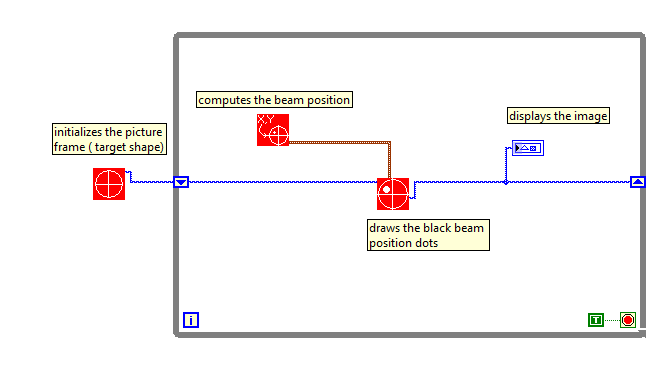
I think the code is self explanatory so let me descrive the problem I am running to:
After about 30 min of execusion, the program responsiveness becomes very low and the image refresh rate seems to be the problem. When I wired the shift register the wasy I did, I though the image that was carried was a kind of a pixel array, but it looks like its size is getting bigger and bigger the longer I keep adding those back beam position squares.
I kind of lie this simple approach but I am wondering if there is a better way of handeling the picture: should I convert to bmp then import it as background ? is there a function that converts from and to a bitmap array ?
Thanks in advance
Regards,
AJ
Solved! Go to Solution.

 Ben
Ben

02-15-2017 02:53 PM
- Mark as New
- Bookmark
- Subscribe
- Mute
- Subscribe to RSS Feed
- Permalink
- Report to a Moderator
If memory serves me...
You can cast (use type cast) the picture data to a string and what you will find is something that looks like old-school "HPGL" (HP graphing Language) ... commands strings like move pen to, pen down, draw arc, etc.
So wha you are doing is building a longer and longer set of draw commands.
Toss the SR and set the picture function "Erase first" to false. The Picture will act like the pixel array you wanted.
Ben

 MikaelH
02-15-2017 03:09 PM
- Mark as New
- Bookmark
- Subscribe
- Mute
- Subscribe to RSS Feed
- Permalink
- Report to a Moderator
Check the size of that picture wire.
Type cast to String and use "StringLength", I think you're adding to many drawing elements on that picture.
Maybe check if you've already drawn a point at that location and is so, ignore that.
And you're running the look without a delay, is that okay?
02-15-2017 03:16 PM - edited 02-15-2017 03:19 PM
- Mark as New
- Bookmark
- Subscribe
- Mute
- Subscribe to RSS Feed
- Permalink
- Report to a Moderator
Thanks for the reply MikaelH.
I do have a delay in the real loop, I just made a mini-version of it to explain what I was doing.
The idea of filtering same location points is good. I will definetly add that.
I am still wondering if I can convert the picture to an arra after drawign the point, pass that through the shift register, and import it as background image for the next point ?
02-15-2017 03:18 PM
- Mark as New
- Bookmark
- Subscribe
- Mute
- Subscribe to RSS Feed
- Permalink
- Report to a Moderator
Thanks for the reply Ben,
If I remove the SR and start a new picture every time, the resulting picture will only display the current position, I will be loosing the history carried by the SR. Does it make sens ?
MikaelH
02-15-2017 03:33 PM
- Mark as New
- Bookmark
- Subscribe
- Mute
- Subscribe to RSS Feed
- Permalink
- Report to a Moderator
I would keep all data in an array, and then redraw the picture control from scratch after you've updated the array with new data.

 daveTW
02-15-2017 03:52 PM
- Mark as New
- Bookmark
- Subscribe
- Mute
- Subscribe to RSS Feed
- Permalink
- Report to a Moderator
Hello Mikael,
your approach is what Ben already described. Since the blue wire, containing the picture, is basically a string, containing drawing commands which are executed by the picture indicator, you don't need to hold a separate array of coordinates. They are held in the picture wire!
And to explain Ben's hint again: Uncheck the "Erase first" item in the context menu of the picture indicator (on the front panel). See attached image:

This Picture is created with the following code:
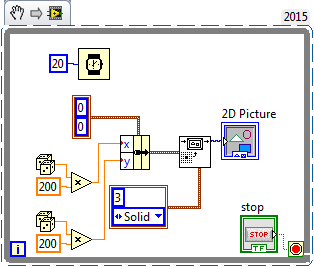
02-15-2017 04:15 PM
- Mark as New
- Bookmark
- Subscribe
- Mute
- Subscribe to RSS Feed
- Permalink
- Report to a Moderator
Got it !!!
Thanks for the help , Ben, Michael and Dave.
02-15-2017 04:18 PM
- Mark as New
- Bookmark
- Subscribe
- Mute
- Subscribe to RSS Feed
- Permalink
- Report to a Moderator
The only tradeoff in this case is that I can't display the current position cursor in floating ( and in different color)
I will find a work around it.
daveTW
02-15-2017 05:08 PM
- Mark as New
- Bookmark
- Subscribe
- Mute
- Subscribe to RSS Feed
- Permalink
- Report to a Moderator
What do you mean with floating?
And for the different color: What about storing the very last position and drawing the point again with black and painting the current position with the different color.
