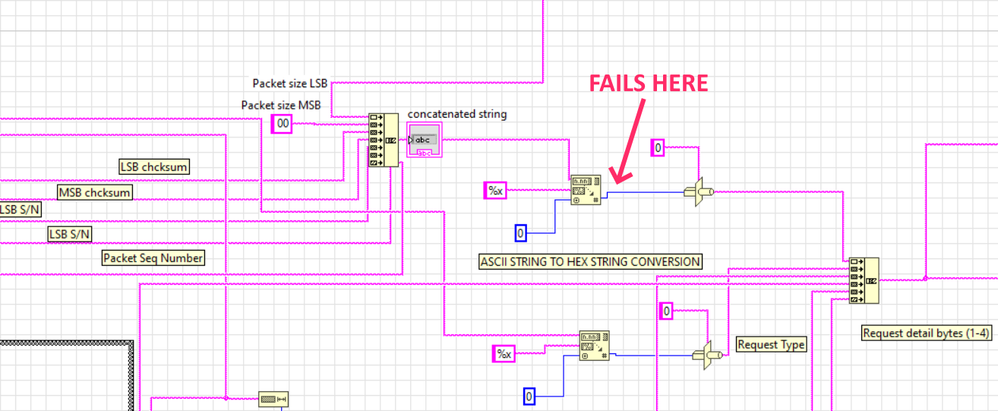
I don't understand a section of a string to hex string converter and it fails

 AndyKron

 GerdW
GerdW

Hi Andy,
@AndyKron wrote:
It seems like when I get too many, or big numbers in the first section it fails between the scan value and type cast objects on the blue DBL line.
How does that String function "fails"? (It cannot "fail" as it will always give an output value!)
Which value do you expect in the blue wire and which value did you receive instead?
Can you supply a VI containing a string constant with typical data for this string conversion function and can you mention the expected output for those typical data?
Can you supply a manual describing the data you need to build into this "request"?
GerdW
using LV2016/2019/2021 on Win10/11+cRIO, TestStand2016/2019

 wiebe@CARYA
If that concatenated string is build out of bytes, you're not converting hexadecimal characters to a number.
That MSB string , 00, is that a hex string containing a single byte (\00) or a normal string containing two bytes (\30\30)? It really helps a lot to make the radix visible on string constants (when it matter).
It also makes sense to work with byte arrays, as these are bytes, not strings. In C, those bytes are chars, but in LabVIEW we have I\U8 bit integers...
If you want to get a single byte\character from that string to a integer, simply use Get String Subset.
ASCII STING TO HEX CONVERSION doesn't really mean anything. Hex data in a string is still ASCII.
 Search LabVIEW like a graph!
 Hi Gerd, thanks for the reply. I don't know which vi to send since they're all in various states of not working so I'll start with what I was given. The only thing I added was the "not used" byte that seemed to be missing. This works with the data entered in the text boxes for initializing the equipment. I set the text boxes to default to initialize. My mission is to increase the number of data packets so I can send enough data to actuate the device. My expanded version works to initialize the device, but if I try to send enough data to move it I get "FFFFFFF" at the output of the scan value object from the 1st string concatenator. The picture is data for moving the device.
The packet is:
SOH = 0x01
LSB packet size
MSB packet size
LSB checksum
MSB checksum
LSB instrument s/n
MSB instrument s/n
NOT USED
Packet sequence number
Request type
Request details in additional data bytes
All of that except the SOH gets Base64 encoded later
This picture shows what I need to move the device
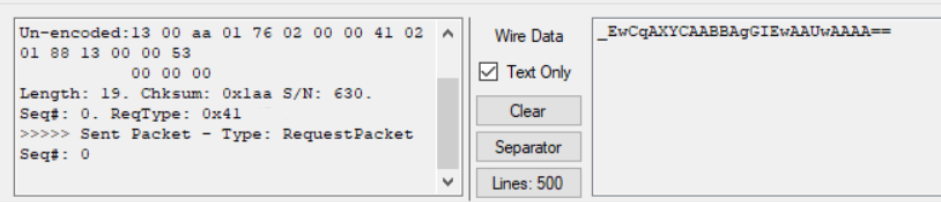
Yes. The "00" shows up as "3030" when I view as hex. I do ultimately want to use this as a sub vi and feed it with an array of some sort. I just have all the text boxes because that's what the intern started with last summer.
wiebe@CARYA
I think you'll have to use Scan From String, and use %2x.
The hex string to number scans as many characters as possible, and then fits it in the wired type. So even if you wire an u8, it scans more then 2 characters.
I was working with my expanded version of the vi and noticed everything works until you add one additional "00" to the req details (7th byte) text box. After that I get "FFFFFFFF". If I just have 6 req details filled with "00" all is well. I'm totally stumped at this point.
GerdW
Hi Andy,
@AndyKron wrote:
I'm totally stumped at this point.
You are stomped much earlier!
See this:

This is so much more compact than your code - and that's only the "left" 15% of your code! )Note the scrollbars of the window!)
All the remaining code needs to be cleaned up the same way!
Why are there SO MANY Rube-Goldberg constructs in your code??? I left some of them in the image for demonstration…
Btw. why do you work with strings all the time when you want to handle bytes (aka U8 values) instead???
GerdW
using LV2016/2019/2021 on Win10/11+cRIO, TestStand2016/2019

I'm handling strings because I'm trying to get code as it was given to me working while trying to understand LabVIEW so everything is pretty chaotic.
 crossrulz
I'm not understanding why you have so many inputs for the data. Why not just have a single string control, set the Display Style to "Hex"? Then so much of your code is not needed.
There are only two ways to tell somebody thanks: Kudos and Marked Solutions
Unofficial Forum Rules and Guidelines
"Not that we are sufficient in ourselves to claim anything as coming from us, but our sufficiency is from God" - 2 Corinthians 3:5
