- Subscribe to RSS Feed
- Mark Topic as New
- Mark Topic as Read
- Float this Topic for Current User
- Bookmark
- Subscribe
- Mute
- Printer Friendly Page
Formula Node is not working
Solved!
 newmemeber123
07-18-2022 10:32 AM - edited 07-18-2022 10:36 AM
- Mark as New
- Bookmark
- Subscribe
- Mute
- Subscribe to RSS Feed
- Permalink
- Report to a Moderator
hi,
Im trying one equation in formula node but its showing error. The error is attached.
the equation is z=(500)/[(2^x)*(y+100)
thank you
Solved! Go to Solution.

 santo_13
07-18-2022 10:54 AM
- Mark as New
- Bookmark
- Subscribe
- Mute
- Subscribe to RSS Feed
- Permalink
- Report to a Moderator
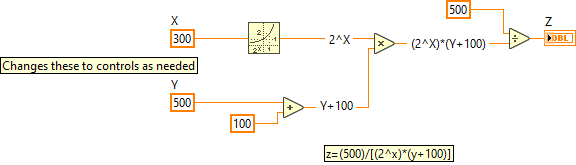
Just wondering why you might need a formula node when you can achieve the same using LabVIEW primitives as shown below,
Soliton Technologies
New to the forum? Please read community guidelines and how to ask smart questions
Only two ways to appreciate someone who spent their free time to reply/answer your question - give them Kudos or mark their reply as the answer/solution

 altenbach

07-18-2022 10:56 AM - edited 07-18-2022 11:03 AM
- Mark as New
- Bookmark
- Subscribe
- Mute
- Subscribe to RSS Feed
- Permalink
- Report to a Moderator
What happens if you replace the "[]" with "()"?

(Still, I agree that there is not need for a formula node to do all this 😄 )
@newmemeber123 wrote:
The error is attached.
Next time, please attach your VI instead. It is impossible debug troubleshoot pictures.


 crossrulz
07-18-2022 10:59 AM - edited 07-18-2022 11:07 AM
- Mark as New
- Bookmark
- Subscribe
- Mute
- Subscribe to RSS Feed
- Permalink
- Report to a Moderator
You cannot use a bracket ([ or ]) in a formula node. You need to use the parenthesis, which can be nested.

Just to be somewhat controversial, I sometimes prefer to use a formula node when math gets "weird". It just seems more natural to read to me. This is only when the math gets more complicated beyond a few nodes and variables are reused.
There are only two ways to tell somebody thanks: Kudos and Marked Solutions
Unofficial Forum Rules and Guidelines
"Not that we are sufficient in ourselves to claim anything as coming from us, but our sufficiency is from God" - 2 Corinthians 3:5
 altenbach
07-18-2022 11:06 AM - edited 07-18-2022 11:13 AM
- Mark as New
- Bookmark
- Subscribe
- Mute
- Subscribe to RSS Feed
- Permalink
- Report to a Moderator
@crossrulz wrote:
You cannot use a bracket ([ or ]) in a formula node.
Yes, you "can", but they have special meaning and are used for array indices, for example. 😄
@crossrulz wrote:
Just to be somewhat controversial, I sometimes prefer to use a formula node when math gets "weird". It just seems more natural to read to me. This is only when the math gets more complicated beyond a few nodes and variables are reused.
Except that a few minutes later, we need the same operation where the inputs/outputs are arrays. Graphical code will adapt automatically, while the formula node would need extra work. 😄
crossrulz
07-18-2022 11:08 AM
- Mark as New
- Bookmark
- Subscribe
- Mute
- Subscribe to RSS Feed
- Permalink
- Report to a Moderator
@altenbach wrote:
@crossrulz wrote:
You cannot use a bracket ([ or ]) in a formula node.
Yes, you "can", but they have special meaning and are used for array indices, for example. 😄
I knew I was going to get called out for that shortly after I hit "Post".
There are only two ways to tell somebody thanks: Kudos and Marked Solutions
Unofficial Forum Rules and Guidelines
"Not that we are sufficient in ourselves to claim anything as coming from us, but our sufficiency is from God" - 2 Corinthians 3:5

 ThomasHenkel
07-18-2022 11:29 AM
- Mark as New
- Bookmark
- Subscribe
- Mute
- Subscribe to RSS Feed
- Permalink
- Report to a Moderator
@newmemeber123 wrote:
Im trying one equation in formula node but its showing error. The error is attached.
The error description includes a hint:
Error on line 1 is marked by a '#' character: "z=(500)/[#(2**x).."
So LabVIEW tells you that there is a problem with the bracket.
altenbach
07-18-2022 11:43 AM
- Mark as New
- Bookmark
- Subscribe
- Mute
- Subscribe to RSS Feed
- Permalink
- Report to a Moderator
@ThomasHenkel wrote:
So LabVIEW tells you that there is a problem with the bracket.
One of the reasons I don't use the formula node is that the error messages are so cryptic.
Here, the problem is not with a "missing semicolon" as described and it is never really obvious (at least to me) if the "#" is to the right or left of the problem. 😄
ThomasHenkel
07-18-2022 11:48 AM
- Mark as New
- Bookmark
- Subscribe
- Mute
- Subscribe to RSS Feed
- Permalink
- Report to a Moderator
@altenbach wrote:
and it is never really obvious (at least to me) if the "#" is to the right or left of the problem.
I'm 98% sure, the '#' is always after the character that caused the error 😉
altenbach
07-18-2022 12:02 PM
- Mark as New
- Bookmark
- Subscribe
- Mute
- Subscribe to RSS Feed
- Permalink
- Report to a Moderator
@ThomasHenkel wrote:
@altenbach wrote:
and it is never really obvious (at least to me) if the "#" is to the right or left of the problem.I'm 98% sure, the '#' is always after the character that caused the error 😉
Yes, after successfully correcting many errors we learn from experience that that's true!
The statement "Error on line 1 marked by a '#' character" is just not concise enough.
If I were the compiler, I would probably place the # before the problem, delineating the border between good and bad code , i.e. "OK, I was able to successfully parse up to here, but I stumbled going forward". 😄
Good thing we have a graphical code alternative. 🙂
