ni.com is currently undergoing scheduled maintenance.
Some services may be unavailable at this time. Please contact us for help or try again later.
- Subscribe to RSS Feed
- Mark Topic as New
- Mark Topic as Read
- Float this Topic for Current User
- Bookmark
- Subscribe
- Mute
- Printer Friendly Page
Display on Waveform & Problem in the Data Flow
Solved!
 A.A.A.
11-22-2011 03:58 PM
- Mark as New
- Bookmark
- Subscribe
- Mute
- Subscribe to RSS Feed
- Permalink
- Report to a Moderator
Hi,
I have an assignment and I am facing trouble in a couple of things.
I am asked to monitor the level of CO and NH3 and the level of measured in ppm which follow equations:
for CO: 50*(1-exp(-t/7000)) and NH3 is 35*(1-exp(t/12000))
The first problem I'm facing is the plotting of the on a wave form chart.
How can I plot on the chart the level of CO and NH3 simultaneously / I tried bundle but it did not give me a graph.
The second problem is that when the condition of the upper case structure is true the while loop stops working; how can i solve that problem?
Thank you
Solved! Go to Solution.

 NIquist
11-22-2011 04:07 PM
- Mark as New
- Bookmark
- Subscribe
- Mute
- Subscribe to RSS Feed
- Permalink
- Report to a Moderator
Here's a big hint: controls are only read inside a loop if they are INSIDE THE LOOP. Once either case goes true and either inside loop starts spinning, that's it, you're in an infinite loop and you can't stop the outside loop. Rethink your structures. 
NIquist
11-22-2011 04:09 PM
- Mark as New
- Bookmark
- Subscribe
- Mute
- Subscribe to RSS Feed
- Permalink
- Report to a Moderator
For the chart problem: Take a look at the shipping examples. Especially the one called charts.vi.
11-23-2011 11:13 AM - edited 11-23-2011 11:14 AM
- Mark as New
- Bookmark
- Subscribe
- Mute
- Subscribe to RSS Feed
- Permalink
- Report to a Moderator
The LED should light up after the level of the gas is above the limit; the LEDs should light up for 0.3 seconds and turns off; then one after it lights for 0.3 seconds, turns off. Once all 5 LED's light up it should repeat the process.10000-01000-...10000...
I tackled each of the terms seperately but I have a couple of problems:
- Chart only shows a horizontal line that varies. EDIT( i checked charts.vi)
- The spot button stops working after seperating into seperate while/for loops.
- How can I set the cluster to zero ( I prefer not to use local variables).
Thank you
P.s t is the real time in milliseconds when the program starts.
The front panel should look like the attached frontpanel.png

11-24-2011 01:34 AM
- Mark as New
- Bookmark
- Subscribe
- Mute
- Subscribe to RSS Feed
- Permalink
- Report to a Moderator
Hi,
from what I see you are making some fundamental LabVIEW programming errors. Please consider this:
- when you make a tunnel into a while loop, it will be read only ONCE (when the loop starts execution)
- any block diagram element (subVI, loop etc.) will start ONLY after it has all the inputs
- you do not need to make that many while loops if you want to transfer data between certain parts of the code and don't have to execute them at different rates
I would recommend you to have a look at the shipping examples - you can learn proper design techniques from them.
You might also want to have a look at http://zone.ni.com/devzone/cda/tut/p/id/5247 in your free time.
BR,
11-24-2011 09:29 AM
- Mark as New
- Bookmark
- Subscribe
- Mute
- Subscribe to RSS Feed
- Permalink
- Report to a Moderator
I have changed significantly the VI; I still have a problem in the chart.
Its changing,but its not changing like the frontpanel.png;
How can I fix it?
I used local variable too;is there a way to avoid it?
11-24-2011 12:39 PM - edited 11-24-2011 12:44 PM
- Mark as New
- Bookmark
- Subscribe
- Mute
- Subscribe to RSS Feed
- Permalink
- Report to a Moderator
Turns out that there is no need for the local variables because when the stop button is pressed the program will execute once and the boolean value is changed to false/ the cluster contains 5 false booleans.
As for the wave form, I rechecked the charts.vi and I think that none of the charts are adequate:
Sweep Chart (1 plot, 1pt/update)
Strip Chart (2 plots, 1 pt/update)
Strip Chart (2 plots, multiple pt/update)
Is the output of the program wrong such that the graph is different?
Btw happy thanksgiving!
11-25-2011 10:02 AM
- Mark as New
- Bookmark
- Subscribe
- Mute
- Subscribe to RSS Feed
- Permalink
- Report to a Moderator
Hi,
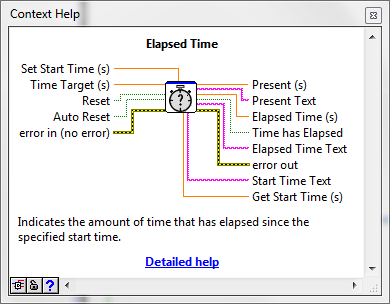
after you reach the warning, you start slowing down the execution of the whole program, instead of delaying only the change of lit LEDs. Thats why your plots behave weird and update after every sequence of LED changes. You should rather use the "Elapsed Time" block, to check whether the time has passed and then update the diodes.

BR,
11-25-2011 11:08 AM - edited 11-25-2011 11:11 AM
- Mark as New
- Bookmark
- Subscribe
- Mute
- Subscribe to RSS Feed
- Permalink
- Report to a Moderator
Hi,
I want to ask you if this is the only possible solution because I haven't taken this in the lab.
If it is the only way, what outputs of this block should I use? and should I use with it tick count?
EDIT: Should I use set start time or get start time?
11-25-2011 11:19 AM
- Mark as New
- Bookmark
- Subscribe
- Mute
- Subscribe to RSS Feed
- Permalink
- Report to a Moderator
The problem is still there; also it is repeating the graph.
