ni.com is currently undergoing scheduled maintenance.
Some services may be unavailable at this time. Please contact us for help or try again later.
- Subscribe to RSS Feed
- Mark Topic as New
- Mark Topic as Read
- Float this Topic for Current User
- Bookmark
- Subscribe
- Mute
- Printer Friendly Page
Differences in Tree Symbols Between Systems
 CoastalMaineBir
07-21-2015 11:17 AM
- Mark as New
- Bookmark
- Subscribe
- Mute
- Subscribe to RSS Feed
- Permalink
- Report to a Moderator
My customer and I are both on LV2013(32) SP1, on Win7(64) SP1.
He complains that his system doesn't look like the screenshots I provided when I offered this feature.
Sure enough, the Symbols for a TREE control look like this on my system:
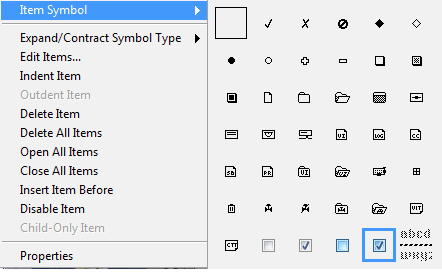
I sold him on the idea of the blue checkboxes meaning one thing and the white ones meaning another.
Bad plan.
On his system, his symbols look like this:
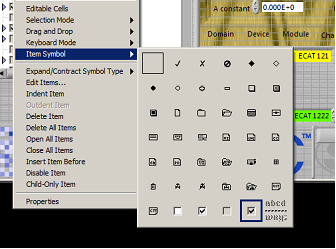
The symbols are gray and white, vs. blue and gray.
Is there a LabVIEW option or a Windows setting that would account for this?
Culverson Software - Elegant software that is a pleasure to use.
Culverson.com
Blog for (mostly LabVIEW) programmers: Tips And Tricks

 JÞB
JÞB
07-21-2015 11:23 AM
- Mark as New
- Bookmark
- Subscribe
- Mute
- Subscribe to RSS Feed
- Permalink
- Report to a Moderator
Windows setting-
Classic theme on the Client's PC
"Should be" isn't "Is" -Jay

 AnalogKid2Digit
07-21-2015 11:24 AM
- Mark as New
- Bookmark
- Subscribe
- Mute
- Subscribe to RSS Feed
- Permalink
- Report to a Moderator
Windows native color scheme settings?
-AK2DM
"It’s the questions that drive us.”
~~~~~~~~~~~~~~~~~~~~~~~~~~

 altenbach

07-21-2015 11:27 AM
- Mark as New
- Bookmark
- Subscribe
- Mute
- Subscribe to RSS Feed
- Permalink
- Report to a Moderator
Yup
Control Panel\Appearance and Personalization\Personalization
They use "Windows Classic" or similar. You are using "Windows 7 aero" theme or similar.

07-21-2015 11:36 AM
- Mark as New
- Bookmark
- Subscribe
- Mute
- Subscribe to RSS Feed
- Permalink
- Report to a Moderator
OK, thanks. I never mess with that stuff, so I forget all about it.
Culverson Software - Elegant software that is a pleasure to use.
Culverson.com
Blog for (mostly LabVIEW) programmers: Tips And Tricks
