- Subscribe to RSS Feed
- Mark Topic as New
- Mark Topic as Read
- Float this Topic for Current User
- Bookmark
- Subscribe
- Mute
- Printer Friendly Page
DAQmx Task in build

 J-Mv2
J-Mv2
01-13-2020 12:19 PM - edited 01-13-2020 12:21 PM
- Mark as New
- Bookmark
- Subscribe
- Mute
- Subscribe to RSS Feed
- Permalink
- Report to a Moderator
I have an USB-6001 and I am not able to make it working properly. I lost the Task in the build.
My project with the task:
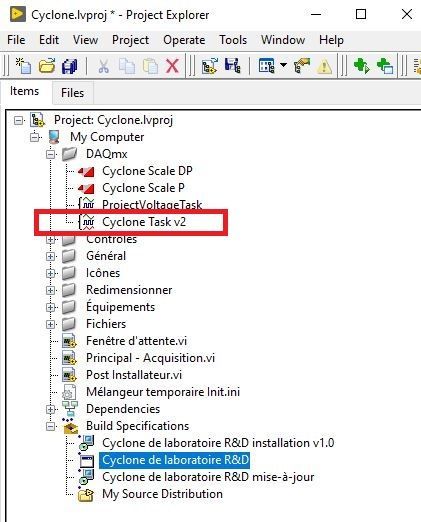
In the Development Mode I have access to the task and I measure the correct values.
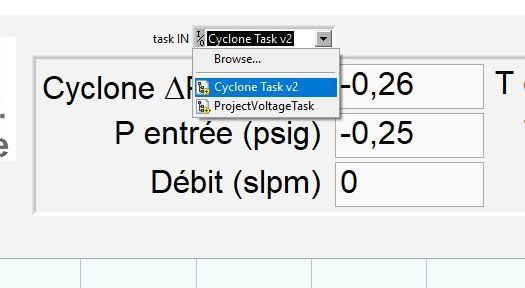
In the build, I don't have access to the task.

What I am doing wrong?
Jean-Marc

 RavensFan

01-13-2020 12:25 PM
- Mark as New
- Bookmark
- Subscribe
- Mute
- Subscribe to RSS Feed
- Permalink
- Report to a Moderator
Did you include DAQmx run-time engine?
Or better yet, install DAQmx with development support? Does Measurement and Automation Explorer exist on the PC you are running this exe on?
01-13-2020 12:32 PM - edited 01-13-2020 12:43 PM
- Mark as New
- Bookmark
- Subscribe
- Mute
- Subscribe to RSS Feed
- Permalink
- Report to a Moderator
Actually, I work only on my development PC. It is the reason that this drive me crazy...
In the data folder of the build I have the Ni-DAQmx.txt file.
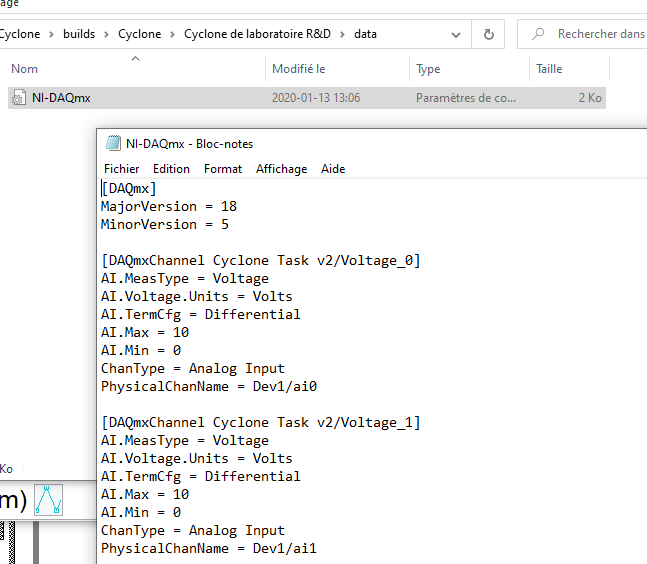
Jean-Marc
RavensFan
01-13-2020 01:37 PM
- Mark as New
- Bookmark
- Subscribe
- Mute
- Subscribe to RSS Feed
- Permalink
- Report to a Moderator
You need to make sure MAX is installed on the PC where you are having problems. It looks like you don't have any tasks created there.
01-13-2020 01:42 PM
- Mark as New
- Bookmark
- Subscribe
- Mute
- Subscribe to RSS Feed
- Permalink
- Report to a Moderator
It is the same PC: I run the VI in the development mode and everything is fine. I built the executable on the same PC and I run it: it seems that the Task disapears.
Jean-Marc
RavensFan
01-13-2020 01:50 PM
- Mark as New
- Bookmark
- Subscribe
- Mute
- Subscribe to RSS Feed
- Permalink
- Report to a Moderator
I'm sorry. I misinterpreted what you said.
So does the task exist in MAX? Or was the task only in the project itself?
01-13-2020 01:52 PM
- Mark as New
- Bookmark
- Subscribe
- Mute
- Subscribe to RSS Feed
- Permalink
- Report to a Moderator
I just created a new Application with the same properties than "Cyclone de laboratoire R&D" and now it's working...
Jean-Marc

