- Subscribe to RSS Feed
- Mark Topic as New
- Mark Topic as Read
- Float this Topic for Current User
- Bookmark
- Subscribe
- Mute
- Printer Friendly Page
DAQmx Routing Counter Signals
Solved!
 stevem181
09-09-2012 02:35 PM
- Mark as New
- Bookmark
- Subscribe
- Mute
- Subscribe to RSS Feed
- Permalink
- Report to a Moderator
Folks,
I'm having trouble figuring out how to change the routing of Counter inputs on a cDAQ-9174 chassis.
There are two NI-9401 modules in the chassis, one is used for inputs from a rotary encoder.
In this posting (first one on page), Tom W mentions using a DAQmx Channel Property Node to select the input terminals.
In the attached file Count Task, I placed a DAQmx Channel Property Node.
I don't get any routing options when I use this property node. What am I doing wrong?
Software environment: LV2010, DAQmx 9.2.3, Max 4.7.7
I have attached a config file that you can import to MAX to create a simulated cDAQ chassis with modules.
Thanks,
steve
Founding (and only) member of AUITA - the Anti UI Thread Association.
----------------------------------------------------------------------------------------------------------------
Solved! Go to Solution.

 Kevin_Price
09-10-2012 01:30 PM
- Mark as New
- Bookmark
- Subscribe
- Mute
- Subscribe to RSS Feed
- Permalink
- Report to a Moderator
steve,
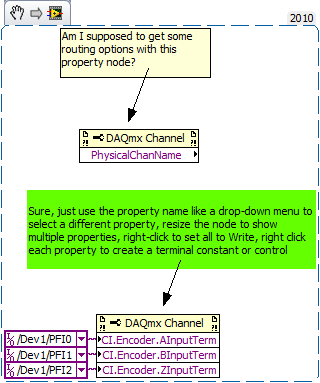
Is this the kind of thing you need?
-Kevin P
09-10-2012 05:56 PM
- Mark as New
- Bookmark
- Subscribe
- Mute
- Subscribe to RSS Feed
- Permalink
- Report to a Moderator
Kevin,
Yes, that is exactly what I was trying to do. However, I could not get the "CI" options when using a Simulated cDAQ Chassis on my office computer. I had to go to my laptop (which had been connected to the hardware) to get the DAQmx Channel Node to show the "CI" (and other) options.
This seems like a bug to me.
Once I moved the vi from the laptop to the office computer, the DAQmx Channel Node retained the "CI" properties but will not let me modify them. The only available properties are: Active Channels, Analog Input, and General Properties. It does run without error in the simulated environment.
Questions for you:
How did you create the DAQmx Channel Node?
Did you use a simulated chassis? If yes, what versions of software are you using?
('m wondering if this issue has been fixed in a later DAQmx or MAX version.)
Thank you,
steve
Founding (and only) member of AUITA - the Anti UI Thread Association.
----------------------------------------------------------------------------------------------------------------
Kevin_Price
09-11-2012 07:03 AM
- Mark as New
- Bookmark
- Subscribe
- Mute
- Subscribe to RSS Feed
- Permalink
- Report to a Moderator
Hmm, I've never run into symptoms like the ones you describe. Answers to your questions:
- The DAQmx channel property node is on the top level of the DAQmx palette. If you don't see it, try right-clicking your block diagram, pin the palette, and choose the "Customize" button. Then pick "Change visible palettes...". I typically just make them all visible.
- I didn't set up a simulated chassis to show you the screenshot. I just dropped a node and selected the properties. I *have* set up a simulated chassis in the past and didn't run into anything strange.
- I use an somewhat older DAQmx that shipped with LV2010 because that's the primary platform we support.
-Kevin P

 Brad_K
09-11-2012 05:07 PM
- Mark as New
- Bookmark
- Subscribe
- Mute
- Subscribe to RSS Feed
- Permalink
- Report to a Moderator
Hi Steve,
Please double check that your property node filter setting is "Show Attributes for Configured Devices": Missing Properties in DAQmx Property Nodes
Brad
Brad Keryan
NI R&D
09-11-2012 09:19 PM
- Mark as New
- Bookmark
- Subscribe
- Mute
- Subscribe to RSS Feed
- Permalink
- Report to a Moderator
Bingo! That solved the issue Brad. I did not know about that setting.
Thank you,
steve
Founding (and only) member of AUITA - the Anti UI Thread Association.
----------------------------------------------------------------------------------------------------------------
