- RSS フィードを購読する
- トピックを新着としてマーク
- トピックを既読としてマーク
- このスレッドを最上位に表示
- {0}にこのスレッドを追加する
- 購読
- ミュート
- 印刷用ページに変更
Calling stored procedures with parameters with the Database Connectivity Toolkit
解決済み
 aputman
03-10-2014 09:13 AM
- 新着としてマーク
- {0}にこのメッセージを追加する。
- 購読
- ミュート
- RSS フィードを購読する
- このメッセージをハイライトする
- このメッセージを印刷する
- 管理者に不正使用を報告する
This should do it for you as long as your connection is setup properly and you have modified the Create Parameterized Query VI like i mentioned above.
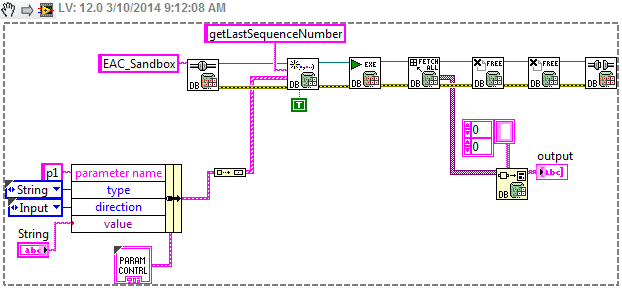


03-10-2014 09:19 AM
- 新着としてマーク
- {0}にこのメッセージを追加する。
- 購読
- ミュート
- RSS フィードを購読する
- このメッセージをハイライトする
- このメッセージを印刷する
- 管理者に不正使用を報告する
Great thanks!
What do you have wired into the "type" terminal in the Database Variant To Data VI?
aputman
03-10-2014 09:29 AM
- 新着としてマーク
- {0}にこのメッセージを追加する。
- 購読
- ミュート
- RSS フィードを購読する
- このメッセージをハイライトする
- このメッセージを印刷する
- 管理者に不正使用を報告する
I wired up a 2D array of strings. If you want you data converted to a string, this will work. If you want your data as an integer, (based on your SP, you are looking for a sequence number, so an INT is the logical choice), change the 2d array of strings to a 2d array of I32. It really depends on what you are doing with the data after retrieving it.
03-10-2014 10:15 AM - 編集済み 03-10-2014 10:16 AM
- 新着としてマーク
- {0}にこのメッセージを追加する。
- 購読
- ミュート
- RSS フィードを購読する
- このメッセージをハイライトする
- このメッセージを印刷する
- 管理者に不正使用を報告する
Ok I tried the 2d array of strings first and after running the program and stored procedure it returned no value. I'm thinking this could be something to do with formatting or that the int value being converted to a string is being displaying as a line feed or character return etc (the example I'm using should return the integer 14) and that is why I was not seeing anything. Anyways, I am now trying with a 2d array of I32 and I32 output but am getting an error:
 aputman
03-10-2014 10:29 AM
- 新着としてマーク
- {0}にこのメッセージを追加する。
- 購読
- ミュート
- RSS フィードを購読する
- このメッセージをハイライトする
- このメッセージを印刷する
- 管理者に不正使用を報告する
The Database Variant to Data will handle the conversion correctly if it is getting the data. In your code, you are telling the VI to return a 2D array of I32 but your indicator is a single I32 (hence the broken wire). Are you sure the stored procedure is returning the proper data? Did you check it using SQL Server Management Studio? Are you sure the connection string is setup right?
I built my own connection string rather than use ODBC. You will need to change DataSource, Initial Catalog, User, and Password in the string below. Then replace EAC_Sandbox with this string. (This is for SQL Express 2008)
Provider=SQLOLEDB; Data Source=server\SQLinstance; Initial Catalog=initialTable; User ID=username; Password=password; DataTypeCompatibility=80;
03-10-2014 10:31 AM
- 新着としてマーク
- {0}にこのメッセージを追加する。
- 購読
- ミュート
- RSS フィードを購読する
- このメッセージをハイライトする
- このメッセージを印刷する
- 管理者に不正使用を報告する
Nevermind, stupid mistake. I just realized it has to be an array of I32, disregard my last message
03-10-2014 10:50 AM
- 新着としてマーク
- {0}にこのメッセージを追加する。
- 購読
- ミュート
- RSS フィードを購読する
- このメッセージをハイライトする
- このメッセージを印刷する
- 管理者に不正使用を報告する
In SQL Management Studio it does return the correct value. One interesting thing I just tried was I made a new modified stored procedure in SQL Managment Studio that does not take any input parameters and only returns the max value:
CREATEPROCEDURE [dbo].[getLastSequenceNumberJMB]
AS
BEGIN
SETNOCOUNTON;
-- Insert statements for procedure here
selectmax(SequenceNumber)from Devices
END
GO
After changing the SQL Query input in the Parameterized Query VI to this new stored procedure name, it does indeed return the highest value in LabVIEW. So I am wondering if this means there is something I am doing wrong in terms of formatting the input parameters? By the way this was with the string array example.

03-10-2014 10:52 AM - 編集済み 03-10-2014 10:53 AM
- 新着としてマーク
- {0}にこのメッセージを追加する。
- 購読
- ミュート
- RSS フィードを購読する
- このメッセージをハイライトする
- このメッセージを印刷する
- 管理者に不正使用を報告する
Also, another question I have is if there needs to be anything done regarding using output parameter. Would I have to do something so it allocates memory for the values of the output of the query?
aputman
03-10-2014 11:11 AM
- 新着としてマーク
- {0}にこのメッセージを追加する。
- 購読
- ミュート
- RSS フィードを購読する
- このメッセージをハイライトする
- このメッセージを印刷する
- 管理者に不正使用を報告する
Change the direction of the parameter from Input/Output to Input. This is not an output parameter.
I don't understand your other question. You are getting data so you just need to figure out the parameter issue. I think the above will fix that.
03-10-2014 11:40 AM
- 新着としてマーク
- {0}にこのメッセージを追加する。
- 購読
- ミュート
- RSS フィードを購読する
- このメッセージをハイライトする
- このメッセージを印刷する
- 管理者に不正使用を報告する
Ok, changed the direction to just input, and it is still returning 0 when it should be returning 14 (verified this in SQL Server Managment Studio).

