Turn on suggestions
Auto-suggest helps you quickly narrow down your search results by suggesting possible matches as you type.
Showing results for
Topic Options
- Subscribe to RSS Feed
- Mark Topic as New
- Mark Topic as Read
- Float this Topic for Current User
- Bookmark
- Subscribe
- Mute
- Printer Friendly Page
5 hour timer

 labtech5555
Member
02-02-2008 04:57 AM
Options
- Mark as New
- Bookmark
- Subscribe
- Mute
- Subscribe to RSS Feed
- Permalink
- Report to a Moderator
I am looking for some advice about how to create a 5 hour timing event.I'm new to labview and not sure how
to go about this.Below is what i am trying to do:
For 5 hours i want to log some data to a file every 10 minutes.After 5 hours the program would stop .And also have a button to stop the process at any time.
I would need 2 loops .The outer being maybe a timed do while setup for 5 hours and the inner loop also being a timed do while setup for 10 minutes
with a method to end the program when a stop button is pressed.I have no idea how to set this timing up.
Can anyone give me some ideas how to do this ?
Regards,
Labtech5555

 LabViewGuruWann
Active Participant
02-02-2008 08:54 AM
Options
- Mark as New
- Bookmark
- Subscribe
- Mute
- Subscribe to RSS Feed
- Permalink
- Report to a Moderator
Which version of LabVIEW are you using? You can use a Timed Loop, or you can use some of the Get Time functions to track the start time and elapsed time. Use a comparison of the elapsed time with the target time to stop the while loop.
A simple example that can be modified to do what you want can be found in this previous post: multiple indicator from elapsed time

A simple example that can be modified to do what you want can be found in this previous post: multiple indicator from elapsed time
02-02-2008 09:38 AM
Options
- Mark as New
- Bookmark
- Subscribe
- Mute
- Subscribe to RSS Feed
- Permalink
- Report to a Moderator
I am using Version 7.1 . Is Timed loop possible with this version ?
Could somebody write me a 5 hour loop that would run in 7.1 to get me started ?
Regards,
Labtech5555
LabViewGuruWann
Active Participant
02-02-2008 01:18 PM - edited 02-02-2008 01:20 PM
Options
- Mark as New
- Bookmark
- Subscribe
- Mute
- Subscribe to RSS Feed
- Permalink
- Report to a Moderator
I don't have 7.1, but if you build this yourself, it will work. I simply modified the TimerExample from the other post to have an end time. Set the End Time (hh:mm:ss) to 05:00:00 (or whatever end time you want.)
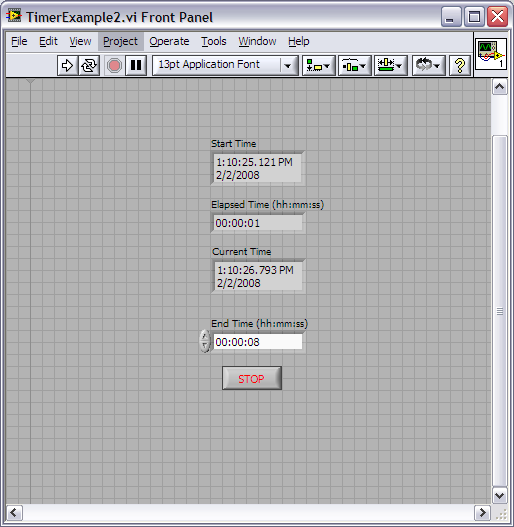
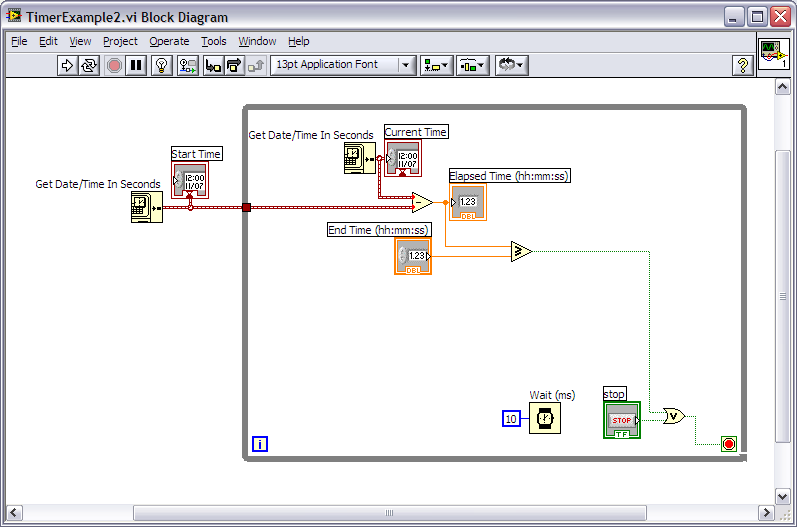
Message Edited by LabViewGuruWannabe on 02-02-2008 01:20 PM
Message Edited by LabViewGuruWannabe on 02-02-2008 01:20 PM
Download All


Virus scan in progress. Please wait to download attachments.
