- Subscribe to RSS Feed
- Mark Topic as New
- Mark Topic as Read
- Float this Topic for Current User
- Bookmark
- Subscribe
- Mute
- Printer Friendly Page
3D Surface Plot Helper To Dynamic Array
Solved!
 CNLSN
CNLSN
03-16-2022 11:47 AM - edited 03-16-2022 11:49 AM
- Mark as New
- Bookmark
- Subscribe
- Mute
- Subscribe to RSS Feed
- Permalink
- Report to a Moderator
Hi all,
I'm trying to use sensors connected to an Arduino. My goal is to create an X-Y plane with fixed values and use the sensor values as Z values. This is my first attempt at trying to make a dynamic 3 dimensional image and using the '3D Surface plot helper'. My example here uses only 4 sensors in a 2 x 2 array. While I get updating values and the graph's Z values continuously change, I'm not actually seeing anything plotted on the graph.
Hopefully I've explained what I'm after in a concise manner.
Thanks for any help.
Solved! Go to Solution.

 altenbach

03-16-2022 12:16 PM
- Mark as New
- Bookmark
- Subscribe
- Mute
- Subscribe to RSS Feed
- Permalink
- Report to a Moderator
Can you use "save for previous" before attaching. (I don't have LabVIEW 2021 here).

03-16-2022 01:13 PM
- Mark as New
- Bookmark
- Subscribe
- Mute
- Subscribe to RSS Feed
- Permalink
- Report to a Moderator
@altenbach sure thing - what version would you like?
altenbach
03-16-2022 01:26 PM
- Mark as New
- Bookmark
- Subscribe
- Mute
- Subscribe to RSS Feed
- Permalink
- Report to a Moderator
03-16-2022 02:11 PM
- Mark as New
- Bookmark
- Subscribe
- Mute
- Subscribe to RSS Feed
- Permalink
- Report to a Moderator
Here it is for 2020.
altenbach
03-16-2022 05:38 PM
- Mark as New
- Bookmark
- Subscribe
- Mute
- Subscribe to RSS Feed
- Permalink
- Report to a Moderator
No, that's still in 2021.
03-17-2022 08:41 AM - edited 03-17-2022 08:42 AM
- Mark as New
- Bookmark
- Subscribe
- Mute
- Subscribe to RSS Feed
- Permalink
- Report to a Moderator
That's odd. I thought I had pressed "20.0". Here it is (hopefully) for 2019.
altenbach
03-17-2022 11:28 AM
- Mark as New
- Bookmark
- Subscribe
- Mute
- Subscribe to RSS Feed
- Permalink
- Report to a Moderator
@CNLSN wrote:
That's odd. I thought I had pressed "20.0". Here it is (hopefully) for 2019.
You probably attached the regular instead of the down-converted version. Happens... 😉
Can you show us how a typical received string looks like?
All you probably need to to reshape your 4 elements 1D array yo a 2x2 2D array.
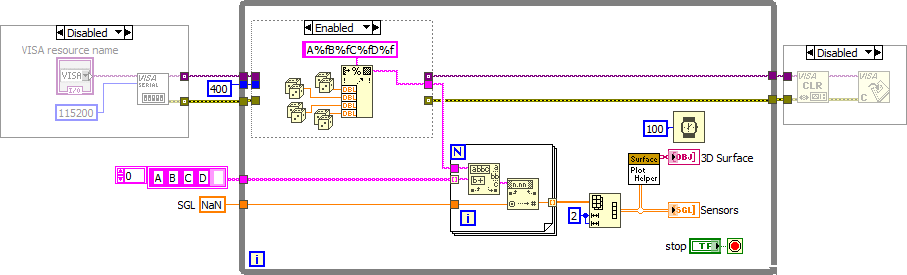
(Your feedback nodes make absolutely no sense and just cause your displayed data to lag behind by one iteration. Also, the 3D plots ask for SGL data, so it is even more puzzling why you would first scan it as EXT?? Why all these coercion dots???)
Here's one possibility (I disabled your IO because I don't have your hardware and simulate data instead. Once we know the format of the received string, things can be further simplified, of course):
03-17-2022 02:16 PM
- Mark as New
- Bookmark
- Subscribe
- Mute
- Subscribe to RSS Feed
- Permalink
- Report to a Moderator
Haha yeah, that might've been it.
Yes, of course - the strings look like "A11B12C13D14".
I've tried your .vi and I'm receiving the numbers into the array but it looks something like:
Sensor 2 | Sensor 1 instead of Sensor 1 | Sensor 2
Sensor 3 | Sensor 4 Sensor 3 | Sensor 4
Is there a way to define the placement of the sensors (paticulary, with respect to the graph)?
Thank you for your help.
altenbach
03-17-2022 03:17 PM
- Mark as New
- Bookmark
- Subscribe
- Mute
- Subscribe to RSS Feed
- Permalink
- Report to a Moderator
You can change the order of the four letters in the diagram constant to get a different order of elements. Right?
