- Subscribe to RSS Feed
- Mark Topic as New
- Mark Topic as Read
- Float this Topic for Current User
- Bookmark
- Subscribe
- Mute
- Printer Friendly Page
LabVIEW Interface for Arduino using Xbee Module

 mikey00409
06-07-2014 10:55 PM
- Mark as New
- Bookmark
- Subscribe
- Mute
- Subscribe to RSS Feed
- Permalink
- Report to a Moderator
what settings did you use for the modem connected to the computer and the arduino, in the CTU. you have pics but i dont know which is which. im having the same problems as everyone here. they wont communicate
 hknizer
06-08-2014 04:04 AM
- Mark as New
- Bookmark
- Subscribe
- Mute
- Subscribe to RSS Feed
- Permalink
- Report to a Moderator
brother you need to do additional programming in arduino for making the xbees communicate . only LIFA will not make the xbee communicate.
mikey00409
06-08-2014 04:45 AM
- Mark as New
- Bookmark
- Subscribe
- Mute
- Subscribe to RSS Feed
- Permalink
- Report to a Moderator
I did the modification of the code that changes the baud rates to 9600. However I know that originally the firmware that's on the xbee them selves need to be correct for them to talk to each other also. If you are talking about a different thing in the life code please provide me details please.
hknizer
06-08-2014 07:30 AM
- Mark as New
- Bookmark
- Subscribe
- Mute
- Subscribe to RSS Feed
- Permalink
- Report to a Moderator
actually i cant provide you the code .... but if you search the internet i hope you will get help.
mikey00409
06-11-2014 12:14 PM
- Mark as New
- Bookmark
- Subscribe
- Mute
- Subscribe to RSS Feed
- Permalink
- Report to a Moderator
hknizer, not to be rude, however if you cannot provide a code or give details to how to fix the issue, why did you post anything at all. The purpose of these disscusions is to help us learn and fix issues that we are having.
If anyone has gotten their Xbee to communicate using the arduino and labview can you please help me with some of the settings and details you used to communicate with the two. I have changed all the baud rates in the approriate 3 places and compiled the code and i still get a 5002 error in labview.
Any ideas?
hknizer
06-11-2014 12:37 PM
- Mark as New
- Bookmark
- Subscribe
- Mute
- Subscribe to RSS Feed
- Permalink
- Report to a Moderator
i am not open sourcing anything my friend ...
i used this in a project so thats why i developed my own code.....i also searched the internet and found the answers..
you can find anything over the internet..
mikey00409
06-11-2014 01:10 PM
- Mark as New
- Bookmark
- Subscribe
- Mute
- Subscribe to RSS Feed
- Permalink
- Report to a Moderator
I have tried the suggestions over the internet and my xbees do not communicate. that is why i turned to here. If the internet had solved my problem i would not have asked the question.

 hrh1818
06-11-2014 05:24 PM
- Mark as New
- Bookmark
- Subscribe
- Mute
- Subscribe to RSS Feed
- Permalink
- Report to a Moderator
Hello Mikey,
Two questions:
Do you have a Sparkfun Xbee Explorer?
Do you have a Sparkfun Xbee Shield or an equivalent Xbee Shield from another source.
You need both when using Xbee for a communication link between Labview and an Adruino board.
My suggested approach is first get your setup working using just the Arduino IDE. Then once you have that working successfully move onto getting your setup to work with LIFA.
The following link is an Instructable quick set up guide.
<http://www.instructables.com/id/Xbee-quick-setup-guide-Arduino/>
Some additional instructions for testing your setup.
1. Connect the Arduino board to your PC using a USB cable.
2. On the Xbee Shield use the SPDT switch to connect the Xbee serial output to the Arduino's digital pins D2 and D3.
3. Compile and upload the AnalogReadSerial example to your Arduino Board. The example is found in the Examples > Basics folder.
4. On the Xbee Shield use the SPDT switch to connect the Xbee serial output to the Arduino's digital pins D0 and D1.
5 Use the IDE Serial monitor to see if the Arduino board is sending or is not sending data to the Serial Monitor.
hrh1818
mikey00409
06-11-2014 05:53 PM
- Mark as New
- Bookmark
- Subscribe
- Mute
- Subscribe to RSS Feed
- Permalink
- Report to a Moderator
Two questions:
Do you have a Sparkfun Xbee Explorer?
Yep,
https://www.sparkfun.com/products/11697
Do you have a Sparkfun Xbee Shield,
Yep,
https://www.sparkfun.com/products/10854
however my shield only has one switch DLINE or UART
The arduino works when plugged in directly. just the xbee communication is not working. however today i found some interesting things.
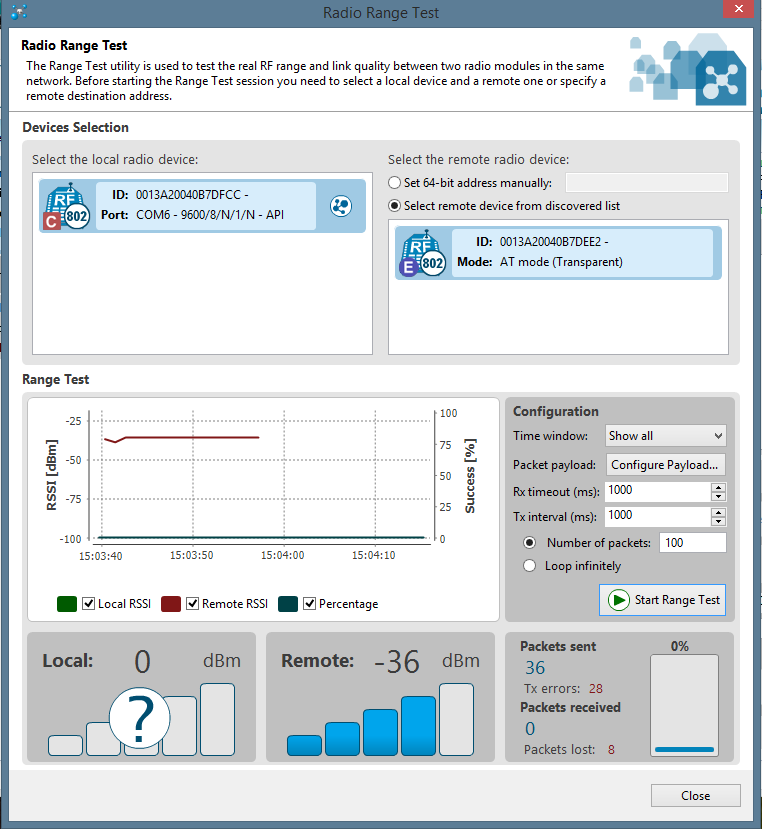
When i use the new X-CTU program they have i am able to find the xbee that is the coordinator, and i can find the xbee thats on the arduino power via the sheild, not connected directly to the computer. This is the end device. The New X-CTU has a open serial connection button. When i do this, and run the range test i get data to send and recieve to both xbees. i do get some TX errors and packets lost however they do communicate. If i leave this open i get a -1073807246 error in labview, if i close the X-CTU program i get the 5003 error. i will attach a copy of the range test also.
mikey00409
06-11-2014 05:54 PM
- Mark as New
- Bookmark
- Subscribe
- Mute
- Subscribe to RSS Feed
- Permalink
- Report to a Moderator