LabVIEW Idea Exchange

cancel
Showing results for 
Search instead for 
Did you mean: 
Hueter

Allow Error Case Structure to Handle Specific Error Numbers

Status: Completed

Available in LabVIEW 2019 and later. You can now specify one or more error frames on an Error case structure, and use numeric ranges in those frames for ranges of error code values in the error cluster.

When you connect the error wire to a case structure selector, you get two cases for error and no error. I think you should be able to add in cases for specific error numbers so you can handle specific errors differently. You could do this currently, but you would have to unbundle the error and use the error code.
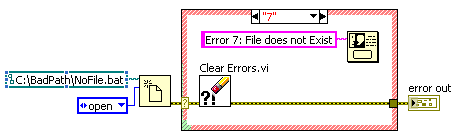
 

Numbered error case.png

15 Comments
Dan_DeFriese
Member

I agree with altenbach, but I'd prefer a yellow frame for warnings Smiley Tongue

gerh
Member

The idea is great, but how @RandyP noticed, there are some more aspects to consider.


If there are different cases for errors (red) and warnings (yellow),it should be possible to enter a code without distinguish between warning and error. Indeed it should be user selectable. I would suggest an orange frame for this.


Because the concept behind the idea of @Hueter is more powerful than just to apply a single code to a case, combinations of codes which apply only to an error or a warning and codes which apply to both are possible too. That could look like this:

Error and Warning Case Structure.jpg

The brown case applies to all possible combinations of more than one category.


Because it isn't intuitive for a beginner, how to express a complex combination which applies to a state, I would recommend an editor like this ...


Edit Errors and Warning Codes Wizzard.jpg


If now somebody complains, what's about a generic warning state, it could look like [Warning ..-1, 1..] or simply [Warning].

AristosQueue (NI)
NI Employee (retired)

gerh: Generally I like the proposal, but I wonder if you have any thoughts on how to differentiate those frames via something other than color. I already hear complaints about red/green on the error case as it stands from color blind folks. You have some pretty subtle shading in your current picture. Can you propose anything to differentiate the border by pattern that wouldn't disrupt your reading of the diagram?


Also, I would expect people to want a frame that handles both one specific error and no error -- that would crop up when trying to filter one error out but report all other errors. Similarly, one frame for no error and a warning, and for no error and an error and a warning.


What if we didn't do any new color differentiation at all? Green for the no error case (even if it had other errors in the same case) and red for all the others, regardless of the error/warning mix?

AristosQueue (NI)
NI Employee (retired)

Muks: I wouldn't want a dialog to display the source directly -- that is not necessarily well formatted information. That's the reason that the General Error Handler exists. At the very least, I would pass through the GEH with the "no dialog" option in order to get the message string.

gerh
Member

@AristosQueue (NI) wrote:

gerh: Generally I like the proposal, but I wonder if you have any thoughts on how to differentiate those frames via something other than color. I already hear complaints about red/green on the error case as it stands from color blind folks. You have some pretty subtle shading in your current picture. Can you propose anything to differentiate the border by pattern that wouldn't disrupt your reading of the diagram?


Distinguish by the header line.


@AristosQueue (NI) wrote:

What if we didn't do any new color differentiation at all? Green for the no error case (even if it had other errors in the same case) and red for all the others, regardless of the error/warning mix?


Just to remind: colour blind people can't distinguish between red and green, but they can see other colours like yellow or brown. So the most frames will look the same, no matter if there are many different colours or just two. But this is an entirely different discussion which addresses many other things throughout the whole Labview environment either.


The differetiating between border colours should just simplify the handling of different cases. At a closer look there is no need for colours, because the header of the frame carries all informations somebody needs. I don't prefer the two colour solution, because it's not clear which colour fits to a mix of "No Error" and "Error", so I chose the brown frame for all mixed cases.


Different border patterns are made to distinguish between different functionality like a case structure or a while loop. So I don't think it's a good idea to introduce this dependent on the value. See the Event Structure as example, there is also no different pattern dependent on the event source or it's value.


@AristosQueue (NI) wrote:

Also, I would expect people to want a frame that handles both one specific error and no error -- that would crop up when trying to filter one error out but report all other errors. Similarly, one frame for no error and a warning, and for no error and an error and a warning.


Maybe I didn't understand that question properly, but I can't see any problem.


First case (examle error is 12345): "a frame that handles both one specific error and no error"

Enter "No Error, Error 12345" into the frame. (brown frame)


Second case (error to leave out is 12345): "filter one error out but report all other errors."

Enter "Error ..12344, Error 12346.." (red frame)


Third case: "one frame for no error and a warning"

Enter "No Error, Warning"


Fourth case (example with error/warning 12345): "no error and an error and a warning"

Doesn't make sense for generic errors and warnings because this would match for everything, so I assumed there is at least one specific error or warning.

With specific error: Enter "No Error, Warning, Error 12345" (brown frame)

Same with a specific warning: "No Error, Warning 12345, Error" (also brown frame)


OK... I just forgot the case "No Error" in the pulldown menu of the editor.


Just to explain: the idea behind the "Error+Warning" case (orange frame) is to have a frame which uses only the "code" and is blind to the "status" value of the error cluster. If entered as "Error 123, Warning 123" the IDE should correct that automatically to "Error+Warning 123".


Edit: One more detail I haven't considered previously: One of the frames should be assigned as "Default" case, similiar to the other numeric based case structures. Otherwise there may remain unhandled cases which break the program.

tyale
Member

Any update on this idea?  It is fantastic and a much needed improvement to LabVIEW's error handling.

Darren
Proven Zealot
Status changed to: In Development
 
Darren
Proven Zealot
Status changed to: In Beta
 
Darren
Proven Zealot
Status changed to: Completed

Available in LabVIEW 2019 and later. You can now specify one or more error frames on an Error case structure, and use numeric ranges in those frames for ranges of error code values in the error cluster.

wiebe@CARYA
Knight of NI