Current Situation
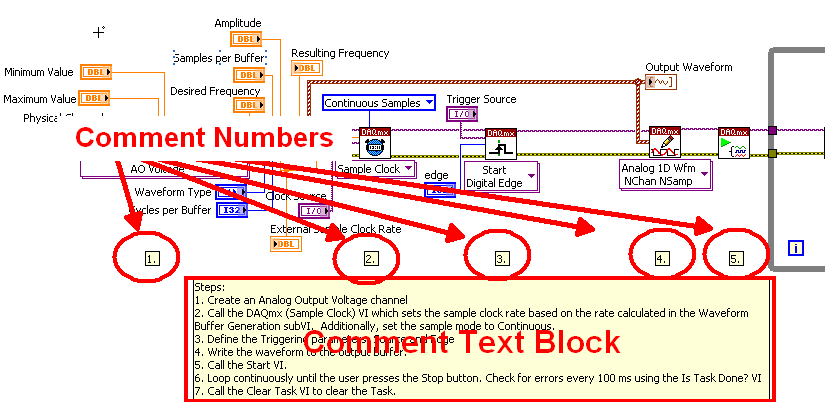
The current commenting practice in the BD is to place free floating comment number labels and write the comment in a text field as in the example below.
Disadvantages
- comment number labels do to stick to the code block. if the code number block is moved the comment has to be moved as well.
- no link between number and comment text block
This unsophisticated way of commenting LabView code lead to the lack of comments in general. Usually a new programmer can understand what happens, but not why a function is implemented like this.
Proposal
LabView provides the Advanced Code Commenting Functions.

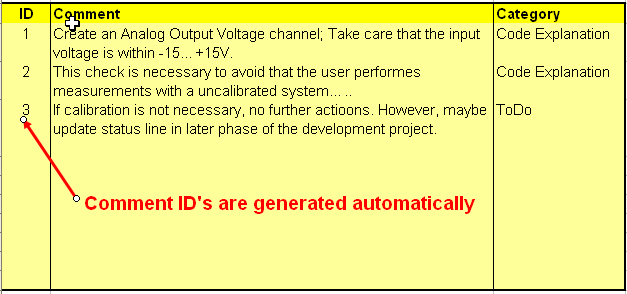
The comment block is more then just a text block. Basically it has a comment ID, the comment itself and a comment category.
By the context menu the following functions are provide:
- add comment
- delete comment
- move comment up
The particular comment line is moved up in the comment block. The ID is decremented
- move comment down
Opposite from 3.
- highlight function
The function to which the comment ID sticks is highlighted.
- the comment category can be selected. (e.g.. Code Explanation, To Do, )
Adding Comments
Adding a comment in the comment block incorporates two steps (after selecting Add Comment from the context menu):
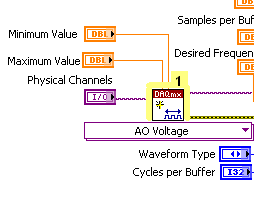
1. Sticking the automatically generated comment ID to a particular code block just by selecting the item the comment belongs to.
This could be any type of code: wires, SubVIs, the whole Case, a particular Case, Sequences....
2. Writing the comment
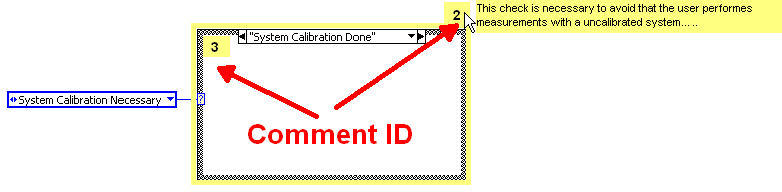
If the mouse pointer is set over a comment ID the comment is shown like a tool tip and disappears as soon as the mouse is moved away.
Advantages
- Comment moves with function block if function is moved on the BD
- Comment ID sticked on the BD item and ID on the comment block always match
- generally more comments in a LabView programm through more simple way of commenting code


