ni.com is currently undergoing scheduled maintenance.
Some services may be unavailable at this time. Please contact us for help or try again later.
- Subscribe to RSS Feed
- Mark Topic as New
- Mark Topic as Read
- Float this Topic for Current User
- Bookmark
- Subscribe
- Mute
- Printer Friendly Page
Help creating a Graph using .SUD
Solved!
 Spidermansreven
01-19-2018 07:56 AM
- Mark as New
- Bookmark
- Subscribe
- Mute
- Subscribe to RSS Feed
- Permalink
- Report to a Moderator
I'm trying to plot data in a graph within my .SUD.
I'm trying to control the start time of each cycle of my data but I'm at a loss to find any examples how to do this.
Does anyone know or have an example of the commands explained for plotting graphs?
I have looked in the DIAdem Help section, but have had no luck.
Thank you in advanced.
shaun
Solved! Go to Solution.

01-22-2018 12:30 AM
- Mark as New
- Bookmark
- Subscribe
- Mute
- Subscribe to RSS Feed
- Permalink
- Report to a Moderator
Hi Spidermansrevenge,
Please have a look at this example:
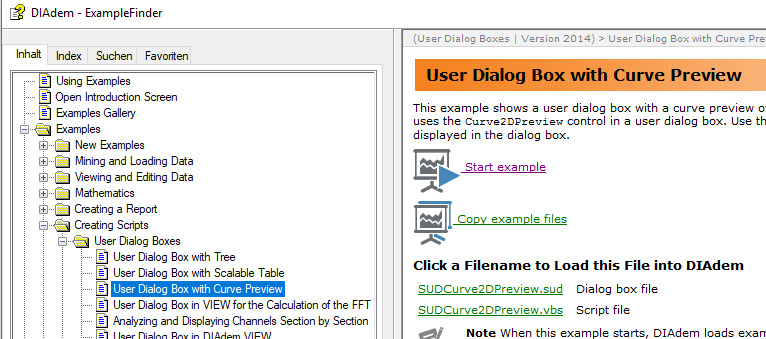
Greetings
Walter
01-22-2018 05:19 AM
- Mark as New
- Bookmark
- Subscribe
- Mute
- Subscribe to RSS Feed
- Permalink
- Report to a Moderator
Walter:
Thanks so much for you help again. Not sure how I missed this help example.
This should get me on my way!!
Always Very helpful
Thank you again !!
Shaun
TamerA
01-24-2018 01:34 PM - edited 01-24-2018 01:44 PM
- Mark as New
- Bookmark
- Subscribe
- Mute
- Subscribe to RSS Feed
- Permalink
- Report to a Moderator
I've used this example to get started with my own plot. Is it possible to programatically change the scaling of the X or Y axis? I see the option to change from linear to logarithmic, but I'm not seeing a way to say adjust what range of the X axis is plotted.
Basically trying to do this:
PlotA.XAxis.Scaling.Begin = 0
PlotA.XAxis.Scaling.End = 0.1

 Brad_Turpin
01-31-2018 11:34 AM
- Mark as New
- Bookmark
- Subscribe
- Mute
- Subscribe to RSS Feed
- Permalink
- Report to a Moderator
Hi Tamer,
You were pretty close.
Set Graph = Report.ActiveSheet.Objects("2DAxis1")
Graph.XAxis.Scaling.AutoScalingType = eAxisAutoScalingBeginEndManual
Graph.XAxis.Scaling.Begin = 0
Graph.XAxis.Scaling.End   = 0.1
Call Report.Refresh()
Brad Turpin
DIAdem Product Support Engineer
National Instruments
TamerA
02-01-2018 06:15 PM
- Mark as New
- Bookmark
- Subscribe
- Mute
- Subscribe to RSS Feed
- Permalink
- Report to a Moderator
Thanks Brad, but doesn't that do the scaling in the report tab? I'm looking to scale the graph on the GUI.
Brad_Turpin
02-02-2018 12:03 PM
- Mark as New
- Bookmark
- Subscribe
- Mute
- Subscribe to RSS Feed
- Permalink
- Report to a Moderator
Hi Tamer,
I thought we were talking about the REPORT panel. If you mean the VIEW panel instead, there is one option to provide specific Y axis start and stop values:

Brad Turpin
DIAdem Product Support Engineer
National Instruments
TamerA
02-02-2018 04:57 PM
- Mark as New
- Bookmark
- Subscribe
- Mute
- Subscribe to RSS Feed
- Permalink
- Report to a Moderator
Hey Brad. I've actually created a GUI with a 2D plot on it for quick plotting (Since using the viewer hasn't been resolved). I'm looking for a callout I can use in the sub of a button click to scale the 2D axis on the plot of the GUI. See screenshot attached.
 Brad_Turpin
02-13-2018 02:13 PM
- Mark as New
- Bookmark
- Subscribe
- Mute
- Subscribe to RSS Feed
- Permalink
- Report to a Moderator
Hi Tamer,
Are you saying that you're using a Curve2DPreview control on a SUDialog to make that graph? If so, I don't see any method to specify the start and stop values of the X or Y axes for that control. I only see the linear vs. logarithmic choice for each axis.
Brad Turpin
DIAdem Product Support Engineer
National Instruments
