- Subscribe to RSS Feed
- Mark Topic as New
- Mark Topic as Read
- Float this Topic for Current User
- Bookmark
- Subscribe
- Mute
- Printer Friendly Page
SignalExpress. Octave graph

 Irafka
01-29-2014 07:47 AM
- Mark as New
- Bookmark
- Subscribe
- Mute
- Subscribe to RSS Feed
- Permalink
- Report to a Moderator
Hello!
I work in LabView2011, use NI Sound and Vibration Assistant (SVA).
I've connected element "СКЗ/СПМ" to the connector pane.
Type of this element: Cluster of 2 elements: 1D array of double, 1D array of double.
In SVA in the field "Strict type of output data" I select "Frequency XY Octave".
In the DataView tab I draw ONE octave graph from step "Run LV2011" .
Now I want to draw two or more octave graphics.
If I connected element: 1D array of Cluster of 2 elements: 1D array of double, 1D array of double
to the connector pane, in the field "Strict type of output data" I can't select any type.
Whats wrong or it's impossible to draw some octave graphics?

01-30-2014 12:59 PM
- Mark as New
- Bookmark
- Subscribe
- Mute
- Subscribe to RSS Feed
- Permalink
- Report to a Moderator
Could you upload your code or possibly add a screen shot or 2 of it? This would help to facilitate discussion.
Applications Engineer
National Instruments
02-03-2014 08:42 AM
- Mark as New
- Bookmark
- Subscribe
- Mute
- Subscribe to RSS Feed
- Permalink
- Report to a Moderator
I've connected element "СКЗ/СПМ" to the connector pane.
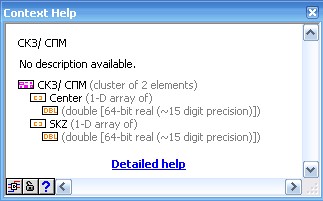
In SVA in the field "Strict type of output data" I select "Frequency XY Octave".

In the DataView tab I draw ONE octave graph from step "Run LV2011" .

Now I want to draw two or more octave graphics.
If I connected this element
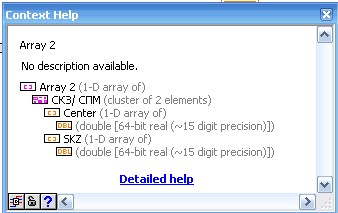
to the connector pane, in the field "Strict type of output data" I can't select any type.
Whats wrong or it's impossible to draw some octave graphics?
Now, I hope you help me.

02-04-2014 02:24 PM
- Mark as New
- Bookmark
- Subscribe
- Mute
- Subscribe to RSS Feed
- Permalink
- Report to a Moderator
Hello Irafka,
I have been able to reproduce your issue and I believe it is because you are using an array of a cluster in the second circumstance to draw your octave graphics. This will not allow you to select a strict type of output data other than an array. However, if you want to add another graphic display, have you tried clicking "Add Display" while in the Data View Tab of the Sound and Vibration Assistant? You can also drag the signals you want to monitor into the data view pane to view the signals you would like.
I hope this helps.
Regards,
Anna L
National Instruments
02-06-2014 10:20 AM
- Mark as New
- Bookmark
- Subscribe
- Mute
- Subscribe to RSS Feed
- Permalink
- Report to a Moderator
You didn't help me.
In my step in the input I used, for example, 15 waveforms (array of the waveforms).
In the output I want to create element, which contain values of 15 XY Graphs.
I want to run this step, calculate values of this graphs.
And then I want to drag all this 15 graphs to the Data View Tab using one click of the mouse.
I want to use only ONE DISPLAY.
Like in this example.

In the output of this standart step "octave" - is ARRAY of XY graphs.
How to create such element in my output?
In output of the my step I can to create only one XY Graph.
If I do it, I must run step for one input waveform, calculate values for first graph, add them to the Data View Tab, save them to the snapshot,
Then run step for second waveform, calculate values for second graph, add them to the Data View Tab, then drag values from the snapshot and so on.
It's very inconveniently.
Also I can to create in the output 1D array of the 15 waveforms.
But when I drag this elements to the Data View Tab I received TimeGraph and I can't to reform TimeGraph to OctaveGraph.
It's very important to decide this for my future tasks.
02-07-2014
03:29 PM
- last edited on
05-02-2025
03:58 PM
by
 Content Cleaner
- Mark as New
- Bookmark
- Subscribe
- Mute
- Subscribe to RSS Feed
- Permalink
- Report to a Moderator
Hi Irafka,
If you are trying to use the Octave Graph, you can only have one spectrum displayed at a time as seen in the link here: https://www.ni.com/docs/en-US/bundle/sound-and-vibration-toolkit-labview-api-ref/page/sound-and-vibr... In Data VIEW tab, the behavior you are seeing with the octave graph is expected.
If you are trying to use a waveform graph, you should be able to display more than one graph at a time. I wanted to make sure that if you were using the graph, you displaying were multiple graphs correctly because the graph only accepts data in certain forms as seen here: https://www.ni.com/docs/en-US/bundle/labview/page/types-of-graphs-and-charts.html
Anna L
National Instruments
