Fire an event based on indicator value change
已解决!
 Loïc.W
Hi,
I trying to make a QControl similar to the tutorial QControl with the string control but for a Numeric indicator.
The idea is, after measured data and extracted some informations, I have to test these informations with logicals tests like:
- Greater than ?
- Lower than ?
- In range ?
- Etc.
It could be useful for me to have an numeric QControl as an indicator which when his value change, have is background color change. (Green/Red for exemple).
We just having to wrap the test logical in the event handler.
But how detect a indicator value change without use the property node "value signalisation" ?
Loïc.W
已解决! 转到解答。

 BertMcMahan
Unfortunately you can't:
https://knowledge.ni.com/KnowledgeArticleDetails?id=kA00Z0000019N6xSAE&l=en-US
What you CAN do is to create a QControl accessor method to write to the indicator. Inside that method, write the user's value to the Value property and do all of your logic on background colors there as well.
Basically, instead of writing a value to the indicator's terminal you write it to a method on your QControl's class.

 Loïc_fr
Thx,
That's what I though...
I would like minimize the work for other developer when using it but I though that's fine if it just use a method to writte the data.
Loic.W
BertMcMahan
A somewhat janky way to do it could be to poll the value of the indicator every 100ms or so, updating the background if there's a value change.
BertMcMahan
Sounds right, but I've never made an XControl so I'm not actually sure.

 TheQ
TheQ

If you have many string indicators you could build the references into an array. Then in a loop call the constructor and destructor. Then pass the array of QControl wires around.
Or maybe better yet, put them in a Map (or Variant Lookup Table) so you can retrieve the right one easily later.
Chief LabVIEW Architect, Testeract | Owner, Q Software Innovations, LLC (QSI)
Director, GCentral | Admin, LabVIEW Wiki | Creator, The QControl Toolkit
Certified LabVIEW Architect | LabVIEW Champion | NI Alliance Partner

An example in attachment.
QControl=>XControl PassFailNumeric =>Tester
Business logic in facade.vi
Loïc.W
Hi Q,
If you have many string indicators you could build the references into an array. Then in a loop call the constructor and destructor. Then pass the array of QControl wires around.
I was thinking about that when I talked about table ^^
Or maybe better yet, put them in a Map (or Variant Lookup Table) so you can retrieve the right one easily later.
Already saw but never used before, need to try that someday !
For now, I'll probably use QControl and area with two instances :
- Single
- Multi
If I have time, I'll try using a Map ^^
Loïc.W
TheQ
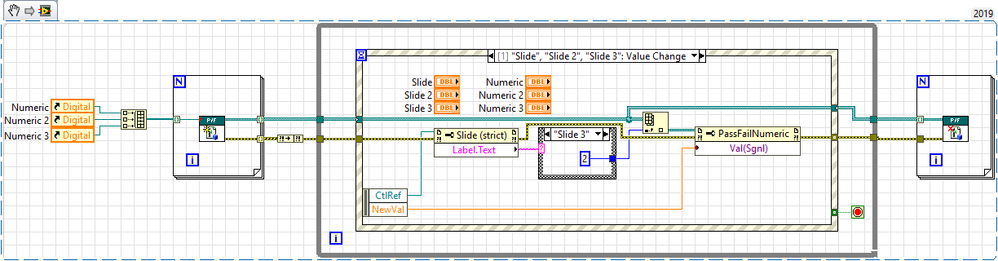
Here is an example of using an array of QControls. However, I did use Value (Signaling) to cause the event to occur.
An alternative is to override the Value property with your own VI that causes the color formatting. I think value signaling is the right way to go here.
Chief LabVIEW Architect, Testeract | Owner, Q Software Innovations, LLC (QSI)
Director, GCentral | Admin, LabVIEW Wiki | Creator, The QControl Toolkit
Certified LabVIEW Architect | LabVIEW Champion | NI Alliance Partner
