ni.com is currently undergoing scheduled maintenance.
Some services may be unavailable at this time. Please contact us for help or try again later.
- Subscribe to RSS Feed
- Mark Topic as New
- Mark Topic as Read
- Float this Topic for Current User
- Bookmark
- Subscribe
- Mute
- Printer Friendly Page
UI Message Help - Send Array to the UI via ActiveX
Solved!
 Bill_Lewis
07-26-2016 08:34 AM
- Mark as New
- Bookmark
- Subscribe
- Mute
- Subscribe to RSS Feed
- Permalink
- Report to a Moderator
Hello,
I have asked a similar questoin before but now I'm having issues trying to get a array to the UI via UI messaging. I'm my TestStand code I have an expression to send a array that is located as a FileGlobal array container to the UI as such:
RunState.Thread.PostUIMessageEx(UIMsg_UserMessageBase + 2,0, "", FileGlobals.DataRead, False)
and in the UImessage callback I have what I thought I should do to send the data to a text table on the UI. This is not working.
Can someone tell me what I'm doing incorrectly?
Attached is the UIcallback, Control and a picture of the table on my UI
Solved! Go to Solution.
 JGruenberg
07-26-2016 02:28 PM
- Mark as New
- Bookmark
- Subscribe
- Mute
- Subscribe to RSS Feed
- Permalink
- Report to a Moderator
You can't directly pass the data in a UIMessage. You can, however, pass a reference to ThisContext. Then, you can modify your UI Message Handler to query for that value, directly using TestStand - Get Property Value.
07-26-2016 02:40 PM
- Mark as New
- Bookmark
- Subscribe
- Mute
- Subscribe to RSS Feed
- Permalink
- Report to a Moderator
@JGruenberg wrote:
You can't directly pass the data in a UIMessage. You can, however, pass a reference to ThisContext. Then, you can modify your UI Message Handler to query for that value, directly using TestStand - Get Property Value.
Like this?
JGruenberg
07-26-2016 02:54 PM
- Mark as New
- Bookmark
- Subscribe
- Mute
- Subscribe to RSS Feed
- Permalink
- Report to a Moderator
Yes, but you can use the TestStand - Get Property Value.vi directly with the TS.SequenceContext reference and avoid casting variants into other things.
07-27-2016 08:17 AM
- Mark as New
- Bookmark
- Subscribe
- Mute
- Subscribe to RSS Feed
- Permalink
- Report to a Moderator
@JGruenberg wrote:Yes, but you can use the TestStand - Get Property Value.vi directly with the TS.SequenceContext reference and avoid casting variants into other things.
Thanks for the help JGruenberg.
I have tried and it seems that the TS.SequecneContext is not correct or I'm not doing something correct. Attached is what i changed. Any other suggestions?
JGruenberg
07-27-2016 08:45 AM
- Mark as New
- Bookmark
- Subscribe
- Mute
- Subscribe to RSS Feed
- Permalink
- Report to a Moderator
07-27-2016 08:58 AM
- Mark as New
- Bookmark
- Subscribe
- Mute
- Subscribe to RSS Feed
- Permalink
- Report to a Moderator
Here is the error the callback is giving during the UI 10001 message
@JGruenberg wrote:
What exactly is happening? Is that callback executing? Is there an error?
JGruenberg
07-27-2016 10:05 AM
- Mark as New
- Bookmark
- Subscribe
- Mute
- Subscribe to RSS Feed
- Permalink
- Report to a Moderator
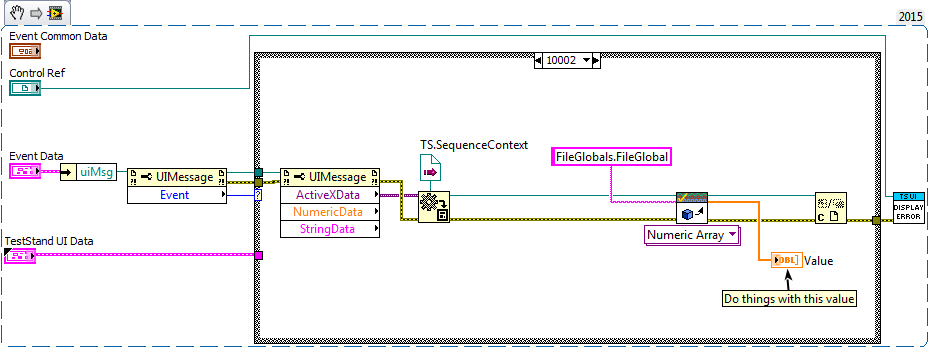
Your SequenceContext control is not connected to anything, so its not going to have a real value. You need to get your sequence context from the UIMessage object's ActiveX member. This is how you'd do that:


07-27-2016 12:33 PM
- Mark as New
- Bookmark
- Subscribe
- Mute
- Subscribe to RSS Feed
- Permalink
- Report to a Moderator
I'm close! 
I get a LabView error stating that a null value or deleted value was passed to the UImessage so I'm assuming this is because of my UI message format. Do i need to put the runstate.thiscontext? there or is this correct?
UI Message code to 10001 and 10002:
RunState.Thread.PostUIMessageEx(UIMsg_UserMessageBase + 1,0, "", Nothing, False),
RunState.Thread.PostUIMessageEx(UIMsg_UserMessageBase + 2,0, "", Nothing, False)
the step before the UI message is a multinumeric test and in the post expression I'm writing the data to the fileglobals with
FileGlobals.DataRead == Step.NumericArray
JGruenberg
07-27-2016 12:57 PM
- Mark as New
- Bookmark
- Subscribe
- Mute
- Subscribe to RSS Feed
- Permalink
- Report to a Moderator
RunState.Thread.PostUIMessageEx(UIMsg_UserMessageBase + 1,0, "", Nothing, False),
RunState.Thread.PostUIMessageEx(UIMsg_UserMessageBase + 2,0, "", Nothing, False)
"Nothing" in there should be replaced with ThisContext. You might want to change it to be synchroneous (changing the last parameter to True).
