- Subscribe to RSS Feed
- Mark Topic as New
- Mark Topic as Read
- Float this Topic for Current User
- Bookmark
- Subscribe
- Mute
- Printer Friendly Page
coordinate transform--robot
Solved!

09-19-2016 02:25 AM
- Mark as New
- Bookmark
- Subscribe
- Mute
- Subscribe to RSS Feed
- Permalink
- Report to a Moderator
Hello sir:
Regarding "Simple Calibration.vi", i had a question:
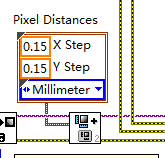
why they use "0.15" for "IMAQ set simple calibration2 vi"? it mean 1pixel=0.15Millimeter? but actually i got 1pixel=0.083Millimeter from picture's resolution. i don't understand these relationship. is there any help? thanks.
09-19-2016 02:27 AM - edited 09-19-2016 02:28 AM
- Mark as New
- Bookmark
- Subscribe
- Mute
- Subscribe to RSS Feed
- Permalink
- Report to a Moderator
09-19-2016 03:55 AM
- Mark as New
- Bookmark
- Subscribe
- Mute
- Subscribe to RSS Feed
- Permalink
- Report to a Moderator
Time_Walker 已写:Hello sir:
Regarding "Simple Calibration.vi", i had a question:
why they use "0.15" for "IMAQ set simple calibration2 vi"? it mean 1pixel=0.15Millimeter? but actually i got 1pixel=0.083Millimeter from picture's resolution. i don't understand these relationship. is there any help? thanks.
any help?

 udka
udka
09-19-2016 04:01 AM
- Mark as New
- Bookmark
- Subscribe
- Mute
- Subscribe to RSS Feed
- Permalink
- Report to a Moderator
-Yes it means one pixel is equivalent to 0.15mm in X direction and 0.15mm in Y direction
uday
09-19-2016 04:28 AM
- Mark as New
- Bookmark
- Subscribe
- Mute
- Subscribe to RSS Feed
- Permalink
- Report to a Moderator
udka 已写:
Yes, based on your image setup and calibration grid image it can vary.
-Yes it means one pixel is equivalent to 0.15mm in X direction and 0.15mm in Y direction
but actually i got the result from picture's resolution :
the resolution for picture is 300dpi. it mean 300pixels/inch, 1inch=25.4Millimeter.
300pixels/25.4Millimeter.
1pixel=0.083Millimeter.
why it is so huge different with "0.15mm" specified in picture? "0.15mm" is an arbitrary setting for demostration? when we need to set "X step", "Y Step" parameter in application, how to caculate it and set it?
 Hatef.fouladi
09-19-2016 07:09 AM
- Mark as New
- Bookmark
- Subscribe
- Mute
- Subscribe to RSS Feed
- Permalink
- Report to a Moderator
09-21-2016
12:59 AM
- last edited on
06-23-2025
08:45 AM
by
 Content Cleaner
- Mark as New
- Bookmark
- Subscribe
- Mute
- Subscribe to RSS Feed
- Permalink
- Report to a Moderator
one more questiion:
X Step and Y Step:
"Scaling factors are the real-world distances between the dots in the calibration grid in the x- and y- directions and the units in which the distances are measured. Use the X Step and Y Step elements of the Grid Descriptor control to specify the scaling factors." this is the definition in "https://zone.ni.com/reference/en-XX/help/370281M-01/nivisionlvbasics/perspective_and_nonlinear_distortion_calibration/ "
the following is the definition in the labview help for "IMAQ Calibration Target to Points - Circular Dots VI", "X Step corresponds to the width of a pixel in real-world units." it make me completely confused.

Any help ? which one is right? Any official explaination? thank you very much ~~~~
Hatef.fouladi 已写:
you have to use sample target in your image that you know the dimensions of this sample
Hatef.fouladi
09-21-2016 03:12 PM
- Mark as New
- Bookmark
- Subscribe
- Mute
- Subscribe to RSS Feed
- Permalink
- Report to a Moderator
09-21-2016
07:20 PM
- last edited on
06-23-2025
08:45 AM
by
Content Cleaner
- Mark as New
- Bookmark
- Subscribe
- Mute
- Subscribe to RSS Feed
- Permalink
- Report to a Moderator
Hatef.fouladi 已写:
witch part confused you?
X Step and Y Step:
"Scaling factors are the real-world distances between the dots in the calibration grid in the x- and y- directions and the units in which the distances are measured. Use the X Step and Y Step elements of the Grid Descriptor control to specify the scaling factors." this is the definition in "https://zone.ni.com/reference/en-XX/help/370281M-01/nivisionlvbasics/perspective_and_nonlinear_disto... "
the following is the definition in the labview help for "IMAQ Calibration Target to Points - Circular Dots VI", "X Step corresponds to the width of a pixel in real-world units."
The definition for X-step and Y-Step are the same? or they are different? i marked it with red color~
Hatef.fouladi
09-22-2016 06:42 AM
- Mark as New
- Bookmark
- Subscribe
- Mute
- Subscribe to RSS Feed
- Permalink
- Report to a Moderator
sppose you have two point with distance of 1 cm
you find out that this two point distance is 3 pixcel in image
so if you check bellow image you have this
x step 1
y stem 0,98
unit :cm

