- Subscribe to RSS Feed
- Mark Topic as New
- Mark Topic as Read
- Float this Topic for Current User
- Bookmark
- Subscribe
- Mute
- Printer Friendly Page
Image Control Reference/Property Node and "Create VI" incompatible?
Solved!
 X.
X.
10-17-2008 04:18 PM - last edited on 09-18-2015 10:04 AM by dcarva
- Mark as New
- Bookmark
- Subscribe
- Mute
- Subscribe to RSS Feed
- Permalink
- Report to a Moderator
Hi,
I have encountered this problem a few times already and although I was able to work around it up to now, I'd really like to understand what it is due to:
If I have an image display control on the front panel (the IMAQ Vision type, not the Picture control) and drop a property node or a reference to it on the Block diagram, it seems impossible to create a subVI from the diagram if the selected objects comprise either an image property node or an image reference. Selecting "Create SubVI" won't don anything, period. No warning message, no system beep, no nothing.
A related issue is that if I have an Image Display control reference on the diagram and try to create a control from it (for instance to use as a control input on a VI connector pane), same thing, "Create Control" won't do anyhting.
Why is that?
Thanks for your feedback.
X.
Solved! Go to Solution.
- Tags:
- X_Bug_Report

10-20-2008 12:06 PM
- Mark as New
- Bookmark
- Subscribe
- Mute
- Subscribe to RSS Feed
- Permalink
- Report to a Moderator
Xavier,
This was reported to R&D (35835) for further investigation. A possible workaround is to make the subVI in LabVIEW 7.1 and open it in the newer version of LabVIEW.
National Instruments
- Tags:
- CAR_35835
09-16-2015 03:34 PM
- Mark as New
- Bookmark
- Subscribe
- Mute
- Subscribe to RSS Feed
- Permalink
- Report to a Moderator
Still pending in LV 2013 SP1. Any chance that has been fixed in LV 2015?

 Corny
Corny
06-16-2016 07:42 AM
- Mark as New
- Bookmark
- Subscribe
- Mute
- Subscribe to RSS Feed
- Permalink
- Report to a Moderator
/bump
Not fixed in LV2014 atleast. Hopefully in 2015 but would not believe so.
However as a work around I pass the reference around as a variant instead (that works)
06-17-2016 10:13 AM
- Mark as New
- Bookmark
- Subscribe
- Mute
- Subscribe to RSS Feed
- Permalink
- Report to a Moderator
Nope, still well and alive in LV 2015.

 SelçukYolcu
01-07-2017 12:12 PM
- Mark as New
- Bookmark
- Subscribe
- Mute
- Subscribe to RSS Feed
- Permalink
- Report to a Moderator
will you do solve this poblem? it is really a big necessity.
01-07-2017 12:16 PM
- Mark as New
- Bookmark
- Subscribe
- Mute
- Subscribe to RSS Feed
- Permalink
- Report to a Moderator
It has been introduced in LV 8 (if I understand Michelle_N's answer of 8+ years ago) and is still not fixed in LV 2016. What's your bet?
 AnalogKid2Digit
04-18-2019 12:43 PM
- Mark as New
- Bookmark
- Subscribe
- Mute
- Subscribe to RSS Feed
- Permalink
- Report to a Moderator
Thanks X.
I was pulling my hair out bundling all my controls references together and it would not allow me to create a control.
Luckily my Image control was the last in the Bundle and the first one I removed then control creation worked.
Googled and your post was at the top of the heap and now I know why (LabVIEW 2015).
-AK2DM
"It’s the questions that drive us.”
~~~~~~~~~~~~~~~~~~~~~~~~~~

 Segeta
08-22-2019 05:38 AM
- Mark as New
- Bookmark
- Subscribe
- Mute
- Subscribe to RSS Feed
- Permalink
- Report to a Moderator
Hi.
You don't need to install LV7.1 and create new VI and transform to new version of LV.
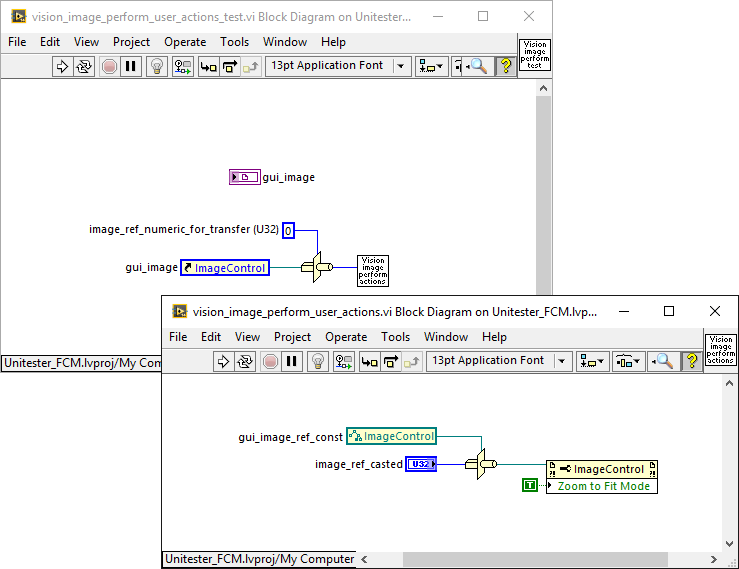
Use Type Cast function to convert vision image reference to U32 number, wire to subVI by connector pane, and use Type Cast to reference back. See image below.
 bmagiske@irissi
02-15-2020 02:34 PM
- Mark as New
- Bookmark
- Subscribe
- Mute
- Subscribe to RSS Feed
- Permalink
- Report to a Moderator
An easy method is to create the reference to the image display (in the block diagram), then drag the reference from the block diagram to the front panel. The reference control will appear there.
