- Subscribe to RSS Feed
- Mark Topic as New
- Mark Topic as Read
- Float this Topic for Current User
- Bookmark
- Subscribe
- Mute
- Printer Friendly Page
write excel file
Solved!
 jess1006
04-05-2016 04:26 AM
- Mark as New
- Bookmark
- Subscribe
- Mute
- Subscribe to RSS Feed
- Permalink
- Report to a Moderator
Hello!
I am trying to generate an excel file (.xls or .csv) which contains four columns, data for each column is an array of doubles. I have tried several ways to get it (using commas with the csv and tabs withe xls) but i am not able to get the four columns of values. How can I do this?
Also, I would like to know if it is possible to include an image (of a chart generated in the VI) in the excel file that I am trying to generate.
Thanks in advance,
Jessica
Solved! Go to Solution.

 Artem.SPb
04-05-2016
06:14 AM
- last edited on
03-23-2025
04:01 PM
by
 Content Cleaner
- Mark as New
- Bookmark
- Subscribe
- Mute
- Subscribe to RSS Feed
- Permalink
- Report to a Moderator
This sample generate 4-column file


If you want work with excel you need LabVIEW Report Generation Toolkit

 Bob_Schor

04-05-2016 07:42 AM
- Mark as New
- Bookmark
- Subscribe
- Mute
- Subscribe to RSS Feed
- Permalink
- Report to a Moderator
As Artem noted, to work with Excel (meaning to output a file in an Excel-specific format, .xls or .xlsx, as opposed to a text file delimited by Tabs or commas, the latter called "Comma-separated-value" files, extension .csv, a file that Excel "hijacks" by assigning it an icon that suggests it is a native Excel format), you need the Report Generation Toolkit, standard now with LabVIEW 2014 and 2015, but an add-on for LabVIEW 2012.
You can use the Write to Spreadsheet File (which, as noted, writes tab-delimited files, though you can specific comma-delimited to give you .csv files). Just arrange your data as a 4-column, many-row array of numeric or text data. I don't use these functions, myself, though I do use the RGT to read/write .xlsx files ...
Bob Schor
04-05-2016 10:12 AM
- Mark as New
- Bookmark
- Subscribe
- Mute
- Subscribe to RSS Feed
- Permalink
- Report to a Moderator
Thank you Artem and Bob!
In the end I am using TDMS files as are easy to work with and can be open easily in excel. Do you know if it is possible to "write an image" generated in labview (image of a chart) in a .tdms file?
Thanks again,
Jessica

04-06-2016
04:55 AM
- last edited on
03-23-2025
04:02 PM
by
Content Cleaner
- Mark as New
- Bookmark
- Subscribe
- Mute
- Subscribe to RSS Feed
- Permalink
- Report to a Moderator
Hey,
You cannot store directly an image in TDMS file but there is a work around
Maybe this article can come in handy:
Regards,
-Natalia
04-06-2016
08:16 AM
- last edited on
03-23-2025
04:02 PM
by
Content Cleaner
- Mark as New
- Bookmark
- Subscribe
- Mute
- Subscribe to RSS Feed
- Permalink
- Report to a Moderator
Thanks Natalia!
I nave seen i need to download the IMAQ drivers. I am using LabVIEW 2012 so i have seen in a forum (http://forums.ni.com/t5/LabVIEW/Where-can-I-find-IMAQ-4-7-for-download/td-p/2451692) that i can download it from here:
https://www.ni.com/en/support/downloads/drivers/download.ni-device-drivers.html#327629
However according to this page this a download of device drivers...
Can anyone tell me if I should download this just to get the IMAQ drivers?
Thanks a lot in advance!
04-07-2016
02:13 AM
- last edited on
03-23-2025
04:03 PM
by
Content Cleaner
- Mark as New
- Bookmark
- Subscribe
- Mute
- Subscribe to RSS Feed
- Permalink
- Report to a Moderator
Hey,
It seems like the .vi is using some peaces of vision acquisition software, indeed the link you posted is where you should download the driver from.
I am not sure whether the .vi will work after you have downloaded the driver if you don't have vision acquisition software.
Could give it a go tho
Regards,
-Natalia
Check drivers compability withthe LabVIEW version you have:
04-07-2016
02:14 AM
- last edited on
03-23-2025
04:03 PM
by
Content Cleaner
- Mark as New
- Bookmark
- Subscribe
- Mute
- Subscribe to RSS Feed
- Permalink
- Report to a Moderator
Hey,
It seems like the .vi is using some peaces of vision acquisition software, indeed the link you posted is where you should download the driver from.
I am not sure whether the .vi will work after you have downloaded the driver if you don't have vision acquisition software.
Could give it a go tho
Regards,
-Natalia
Check drivers compability withthe LabVIEW version you have:

 BIJOE
BIJOE
04-07-2016 03:38 AM
- Mark as New
- Bookmark
- Subscribe
- Mute
- Subscribe to RSS Feed
- Permalink
- Report to a Moderator
hi
i m bijoe
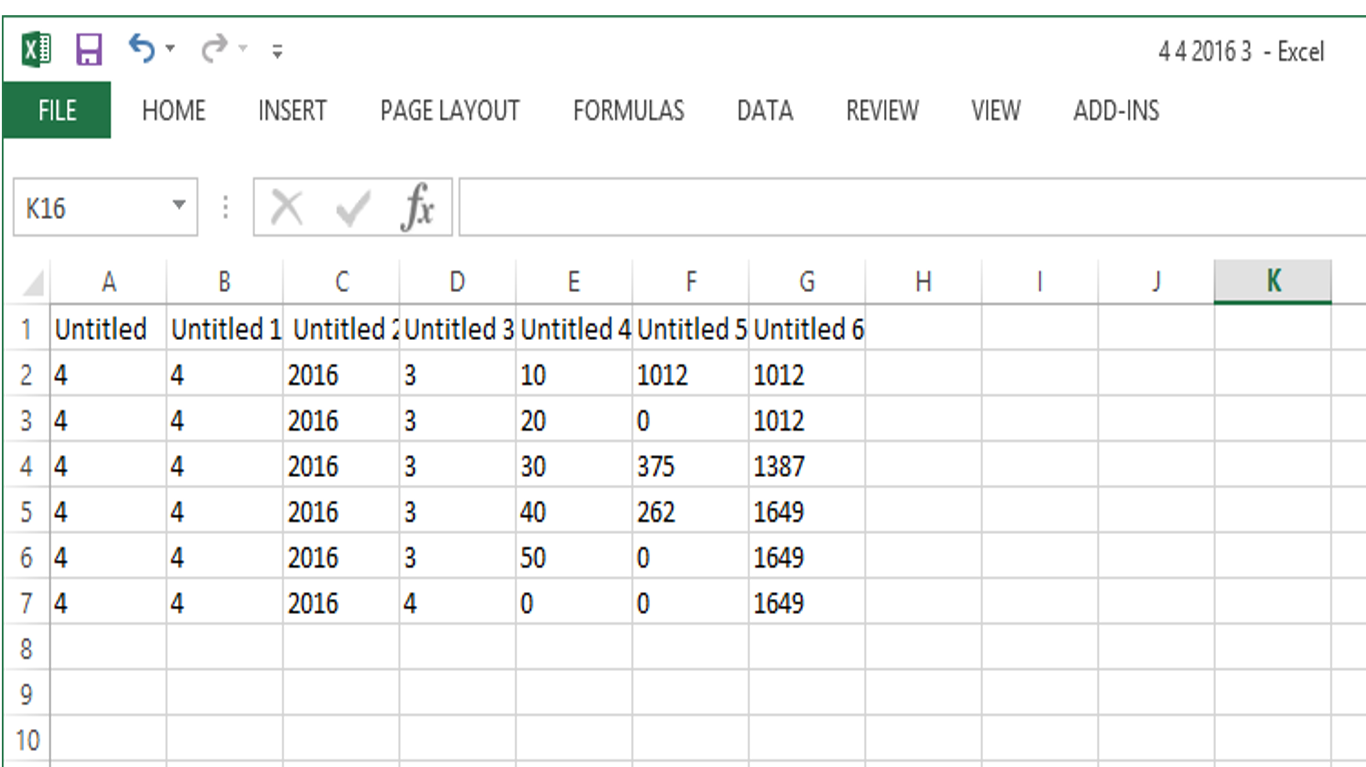
i m having doubt on saving excel file using write to measurement file icon...
I have attached the image format of the saved measurement file .While the file is saved , it generates header as untitled,untitled1,untitled2,,so on as shown on the image.Please suggest me a solution to change the header of excel file through VI program according to my convenient.
04-07-2016 03:44 AM
- Mark as New
- Bookmark
- Subscribe
- Mute
- Subscribe to RSS Feed
- Permalink
- Report to a Moderator
If you are writing the excel file with tdms it is easy. Just add the the header of the column as shown in the image attached.

