- Subscribe to RSS Feed
- Mark Topic as New
- Mark Topic as Read
- Float this Topic for Current User
- Bookmark
- Subscribe
- Mute
- Printer Friendly Page
scan string problem

 shabbir.1
09-01-2015 09:22 AM
- Mark as New
- Bookmark
- Subscribe
- Mute
- Subscribe to RSS Feed
- Permalink
- Report to a Moderator
Hi everyone!
I am relatively new to labview programming and have got stuck to resolve to the follwing issue.
I have got a an alarm panel, which has a default output in the following format (in case of no alarm)
$IIARL,,000,V,A,*38 [default value]
The 000 porion shows the address of the alarm and the last two digits represent a particular code, so I am only interested in these two values.
I tried the follwing string format to scan only the requisite paramters.
$IIARL,,%3d,V,A,*%2d
match characters ($IIARL,,) ----- scan 3 places of decimal value (%3d) ----- match characters (,V,A,*) ----- scan 2 posiitons of decimal values (%2d)
After running the VI, I got the following values
adress = 0
code = 38
remaining string value = empty
This is nice and accpetable.
But when an alarm event occurs the address and code changes to lets suppose 000 > 013 and 38 > 84.
In this case output becomes
adress = 13
code = 0
remianing string value = V,A,*84
where, ideally I am looking for the following results
adress = 13 or 013
code = 84
remaining string value = empty
Best Regards
Shabbir

 natasftw
09-01-2015 09:26 AM
- Mark as New
- Bookmark
- Subscribe
- Mute
- Subscribe to RSS Feed
- Permalink
- Report to a Moderator
It would help to debug if you attached your VI with your test cases. That way we can see if there's a problem with the way things are being wired or if there's something more to it than just that.

 crossrulz

09-01-2015 09:58 AM
- Mark as New
- Bookmark
- Subscribe
- Mute
- Subscribe to RSS Feed
- Permalink
- Report to a Moderator
Use %d instead of %3d and %2d. This way you can have any number of characters for the address.
Also, am I seeing that a comma is missing in the error message (right after the address)? Or was that a typo?
There are only two ways to tell somebody thanks: Kudos and Marked Solutions
Unofficial Forum Rules and Guidelines
"Not that we are sufficient in ourselves to claim anything as coming from us, but our sufficiency is from God" - 2 Corinthians 3:5

 daveTW
09-01-2015 10:03 AM - edited 09-01-2015 10:04 AM
- Mark as New
- Bookmark
- Subscribe
- Mute
- Subscribe to RSS Feed
- Permalink
- Report to a Moderator
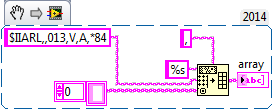
I would recommend to use "spreadsheet string to array", with the comma as separator. Then you can acces the fields via array index.


 Bob_Schor
09-01-2015 10:33 AM
- Mark as New
- Bookmark
- Subscribe
- Mute
- Subscribe to RSS Feed
- Permalink
- Report to a Moderator
I did exactly what you say you did, and got the expected answers of 13, 84, and an empty Remaining String.
Bob Schor
09-01-2015 11:25 AM - edited 09-01-2015 11:26 AM
- Mark as New
- Bookmark
- Subscribe
- Mute
- Subscribe to RSS Feed
- Permalink
- Report to a Moderator
@crossrulz, I think, I have tried this randomly but don't excatly remember the results
09-01-2015 11:28 AM
- Mark as New
- Bookmark
- Subscribe
- Mute
- Subscribe to RSS Feed
- Permalink
- Report to a Moderator
@daveTW
will defintely give it a try tomorrow morning and will reprt back here
