- Subscribe to RSS Feed
- Mark Topic as New
- Mark Topic as Read
- Float this Topic for Current User
- Bookmark
- Subscribe
- Mute
- Printer Friendly Page
.net constructor error message
Solved!
 Gary_H
04-18-2016 08:43 AM
- Mark as New
- Bookmark
- Subscribe
- Mute
- Subscribe to RSS Feed
- Permalink
- Report to a Moderator
Hi,
I'm trying to use the .Net Constructor node with an assembly which I'm sure has been used by others,
see http://forums.ni.com/t5/LabVIEW/TI-USB-to-GPIO-interface-EVM-adapter-Dll-for-Labview-driver/td-p/112... for example.
But when I try to create an object from the assembly I get the following error displayed in Labview:

I don't understand why I am prevented from creating an object instance ?
I'm using : Windows 7 Pro, Labview 2014 SP1. And Microsoft .Net Framework 4.5.2 is installed.
I've attached a copy of the USB Adapter Driver assembly, (replace file extension: .z with .dll to use.)
Thanks,
Gary.
Solved! Go to Solution.

 J-M
J-M
04-18-2016 09:35 AM
- Mark as New
- Bookmark
- Subscribe
- Mute
- Subscribe to RSS Feed
- Permalink
- Report to a Moderator
04-18-2016 10:09 AM
- Mark as New
- Bookmark
- Subscribe
- Mute
- Subscribe to RSS Feed
- Permalink
- Report to a Moderator
Jean-Marc,
Thank you for your helpful answer, problem now resolved.
Here's some additional text to the link text you pointed to:
The link text said:
Tip: In Windows 7 or later, you also can right-click the assembly and click Unblock on the General tab to grant an assembly full trust.
When the .Net assembly file was right clicked in Windows ExpIorer I saw:
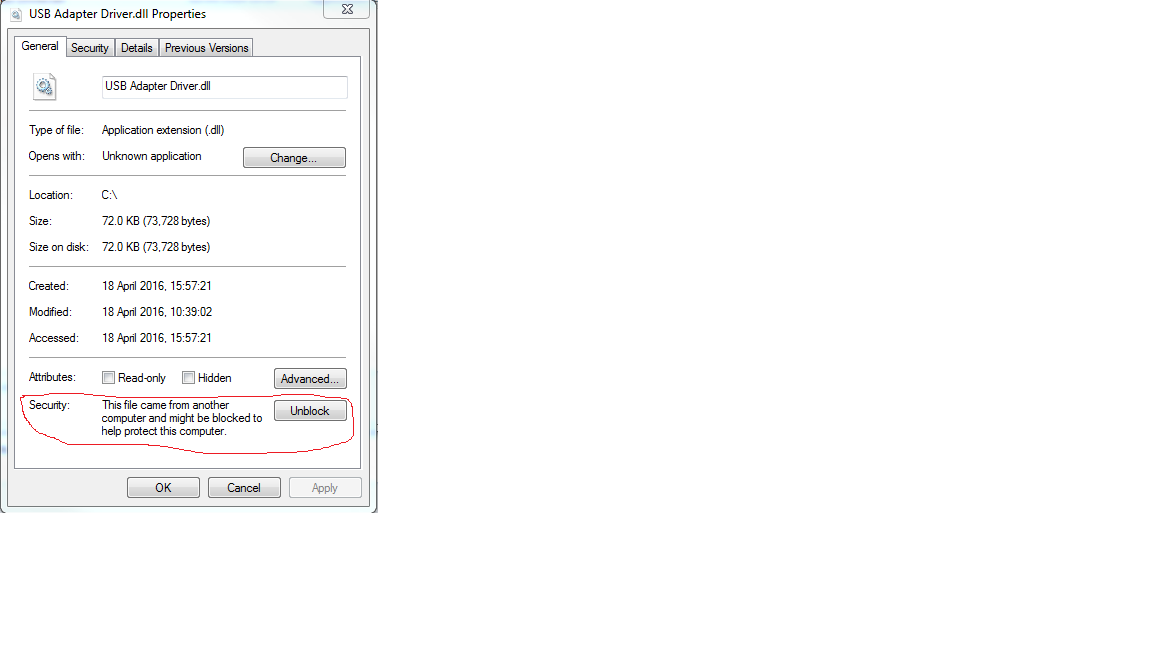
Clicking on "Unblock" resolved the problem and allowed the Labview .Net Constructor node to function correctly.
Thank you Jean-Marc.
Gary.
