- Subscribe to RSS Feed
- Mark Topic as New
- Mark Topic as Read
- Float this Topic for Current User
- Bookmark
- Subscribe
- Mute
- Printer Friendly Page
labview excel with activex
Solved!
 louis293
03-21-2018 08:49 AM
- Mark as New
- Bookmark
- Subscribe
- Mute
- Subscribe to RSS Feed
- Permalink
- Report to a Moderator
Hello everyone,
during my intership i have a project where i have to add some data to an excel file which already exist, i have to use activex but no idea how to use it, is there some vi available where i can give a file and the coordinates of cells where to writte
Solved! Go to Solution.
- Tags:
- LabVIEW 2014

 PalanivelThiruv
03-21-2018 09:05 AM
- Mark as New
- Bookmark
- Subscribe
- Mute
- Subscribe to RSS Feed
- Permalink
- Report to a Moderator
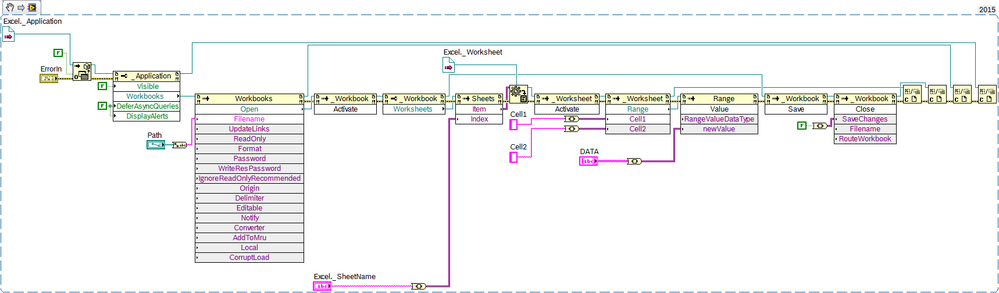
Try This
Palanivel Thiruvenkadam | பழனிவேல் திருவெங்கடம்
LabVIEW™ Champion |Certified LabVIEW™ Architect |Certified TestStand Developer
Kidlin's Law -If you can write the problem down clearly then the matter is half solved.
-----------------------------------------------------------------------------------------------------------------
03-21-2018 09:31 AM
- Mark as New
- Bookmark
- Subscribe
- Mute
- Subscribe to RSS Feed
- Permalink
- Report to a Moderator
thanks a lot, do you by chance have the vi so that i can dowland it ?
03-22-2018 02:47 AM
- Mark as New
- Bookmark
- Subscribe
- Mute
- Subscribe to RSS Feed
- Permalink
- Report to a Moderator
i don't manage to drag and paste, can somebody put the VI file please ? thanks in advance

 GerdW
GerdW
03-22-2018 03:35 AM
- Mark as New
- Bookmark
- Subscribe
- Mute
- Subscribe to RSS Feed
- Permalink
- Report to a Moderator
Hi Louis,
left-click the image to start the image viewer of the NI forum.
Then you will see a download button below the image: save the image to your harddrive.
Drag the image file from your harddrive into an empty VI block diagram.
Finished.
GerdW
using LV2016/2019/2021 on Win10/11+cRIO, TestStand2016/2019
03-22-2018 03:44 AM
- Mark as New
- Bookmark
- Subscribe
- Mute
- Subscribe to RSS Feed
- Permalink
- Report to a Moderator
Thanks
well the probleme now is that i have the labview 2014, doesn't work with this file.
GerdW
03-22-2018 03:52 AM
- Mark as New
- Bookmark
- Subscribe
- Mute
- Subscribe to RSS Feed
- Permalink
- Report to a Moderator
Hi Louis,
here you go.
(You could state your LabVIEW version in your signature to aid other to provide VIs in the needed version…)
GerdW
using LV2016/2019/2021 on Win10/11+cRIO, TestStand2016/2019
03-22-2018 04:24 AM - edited 03-22-2018 04:28 AM
- Mark as New
- Bookmark
- Subscribe
- Mute
- Subscribe to RSS Feed
- Permalink
- Report to a Moderator
thanks a lot, but it still doesn't work but i think it is an individual error (it will probably work on other computers), when i run an error occur , and when i open the excel file after it didn't change as expected and it is suddenly only lecture mode available
the error is error -2147352565 index not valid
GerdW
03-22-2018 04:47 AM - edited 03-22-2018 04:47 AM
- Mark as New
- Bookmark
- Subscribe
- Mute
- Subscribe to RSS Feed
- Permalink
- Report to a Moderator
Hi Louis,
index not valid
The VI will select a certain Excel sheet: you have to provide a valid sheet name!
GerdW
using LV2016/2019/2021 on Win10/11+cRIO, TestStand2016/2019
03-22-2018 04:53 AM - edited 03-22-2018 04:55 AM
- Mark as New
- Bookmark
- Subscribe
- Mute
- Subscribe to RSS Feed
- Permalink
- Report to a Moderator
i think i gave a valid one, i used the path button to specify the file, i don't know what i can do better

