- Subscribe to RSS Feed
- Mark Topic as New
- Mark Topic as Read
- Float this Topic for Current User
- Bookmark
- Subscribe
- Mute
- Printer Friendly Page
keep subVi at front
Solved!
 zerotolerance
04-05-2010 12:03 AM - edited 04-05-2010 12:05 AM
- Mark as New
- Bookmark
- Subscribe
- Mute
- Subscribe to RSS Feed
- Permalink
- Report to a Moderator
Is there a way of KEEPING a SubVI at front until its finished its job. I need this to be true even if the user accidently presses the Main VI (which would be at the back when Sub Vi is running).
Thanks
Kas
Solved! Go to Solution.


 muks
muks
04-05-2010 12:40 AM
- Mark as New
- Bookmark
- Subscribe
- Mute
- Subscribe to RSS Feed
- Permalink
- Report to a Moderator
04-05-2010 01:01 AM
- Mark as New
- Bookmark
- Subscribe
- Mute
- Subscribe to RSS Feed
- Permalink
- Report to a Moderator
I don't think I can see the "bring to front" option from an invoke node. I'm wiring VI's reference to the invoke node, but nada.
Kas
muks
04-05-2010 01:02 AM
- Mark as New
- Bookmark
- Subscribe
- Mute
- Subscribe to RSS Feed
- Permalink
- Report to a Moderator
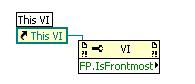
Hey forget my above post you can do exactly what you want by using a vi reference and using a property node like this
Use this inside the subvi.
muks
04-05-2010 01:08 AM
- Mark as New
- Bookmark
- Subscribe
- Mute
- Subscribe to RSS Feed
- Permalink
- Report to a Moderator

 Guruthilak
04-05-2010 01:09 AM
- Mark as New
- Bookmark
- Subscribe
- Mute
- Subscribe to RSS Feed
- Permalink
- Report to a Moderator
You can use the window behaviour by changing it to "modal"
CTRL+I->Windows appearence (from the drop down ring)->hit the "Customize" boolean and select option "Modal" from
Guru
Guru (CLA)
04-05-2010 01:15 AM - edited 04-05-2010 01:16 AM
- Mark as New
- Bookmark
- Subscribe
- Mute
- Subscribe to RSS Feed
- Permalink
- Report to a Moderator
Window behaviour "model" did it. I usually run my SubVi's through "VI preference". I tried muks idea and that worked just as well.
Thank you both.
Kas
Guruthilak
04-05-2010 01:25 AM
- Mark as New
- Bookmark
- Subscribe
- Mute
- Subscribe to RSS Feed
- Permalink
- Report to a Moderator
Its "MODAL" not "MODEL"
Guru
Guru (CLA)
04-05-2010 01:33 AM
- Mark as New
- Bookmark
- Subscribe
- Mute
- Subscribe to RSS Feed
- Permalink
- Report to a Moderator
haha. Sorry. Just noticed. 
Thanks again.
Kas
