- Subscribe to RSS Feed
- Mark Topic as New
- Mark Topic as Read
- Float this Topic for Current User
- Bookmark
- Subscribe
- Mute
- Printer Friendly Page
indicator not showing array
Solved!
 rugebiker
02-17-2012 11:07 AM
- Mark as New
- Bookmark
- Subscribe
- Mute
- Subscribe to RSS Feed
- Permalink
- Report to a Moderator
Hi,
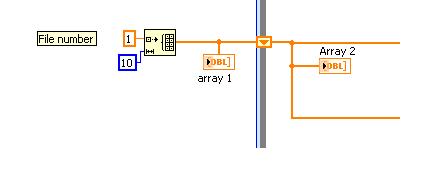
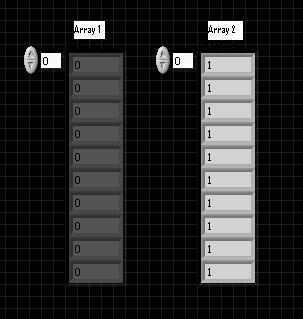
I am currently developing a machine at work using LabView 2011. Basically it is a gas cycling machine. I sense the output pressure and cycle the valve state. But I have one problem, at the beginning I'm initializing an array of 10 elements with '1' in each one of the elements. After that, the array goes to a producer/consumer code. The problem I have is that I put an indicator to the array before the loop, and when I run the VI the indicator shows and empty and grayed array (like if the indicator was never used), I also put a probe to the wire and there it does shows the array. Also if I connect the indicator inside the loop, the indicator shows the array. So why the indicator just after creating the array isn't showing? In the image below there is a part of the code, array 1 does not shows nothing in the indicator, while array 2 does shows it.
Thank you.
Solved! Go to Solution.

 JÞB
JÞB
02-17-2012 11:19 AM - edited 02-17-2012 11:21 AM
- Mark as New
- Bookmark
- Subscribe
- Mute
- Subscribe to RSS Feed
- Permalink
- Report to a Moderator
This is really unusual behavior. two possibilities.
1 you actually have two indicators named array 1 and you are looking at the wrong array. (run the vi anaizer and see if you have terminal with the same name)
2 there is an insane object somewhere. (recreate your vi)
{edit}
Whoops - looking again - your bd shows "array 1" and the fp shows "Array 1" you are looking at the wrong indicator!
"Should be" isn't "Is" -Jay

 P@Anand
02-17-2012 11:25 AM
- Mark as New
- Bookmark
- Subscribe
- Mute
- Subscribe to RSS Feed
- Permalink
- Report to a Moderator
@JÞB wrote:
Whoops - looking again - your bd shows "array 1" and the fp shows "Array 1" you are looking at the wrong indicator!
Good catch Jeff. 
The best solution is the one you find it by yourself
02-17-2012 11:39 AM
- Mark as New
- Bookmark
- Subscribe
- Mute
- Subscribe to RSS Feed
- Permalink
- Report to a Moderator
Thanks for answering Jeff, but that array 1 is just the caption, Array 1 is the name for both.
+++1 you actually have two indicators named array 1 and you are looking at the wrong array. (run the vi anaizer and see if you have terminal with the same name)
I already checked this and it is just the indicator and they have the same name.
+++2 there is an insane object somewhere. (recreate your vi)
What do you mean with "insane object?"
Thanks 
JÞB
02-17-2012 11:46 AM
- Mark as New
- Bookmark
- Subscribe
- Mute
- Subscribe to RSS Feed
- Permalink
- Report to a Moderator
@rugebiker wrote:.
+++2 there is an insane object somewhere. (recreate your vi)
What do you mean with "insane object?"
Thanks
its a very rare condition but it does happen- usually on vis that have become very large and highly edited. A bit flipped somewhere and somethig bad happened to corrupt the code. Darren pointed out a bit about them (and a few links to special methods that sometimes find them) here
"Should be" isn't "Is" -Jay
 Darin.K
02-17-2012 11:49 AM
- Mark as New
- Bookmark
- Subscribe
- Mute
- Subscribe to RSS Feed
- Permalink
- Report to a Moderator
As a shot in the dark, I have seen some funny behavior when LV tries to fold code, and that initialize array function looks like a prime candidate for folding. You can try a couple of things, change one of the constants wired to the Initialize Array to a control, or try putting an Always Copy primitive in between the Initialize Array and your first indicator (that is often a good band-aid for these head scratchers).
JÞB
02-17-2012 11:57 AM
- Mark as New
- Bookmark
- Subscribe
- Mute
- Subscribe to RSS Feed
- Permalink
- Report to a Moderator
@Darin.K wrote:
As a shot in the dark, I have seen some funny behavior when LV tries to fold code, and that initialize array function looks like a prime candidate for folding. You can try a couple of things, change one of the constants wired to the Initialize Array to a control, or try putting an Always Copy primitive in between the Initialize Array and your first indicator (that is often a good band-aid for these head scratchers).
Nice thought. the init will be folded. If the allawys copy works. Please strip down the code or zip it with all of its sub-vis so we canexplore the bug in the compiler you just found.
"Should be" isn't "Is" -Jay
02-17-2012 02:30 PM
- Mark as New
- Bookmark
- Subscribe
- Mute
- Subscribe to RSS Feed
- Permalink
- Report to a Moderator
@Darin.K wrote:
As a shot in the dark, I have seen some funny behavior when LV tries to fold code, and that initialize array function looks like a prime candidate for folding. You can try a couple of things, change one of the constants wired to the Initialize Array to a control, or try putting an Always Copy primitive in between the Initialize Array and your first indicator (that is often a good band-aid for these head scratchers).
I tried both solutions, but none of them worked =/
I also found something interesting: if I add a breakpoint to the wire before between the array and the first array indicator, when I run the program the indicator shows everything in 1, like it is suppose to be, but if I unpause the VI, then the indicator becomes gray and with 0 again. =/
Darin.K
02-17-2012 02:33 PM
- Mark as New
- Bookmark
- Subscribe
- Mute
- Subscribe to RSS Feed
- Permalink
- Report to a Moderator
Any locals, or other use of that indicator? I say post the simplest version of the code which shows the problem.
02-17-2012 02:36 PM
- Mark as New
- Bookmark
- Subscribe
- Mute
- Subscribe to RSS Feed
- Permalink
- Report to a Moderator
Darin.k said:
Any locals, or other use of that indicator? I say post the simplest version of the code which shows the problem.
I'm not using locals or other use of that indicator. It just used there. I cannot upload the code because it is forbidden here where I work, sorry.
