- Subscribe to RSS Feed
- Mark Topic as New
- Mark Topic as Read
- Float this Topic for Current User
- Bookmark
- Subscribe
- Mute
- Printer Friendly Page
get Labview exe folder

 D60
D60
12-20-2011 01:57 AM
- Mark as New
- Bookmark
- Subscribe
- Mute
- Subscribe to RSS Feed
- Permalink
- Report to a Moderator
Hi!
How can I get the Installed LabVIEW.exe or labview palette path from exe?
(exe is created in LabVIEW)
Thanks
+++ In God we believe, in Trance we Trust +++
[Hungary]

 EAronsson
12-20-2011 03:07 AM
- Mark as New
- Bookmark
- Subscribe
- Mute
- Subscribe to RSS Feed
- Permalink
- Report to a Moderator
There is a Application Directory VI under the File Constants pallette that will give you the path of the running vi(.exe).
----
Returns the path to the directory containing the application.
If you call this VI from a stand-alone application or shared library, this VI returns the path to the folder containing the stand-alone application or shared library.
If you call this VI from the development environment and the VI is loaded in a LabVIEW project file (.lvproj), this VI returns the path to the folder containing the project file. If the project is not saved, this VI returns <Not a Path>.
If the top-level VI is not loaded in a project, the VI returns the path to the directory containing the top level VI. If the VI is not saved to disk, this VI returns <Not a Path>.
----
 smercurio_fc
12-20-2011 08:48 AM
- Mark as New
- Bookmark
- Subscribe
- Mute
- Subscribe to RSS Feed
- Permalink
- Report to a Moderator
As noted, the Application Directory function will return to you the application's directory, i.e., your executable's directory. Why are you trying to get the location of the labview.exe file from your executable? There's no guarantee that the LabVIEW development environment will even be installed on a target computer, since the built executable uses the LabVIEW Run-Time engine, not the LabVIEW development environment.
 zedtwitz
10-29-2014 06:20 AM
- Mark as New
- Bookmark
- Subscribe
- Mute
- Subscribe to RSS Feed
- Permalink
- Report to a Moderator
I would need the folder/directory of Labview.exe to copy a folder that provides a custom functionality to the installed Labview version.
So is there actually a simple way of getting it instead of scanning through the local volumes and folders until you find it?

 crossrulz

10-29-2014 07:36 AM
- Mark as New
- Bookmark
- Subscribe
- Mute
- Subscribe to RSS Feed
- Permalink
- Report to a Moderator
@zedtwitz wrote:
I would need the folder/directory of Labview.exe to copy a folder that provides a custom functionality to the installed Labview version.
So is there actually a simple way of getting it instead of scanning through the local volumes and folders until you find it?
I would recommend getting VI Package Manager for that. With it, you can build up a package and install it on each version of LabVIEW you have installed.
There are only two ways to tell somebody thanks: Kudos and Marked Solutions
Unofficial Forum Rules and Guidelines
"Not that we are sufficient in ourselves to claim anything as coming from us, but our sufficiency is from God" - 2 Corinthians 3:5
zedtwitz
10-29-2014 12:38 PM
- Mark as New
- Bookmark
- Subscribe
- Mute
- Subscribe to RSS Feed
- Permalink
- Report to a Moderator
Thanks for your reply. In the meantime I have found also another possibilty to get the path by using the "VI Library" Function that returns the path to the 'vi.lib' file that usually located in the same folder as 'Labview.exe'.
@crossrulz wrote:
I would recommend getting VI Package Manager for that. With it, you can build up a package and install it on each version of LabVIEW you have installed.

 Bob_Schor
10-30-2014 04:01 PM
- Mark as New
- Bookmark
- Subscribe
- Mute
- Subscribe to RSS Feed
- Permalink
- Report to a Moderator
An even easier way, if you are trying to run this in Development mode (as opposed to "as an executable", is to simply drop an Invoke node and ask for the Directory Path.
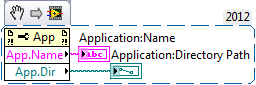
On my machine, Application:Name is "LabVIEW.exe", and Application:Directory Path is C:\Program Files (x86)\National Instruments\LabVIEW 2012.
BS
 lio123
01-31-2018 10:55 AM
- Mark as New
- Bookmark
- Subscribe
- Mute
- Subscribe to RSS Feed
- Permalink
- Report to a Moderator
@D60 wrote:
Hi!
How can I get the Installed LabVIEW.exe or labview palette path from exe?
(exe is created in LabVIEW)
Thanks
oz
lio123
01-31-2018 10:55 AM
- Mark as New
- Bookmark
- Subscribe
- Mute
- Subscribe to RSS Feed
- Permalink
- Report to a Moderator
@D60 wrote:
Hi!
How can I get the Installed LabVIEW.exe or labview palette path from exe?
(exe is created in LabVIEW)
Thanks
OZ
