- Subscribe to RSS Feed
- Mark Topic as New
- Mark Topic as Read
- Float this Topic for Current User
- Bookmark
- Subscribe
- Mute
- Printer Friendly Page
empty folder
Solved!
 krispiekream
01-13-2010 03:16 PM - edited 01-13-2010 03:17 PM
- Mark as New
- Bookmark
- Subscribe
- Mute
- Subscribe to RSS Feed
- Permalink
- Report to a Moderator
Hi Labview experts,
i been noticing my Delete folder function is not working properly when the folder is not emptied.
Can someone show me how to empty out a folder or delete a folder with files in it?
Krispiekream
Solved! Go to Solution.

 Dennis_Knutson
01-13-2010 03:23 PM
- Mark as New
- Bookmark
- Subscribe
- Mute
- Subscribe to RSS Feed
- Permalink
- Report to a Moderator
01-13-2010 03:33 PM
- Mark as New
- Bookmark
- Subscribe
- Mute
- Subscribe to RSS Feed
- Permalink
- Report to a Moderator
oh boy, i am using labview 7.0 and i dont think it has that.
labview 8.5 do.
Krispiekream
 smercurio_fc
01-13-2010 03:43 PM
- Mark as New
- Bookmark
- Subscribe
- Mute
- Subscribe to RSS Feed
- Permalink
- Report to a Moderator
01-13-2010 05:20 PM
- Mark as New
- Bookmark
- Subscribe
- Mute
- Subscribe to RSS Feed
- Permalink
- Report to a Moderator
Unfornately, installing openG could be a problem when there is not internet on the testing station.
Are there any other options?
Krispiekream

 RavensFan

01-13-2010 06:53 PM
- Mark as New
- Bookmark
- Subscribe
- Mute
- Subscribe to RSS Feed
- Permalink
- Report to a Moderator

 DavidMaidman
01-14-2010 02:35 AM
- Mark as New
- Bookmark
- Subscribe
- Mute
- Subscribe to RSS Feed
- Permalink
- Report to a Moderator
www.controlsoftwaresolutions.com
 Guruthilak
01-14-2010 08:08 AM
- Mark as New
- Bookmark
- Subscribe
- Mute
- Subscribe to RSS Feed
- Permalink
- Report to a Moderator
also check that the folder whichyou want to delete is having the proper permission.
Also there is a chance that one or more of these files (or the refnum) might be open when you are trying to delete the folder itself.
Guru (CLA)

01-14-2010 03:17 PM
- Mark as New
- Bookmark
- Subscribe
- Mute
- Subscribe to RSS Feed
- Permalink
- Report to a Moderator
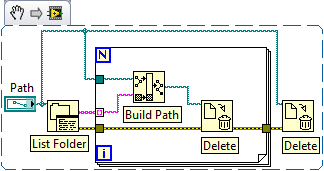
Hey krispiekream
In regards to your original request. Here is a simple routine you could use to delete all the files in a folder and then delete the folder itself.
01-14-2010 06:44 PM
- Mark as New
- Bookmark
- Subscribe
- Mute
- Subscribe to RSS Feed
- Permalink
- Report to a Moderator
thank works.
thank you so much!
Krispiekream
