- Subscribe to RSS Feed
- Mark Topic as New
- Mark Topic as Read
- Float this Topic for Current User
- Bookmark
- Subscribe
- Mute
- Printer Friendly Page
- « Previous
-
- 1
- 2
- Next »
building an executable with .vits with Labview 2011


04-10-2013 10:45 AM
- Mark as New
- Bookmark
- Subscribe
- Mute
- Subscribe to RSS Feed
- Permalink
- Report to a Moderator
Hi Dan_U,
I've attached the block diagram for the section that is opening the .vit. It is interesting to note that if I move a copy of the .vit into the folder of the built executable, the exe appears to open that .vit (but with errors).
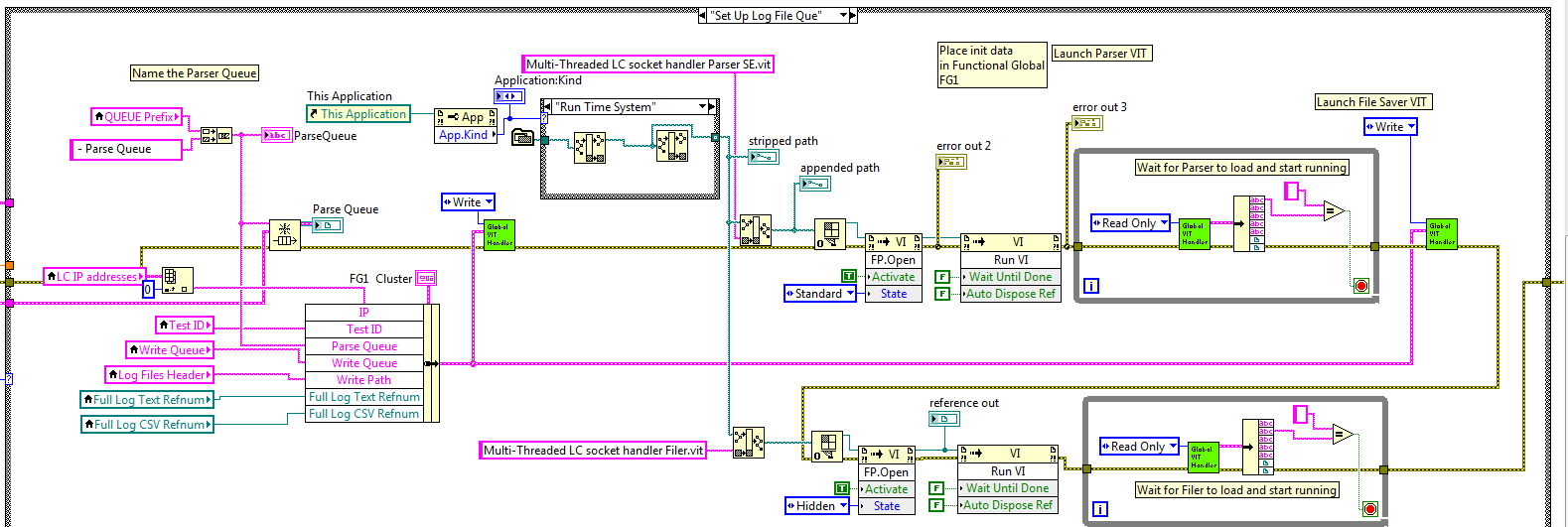
Jim S
GRA/Colorado School of Mines
04-10-2013 10:47 AM
- Mark as New
- Bookmark
- Subscribe
- Mute
- Subscribe to RSS Feed
- Permalink
- Report to a Moderator
Eric,
Changing the vits to regular/reentrant subVI's is my next attempt for today.
Thanks for the other recommendations!
Jim S
GRA/Colorado School of Mines
04-10-2013 10:50 AM
- Mark as New
- Bookmark
- Subscribe
- Mute
- Subscribe to RSS Feed
- Permalink
- Report to a Moderator
Jeff,
This is a really slick example!
Thanks!
Jim
Jim S
GRA/Colorado School of Mines

 dan_u
dan_u
04-10-2013 10:51 AM
- Mark as New
- Bookmark
- Subscribe
- Mute
- Subscribe to RSS Feed
- Permalink
- Report to a Moderator
Since the .vit is located in the exe you could also try to open the reference just by passing the .vit name (no path).
You seem to already have a 'debug' indicator 'appended path'. What does this show when running the .exe?
04-10-2013 05:53 PM
- Mark as New
- Bookmark
- Subscribe
- Mute
- Subscribe to RSS Feed
- Permalink
- Report to a Moderator
All,
I changed my .vits over to reentrant vis, and observed the same problem. After lots of path fiddling, I finally ran across this document, and I'm happy (and also cranky  ) to say that it fixed the build issue with not just the reentrant vis, but the .vits as well!
I am still trying to understand exactly what this means (i.e. if my main executable is located in build/main.exe, exactly what path am I supposed to point to for the .vit), but am satisfied to be able to run the vi independant of developer.
Many, many thanks to those that contributed. As always, it has been a pleasure!
Jim
Jim S
GRA/Colorado School of Mines
- Tags:
- KB_EXERelPaths

 Hooovahh

04-11-2013 07:56 AM - edited 04-11-2013 07:56 AM
- Mark as New
- Bookmark
- Subscribe
- Mute
- Subscribe to RSS Feed
- Permalink
- Report to a Moderator
If you are using a static VI reference it doesn't matter where on disk (or in the EXE) that the VI is. You can get the VI Name (or path) and use that to open the reference. This is a more robust way of getting a reference to the VI. Attatched is the edit of Launch N Folder posted earlier.
Unofficial Forum Rules and Guidelines
Get going with G! - LabVIEW Wiki.
17 Part Blog on Automotive CAN bus. - Hooovahh - LabVIEW Overlord
- « Previous
-
- 1
- 2
- Next »
