Turn on suggestions
Auto-suggest helps you quickly narrow down your search results by suggesting possible matches as you type.
Showing results for
Topic Options
- Subscribe to RSS Feed
- Mark Topic as New
- Mark Topic as Read
- Float this Topic for Current User
- Bookmark
- Subscribe
- Mute
- Printer Friendly Page
XY Graph-Non numeric values for scale

 user_1
Active Participant
06-18-2007 11:33 PM
Options
- Mark as New
- Bookmark
- Subscribe
- Mute
- Subscribe to RSS Feed
- Permalink
- Report to a Moderator
Hi,
I am working with a graph in which i have to associate with each numeric value in the X axis ,a curresponding string also.
ie,if X axis's first scale marker is 100 then,in X1 axis(Duplicate scale of Xaxis),i have to represent AA instead of 100.
(X axis-100,200,300 then X1 axis-AA,BB,CC)
Nothing related to plottin as values can be got from the X axis.For the user friendliness only,have to add the strings corresponding to values.
How can i do this?
One more doubt for me...
I want the graph to be maximised /minimised when the user clicks resize window button.But currently,when the user clicks resize window buttton(on top right corner,the entire VI is getting minimised/maximised.Is there a way to achieve my requirement?
Thanks in advance

 altenbach

Knight of NI
06-19-2007 01:06 AM
Options
- Mark as New
- Bookmark
- Subscribe
- Mute
- Subscribe to RSS Feed
- Permalink
- Report to a Moderator
Unlike the scales of slides, the scales of graphs don't support text labels.
I agree that this would be a useful feature.
If you have a newer version of LabVIEW, maybe you can use the "plot images" node to add your labels. You could also add a hidden slide indicator, with only the text label scale visible and manipulate it according to the current x-axis.
You can use filtering events to do whatever you want if the user tries to maximize or minimize the window. Just discard the event and do your own song and dance. 🙂

06-19-2007 03:57 AM
Options
- Mark as New
- Bookmark
- Subscribe
- Mute
- Subscribe to RSS Feed
- Permalink
- Report to a Moderator
Thank you for your reply sir.
I am not much familiar with filtering events.Can you please explain how can i maximise the graph with the use of filtering events.
Thanks once again

 Ben
Ben
Knight of NI
06-19-2007 08:22 AM
Options
- Mark as New
- Bookmark
- Subscribe
- Mute
- Subscribe to RSS Feed
- Permalink
- Report to a Moderator
In this thread I posted an example that illustrates how to use the picture control to establish text lables.
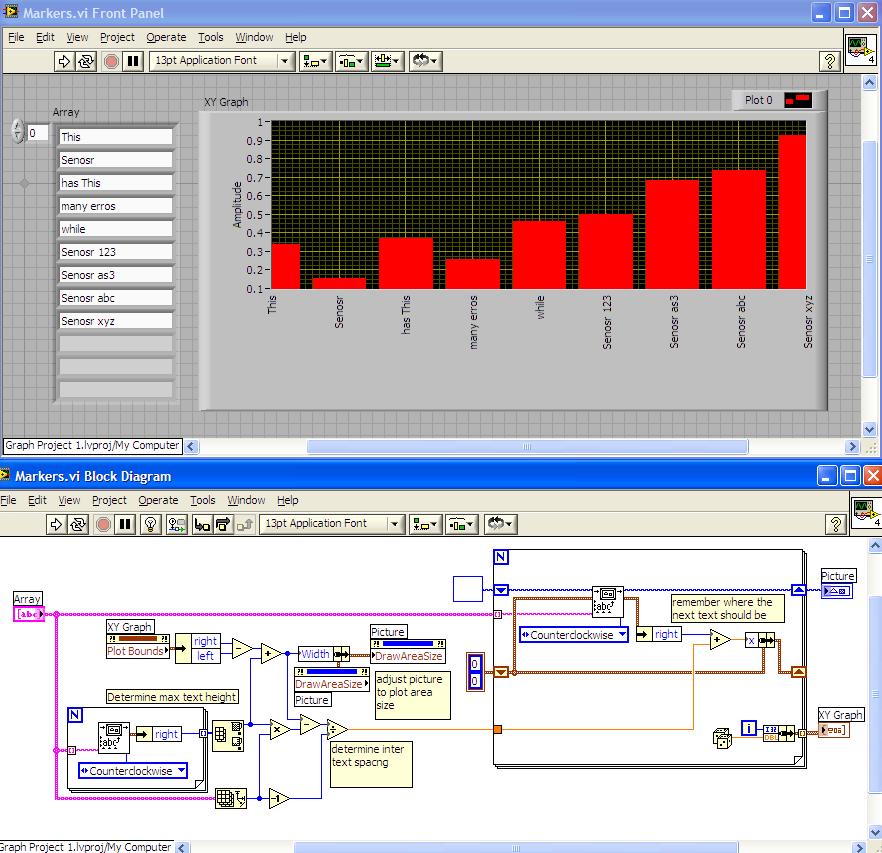
Ben
Retired Senior Automation Systems Architect with Data Science Automation LabVIEW Champion Knight of NI and Prepper LinkedIn Profile YouTube Channel
