- Subscribe to RSS Feed
- Mark Topic as New
- Mark Topic as Read
- Float this Topic for Current User
- Bookmark
- Subscribe
- Mute
- Printer Friendly Page
Write Data into 2D Array in differents orientations
Solved!
 LearnIT
10-04-2016 08:24 AM
- Mark as New
- Bookmark
- Subscribe
- Mute
- Subscribe to RSS Feed
- Permalink
- Report to a Moderator
Hi community,
how can I write data into an array in differents directions?
here is my vi but i dont know how to do it in LabVIEW.
Thank you for your answer
Solved! Go to Solution.

 RavensFan

10-04-2016 08:33 AM
- Mark as New
- Bookmark
- Subscribe
- Mute
- Subscribe to RSS Feed
- Permalink
- Report to a Moderator
Where does the data come from? How many different orientations could you have? Why does your picture so a 20° orientation, but behaves more like 45° (one over, one up, one over, one up)?
At the end of the day, you will probably need a loop and the Replace Array Subset function working on an array that you keep in a shift register.

 JÞB
JÞB
10-04-2016 08:46 AM
- Mark as New
- Bookmark
- Subscribe
- Mute
- Subscribe to RSS Feed
- Permalink
- Report to a Moderator
I'm not going to give you the answer. (I suspect a homework assignment is involved)
However, since you know the angle and the number of elements you want to place in a line along that angle, this primitive is likely going to become your best friend

"Should be" isn't "Is" -Jay
10-04-2016 08:49 AM
- Mark as New
- Bookmark
- Subscribe
- Mute
- Subscribe to RSS Feed
- Permalink
- Report to a Moderator
Thank you for your reply. I only simulated the data.
i get the data from the sensor (1D Array of 10 values) and i want to plot it on the intensity graph depending from the orientation.
The orientation changes between 0 to 180°.
Thx
10-04-2016 02:05 PM
- Mark as New
- Bookmark
- Subscribe
- Mute
- Subscribe to RSS Feed
- Permalink
- Report to a Moderator
Hi Jeff·Þ·Bohrer,
it is not an assignment. Im working on a project.
i tried your suggestion but dont get any useable results
can u help me please?
thx
JÞB
10-04-2016 02:12 PM
- Mark as New
- Bookmark
- Subscribe
- Mute
- Subscribe to RSS Feed
- Permalink
- Report to a Moderator
I'm flying today and have no LabVIEW available. I'll look in @ Thursday. I bet others will beat me to a solution.
"Should be" isn't "Is" -Jay
10-05-2016 04:45 PM
- Mark as New
- Bookmark
- Subscribe
- Mute
- Subscribe to RSS Feed
- Permalink
- Report to a Moderator
JÞB
10-06-2016 03:46 PM - edited 10-06-2016 03:55 PM
- Mark as New
- Bookmark
- Subscribe
- Mute
- Subscribe to RSS Feed
- Permalink
- Report to a Moderator
@JÞB wrote:@I'm flying today and have no LabVIEW available. I'll look in @ Thursday. I bet others will beat me to a solution.
Well, Well, Well! One time the 8-Ball missed by a mile! No one went to town and got jiggy on the problem! It really was a fun little vi to write. I'll start with a tease: Code capture (Backsaved to 9.0 since it depends on no features that haven't been around for a long long time) to follow in a spoiler. For those playing along for fun and games, duplicate the code without peeking.
File this under the heading "Polar is cool - Cartesian is square!"
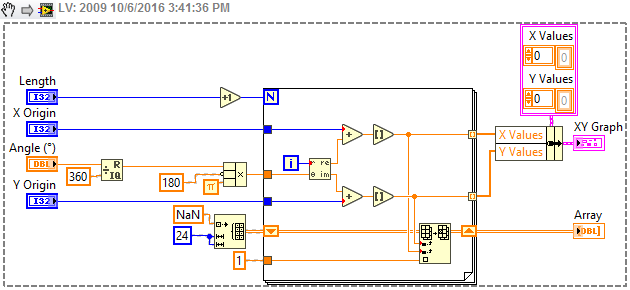 Drat the Silver FP controls are going to look really bad in 2009 lets add a 2012 version to save your eyeballs some stress
"Should be" isn't "Is" -Jay
10-06-2016 04:56 PM
- Mark as New
- Bookmark
- Subscribe
- Mute
- Subscribe to RSS Feed
- Permalink
- Report to a Moderator
Hi Jeff·Þ·Bohrer,
you are the best. That is exactly what i need to plot the Data on the intensity graph
Thank you very much
